


The Burden of Manual Tracking
Picture this: It’s Monday morning. Your HR manager is drowning in spreadsheets.
Field employees visited 47 clients last week. But where’s the proof? Someone scribbled notes on paper. Another sent a blurry photo on WhatsApp. Three people forgot to report entirely.
Sound familiar?
Manual field visit tracking is a nightmare. Your team wastes hours chasing data. Errors slip through every day. You can’t see who’s actually working or just pretending.
Outdated attendance systems create chaos, not clarity. Employee visit log issues pile up like dirty dishes. And your HR automation solution feels like a distant dream.
According to Forbes, businesses waste up to 14 hours per week on manual HR tasks that could be automated.
But here’s the good news: It doesn’t have to be this way.
Digital field workforce management isn’t rocket science anymore. Companies like yours are ditching spreadsheets for smart systems. They’re tracking field reporting challenges with a few taps on their phones.
Welcome to Tipsoi. Where field reports write themselves while you focus on growing your business.
Why Your Business Needs Automated Field Reports
Think about how much time you waste on manual reports every week. Now imagine getting that time back.
Automated field reports turn chaos into clarity. Your digital field reporting system captures everything automatically. No chasing. No guessing. No stress.
Employee activity tracking becomes effortless when technology does the heavy lifting. Field workforce automation means your team stays productive. And HR reporting efficiency skyrockets when data flows smoothly.
Let’s explore why automation changes everything.
1.Transparency – Real-time visibility into employee activities
You deserve to know what’s happening in the field right now. Not yesterday. Not next week. Right now.
Real-time employee tracking gives you instant updates. Your live field activity monitoring shows who’s where and doing what. No more wondering if your team is actually working.
Workforce transparency tools build trust between managers and employees. Everyone knows the system is fair. Field staff visibility eliminates those awkward “where were you?” conversations.
Remote employee oversight becomes simple. Check your dashboard. See the truth. Make smarter decisions.
2.Accuracy – Eliminate human error in entry and exit timings
Humans make mistakes. It’s just how we’re built. But those mistakes cost you money.
Research from Harvard Business Review shows that manual data entry errors cost businesses thousands annually in payroll corrections alone.
Accurate attendance tracking removes the guesswork. No more “I think I arrived around 9:30.” Automated entry exit logs capture the exact second your employee punches in.
Error-free field attendance means payroll runs smoothly. Digital punch accuracy eliminates disputes before they start. Your time tracking automation works 24/7 without complaining or forgetting.
Numbers don’t lie. Systems don’t forget. Your business deserves both.
3.Productivity – Free up your HR team from tedious data entry
Your HR team didn’t study business to become data entry clerks. Yet that’s where they spend half their time.
SHRM (Society for Human Resource Management) reports that HR professionals spend 73% of their time on administrative tasks rather than strategic work.
HR productivity tools give them their lives back. Reduce manual HR work by up to 70%. Let technology handle the boring stuff.
Automated workforce data flows directly into your system. HR operations optimization happens when smart people focus on smart work. Time-saving HR software means your team can actually talk to employees instead of typing numbers.
Imagine what your HR department could accomplish with 20 extra hours per week. That’s the power of automation.
Key Automation Features for Field Reports
Great automation isn’t just about going digital. It’s about going smart.
Field report automation features in Tipsoi work together like a symphony. Mobile field reporting tools put power in your employees’ pockets. Smart workforce management happens because every feature connects seamlessly.
Your digital field visit solution should feel invisible. Employees barely notice it. Managers get everything they need.
Here’s how Tipsoi makes it happen.
1. Mobile Punch with GPS
Your employee says they visited the construction site. But did they really? GPS knows the truth.
According to TechCrunch, GPS-enabled workforce management reduces time theft by up to 80%.
GPS-based mobile punch verifies every clock-in with coordinates. Location-based attendance proves your team went where they said. No more fake check-ins from the coffee shop down the street.
Field staff GPS tracking protects honest employees and catches dishonest ones. Mobile attendance system works anywhere with internet. Geo-verified punch-in creates accountability without micromanaging.
Trust the map. Not just the word.
2. Real-Time Multimedia Documentation
A picture is worth a thousand words. And it’s definitely worth more than “I visited the client.”
Photo-based field reports show proof instantly. Your employee snaps a photo at the site. The system timestamps it. Done.
Real-time site documentation means managers see what’s happening as it happens. Multimedia field evidence protects you during disputes. Image-enabled visit logs tell the full story.
“I met the client” becomes a photo of them shaking hands. “I checked the inventory” becomes pictures of the actual shelves. Evidence beats excuses every time.
3. Automated Data Sync
Nobody should manually transfer data from phones to computers anymore. That’s like using a typewriter in 2025.
Gartner research indicates that cloud-based HR systems improve data accuracy by 95% compared to manual methods.
Automated data synchronization happens in the background. Your employee submits a report. The cloud-based field reporting system catches it instantly.
Real-time data sync means managers always see the latest information. Centralized HR data lives in one place everyone can access. Seamless system updates mean zero lost information.
Data flows like water. Fast, smooth, and always reaching where it needs to go.
4. Instant Compliance & Reporting
Audit season shouldn’t feel like tax season. Good systems make compliance boring in the best way.
Compliance-ready reports generate at the click of a button. Instant audit reporting means you’re always prepared for inspections. Regulatory field documentation stays organized automatically.
Automated compliance logs prove you followed the rules. HR audit automation turns a week-long nightmare into a 10-minute task.
When inspectors ask for records, you smile. Because everything’s already perfect.
5. Geo-Fencing
Some places are off-limits. Some zones require special permissions. Smart systems enforce boundaries automatically.
Geo-fencing attendance creates virtual boundaries on the map. Employees can only punch in when they’re inside the fence. Location boundary tracking stops unauthorized clock-ins cold.
Restricted zone punching protects sensitive areas. Smart location enforcement happens without confrontation. Field workforce control maintains security while respecting privacy.
The system says no, so you don’t have to.
Step-by-Step Guide – How to Generate Reports in Tipsoi
You don’t need a PhD to run great reports. Tipsoi makes it stupidly simple.
How to generate field visit report in Tipsoi takes about two minutes. This Tipsoi reporting guide walks you through every click. Automated report generation means the hard work happens behind the scenes.
Follow this HR report walkthrough and you’ll be a pro by the end of your coffee.
Step 1 – Accessing the Dashboard
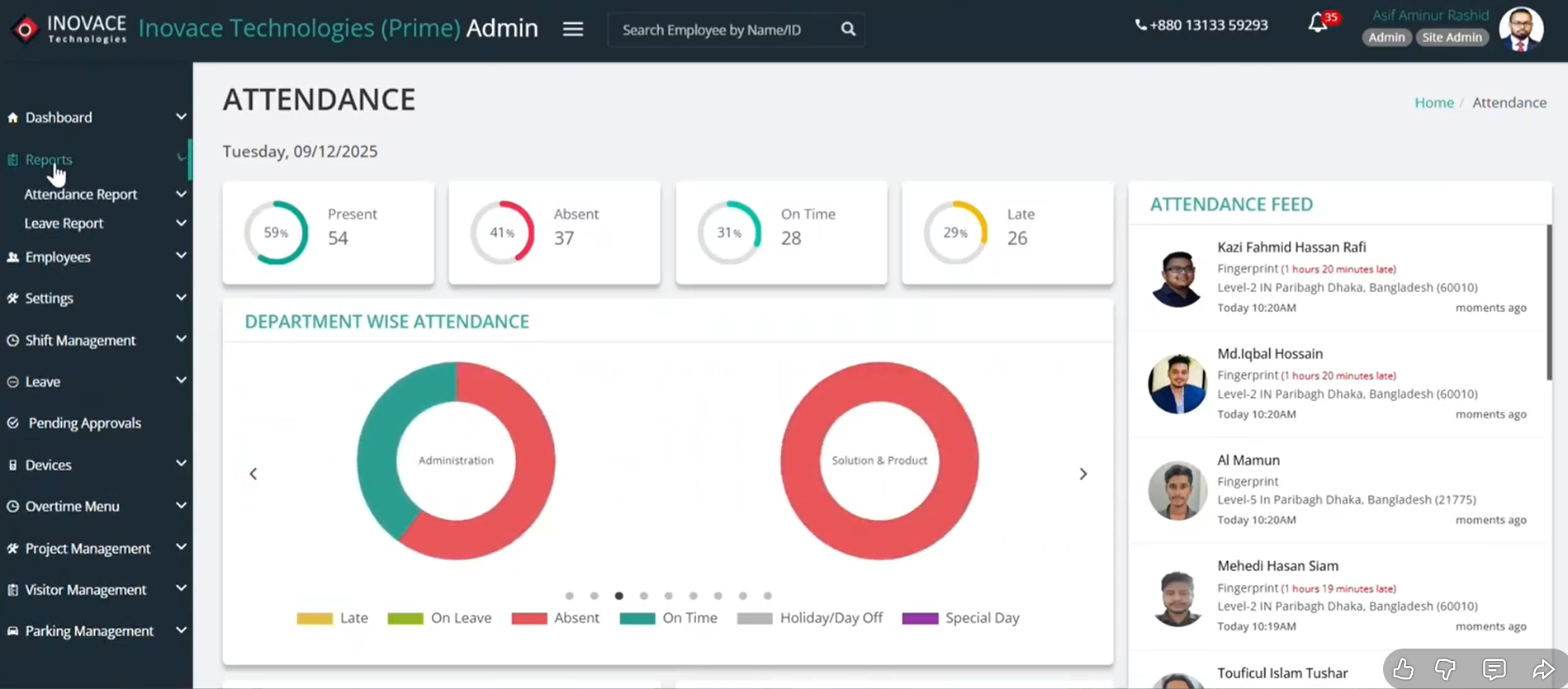
Open Tipsoi. Log in with your credentials. You’ll land on the main screen.
Tipsoi dashboard access is your command center. The HR admin panel navigation feels intuitive from day one. Your workforce management dashboard shows everything at a glance.
The reporting interface overview displays key metrics right on top. You can see today’s attendance, pending approvals, and recent activities.
Click on the “Reports” menu in the left sidebar. That’s where the magic happens.
Step 2 – Locating Reports
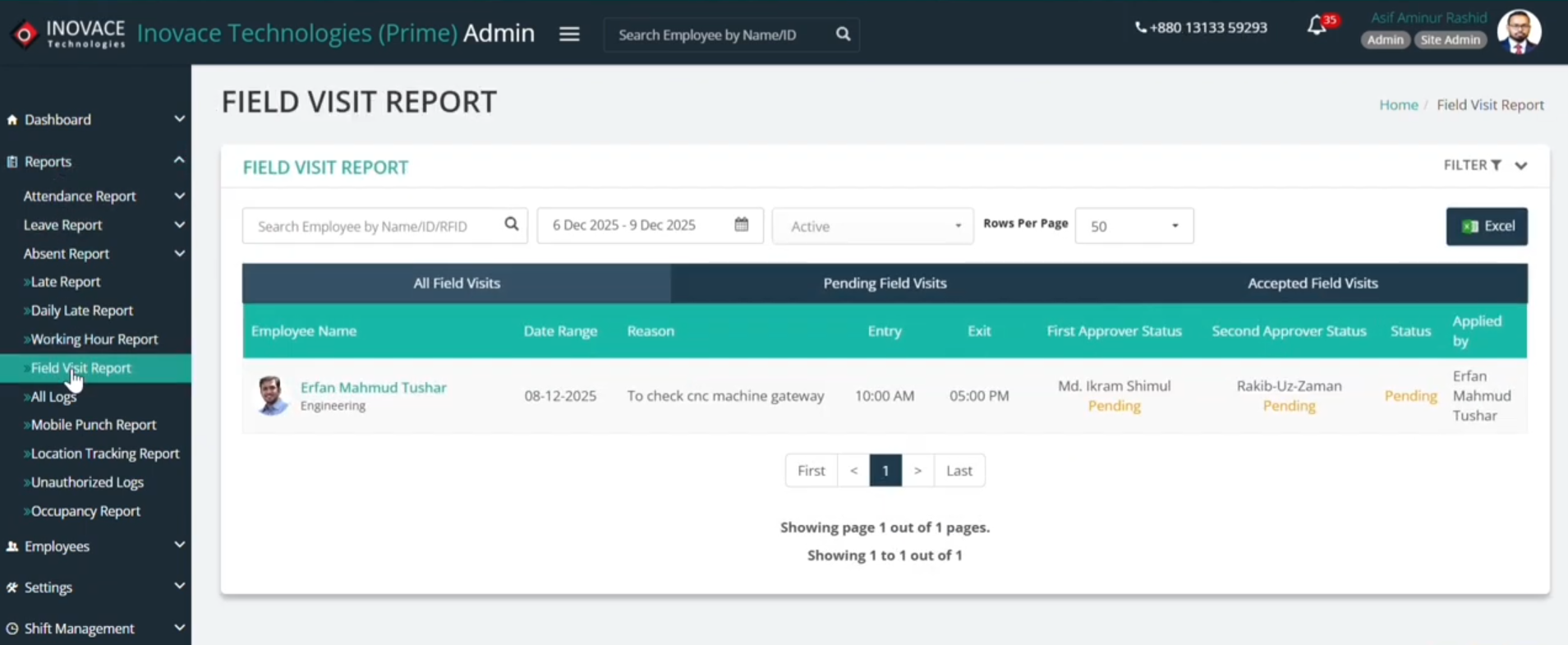
The Reports section contains multiple options. You’ll see attendance, leave, overtime, and more.
Look for field visit report menu in the list. It’s usually near the top. Click on it to open the HR reports section.
These report navigation steps are identical whether you’re on desktop or mobile. The Tipsoi reports module works the same everywhere.
One click. That’s all it takes to access your field data.
Step 3 – Customizing Your View
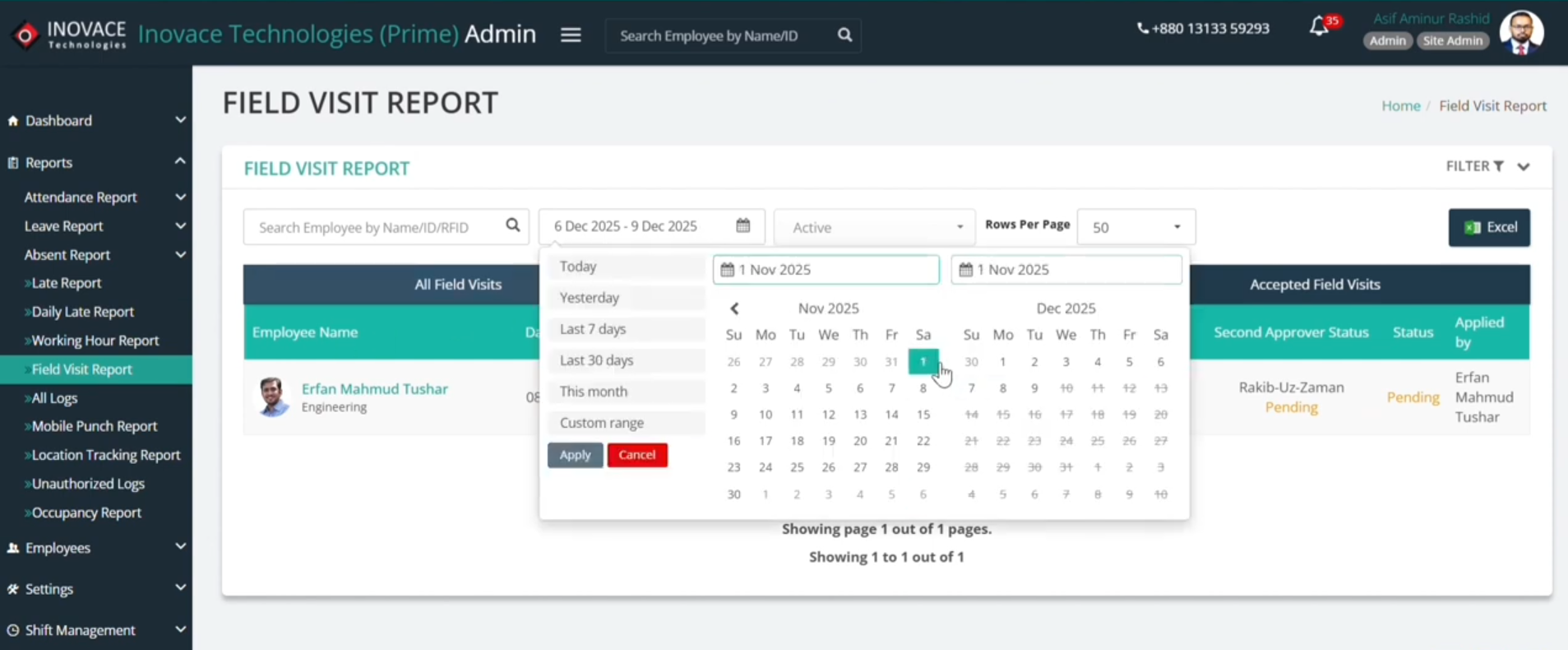
Now you need to pick your timeframe. See the calendar icon? Click it.
Custom date range reports let you choose any period. Want last week? Select November 1 to November 7. Need the whole month? Pick November 1 to November 30.
Filtered field visit data appears based on your selection. The reporting calendar selection highlights your chosen dates clearly. Date-based HR analytics work best when you compare similar timeframes.
You can also filter by employee name, department, or status. The system remembers your preferences for next time.
Step 4 – Analyzing the Data
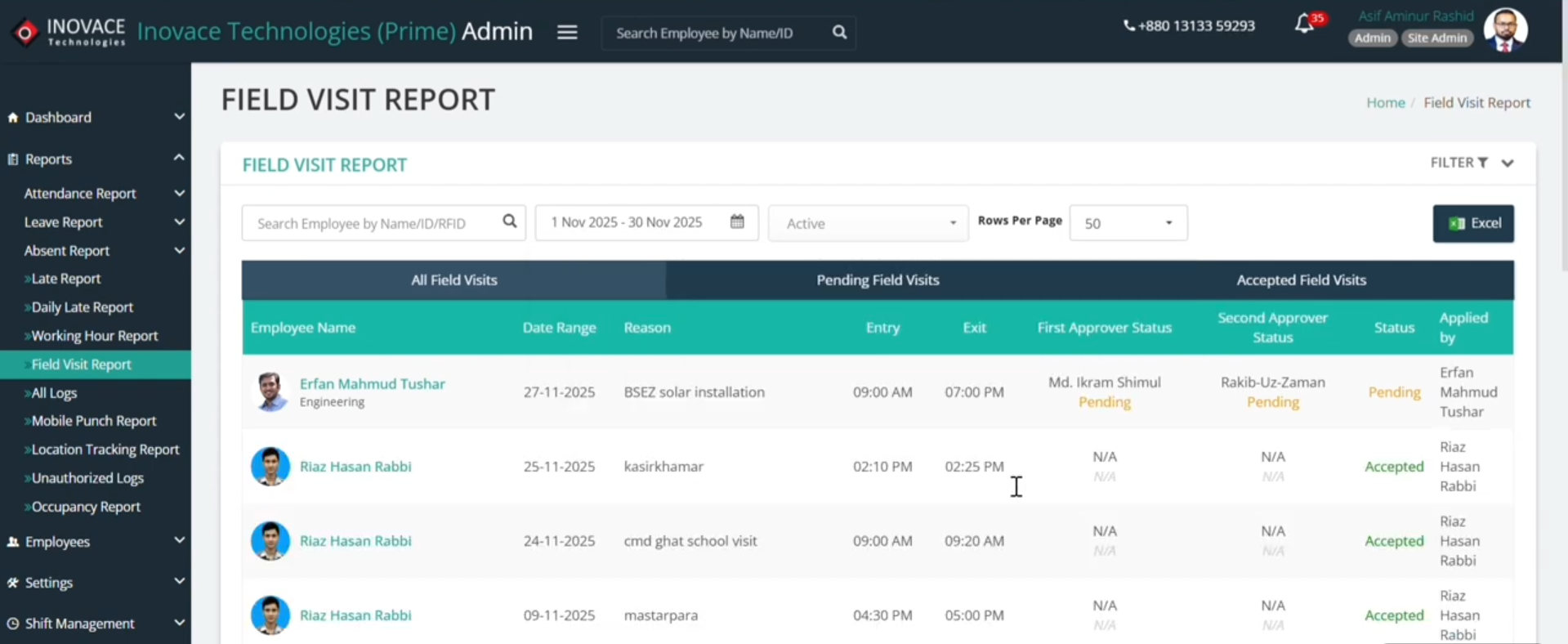
Your report appears on screen. It looks clean and organized.
Field visit report columns show employee name, date, visit reason, entry time, exit time, and status. Employee visit analytics help you spot patterns quickly. Attendance data interpretation becomes obvious when information is well-organized.
Field activity metrics reveal who’s most productive. You’ll see:
- Which employees visit the most sites
- Average time spent per visit
- Pending approvals that need attention
- Late arrivals or early exits
Scroll through the list. Click any row for detailed information about that specific visit.
Step 5 – One-Click Export
Need to share this with your boss or keep it for records? Hit the Export button.
Export field visit report downloads a file instantly. Excel HR reports open in any spreadsheet program. Downloadable attendance data lets you analyze offline.
Offline report analysis works great for presentations or board meetings. The file includes everything you saw on screen plus some extra details.
Save it to your computer. Email it to stakeholders. Print it for the filing cabinet. Your data, your choice.
Still in Confusion? Check out this quick video guide…..
Benefits of Tipsoi Automation
The numbers tell an incredible story. Companies using Tipsoi see massive improvements fast.
Benefits of HR automation extend beyond just saving time. Tipsoi advantages include better employee satisfaction and reduced turnover. Workforce efficiency gains show up in your bottom line.
Digital HR transformation sounds fancy. But it really just means working smarter instead of harder.
1. 70% Reduction in Manual Work
Imagine getting back 14 hours every week. That’s what happens when automation takes over.
Reduce manual workload by eliminating repetitive tasks. HR process efficiency improves when people focus on people instead of paperwork.
Automation time savings compound over months and years. Operational cost reduction comes from doing more with less.
Your HR team can finally breathe. They can train employees, resolve conflicts, and build culture. You know, the work they actually signed up for.
2. Zero Data Loss
Servers crash. Files get corrupted. Coffee spills on laptops. Life happens.
Secure HR data lives safely in the cloud. Zero data loss system means your information survives disasters. Cloud data reliability provides redundancy and backups automatically.
Workforce data protection includes encryption and secure access controls. Your employees’ information stays private and safe.
Sleep better knowing your data won’t vanish overnight.
3. Seamless Integration
Your business already uses other tools. Payroll software. Accounting systems. CRM platforms.
HR software integration connects Tipsoi with your existing stack. Payroll system compatibility means attendance data flows directly into salary calculations.
Integrated workforce tools eliminate duplicate data entry. Scalable HR platform grows with your company without requiring replacements.
One ecosystem. Everything connected. No headaches.
Beyond Tracking – Employee Profile Insights
Field visit reports are just the beginning. Tipsoi gives you a complete employee picture.
Employee profile analytics show each person’s full work history. Click on any employee name to see their complete record. Attendance history tracking displays patterns over weeks and months.
Need to check someone’s leave management insights? It’s all there. Sick days, vacation time, personal leaves. Everything organized and easy to read.
Workforce performance data helps you identify your stars and coach struggling team members. Employee lifecycle visibility means you understand each person’s journey from onboarding to promotion.
See who consistently arrives early. Notice who takes the most client visits. Spot attendance issues before they become problems.
These insights help you make smarter decisions about raises, promotions, and team assignments. You’re not guessing anymore. You’re looking at facts.
A McKinsey study found that data-driven HR decisions improve employee retention by up to 25%.
Data doesn’t play favorites. It just tells you what’s really happening in your organization.
Empower Your Team with Data
The future of work isn’t about controlling people. It’s about empowering them with better tools.
Digital workforce empowerment happens when everyone has access to accurate information. Employees know exactly what’s expected. Managers know exactly what’s happening. Smart HR decision making replaces gut feelings with real data.
Modern field management doesn’t require expensive consultants or complicated training. It requires a commitment to doing things better.
Your competitors are already using these tools. They’re moving faster, making fewer mistakes, and keeping better talent.
The question isn’t whether to upgrade attendance tracking. It’s whether you want to lead or follow.
Tipsoi’s HR automation platform transforms field reporting from a chore into an advantage. Your team spends less time on admin work and more time delighting customers.
Ready to see the difference for yourself? Schedule HR software demo with our team today. We’ll show you exactly how Tipsoi works in your specific industry.
Want to upgrade field tracking system without disrupting your current workflow? Request Tipsoi demo and we’ll prove it’s easier than you think.
Join thousands of companies that chose to automate field visit reporting. See why they’re never going back to spreadsheets.
The tools are ready. The technology works. Your team deserves better.
Let’s make it happen.
FAQs
1. What is a field visit report and why is it important?
A field visit report is a digital record of employee activities outside the office. It tracks entry time, exit time, location, and visit purpose. Automated field reports eliminate manual errors and provide real-time employee tracking for better accountability and transparency.
2. How does GPS-based mobile punch improve accuracy?
GPS-based mobile punch uses location-based attendance to verify employees are actually at client sites. The geo-verified punch-in system prevents fake check-ins and ensures accurate attendance tracking. This field staff GPS tracking reduces time theft by up to 80%
3. Can I export field visit reports for payroll processing?
Yes! Tipsoi allows you to export field visit report data instantly. Download Excel HR reports with one click. The downloadable attendance data includes all visit details and integrates seamlessly with payroll system compatibility for effortless processing.
4. How much time does HR automation actually save?
Companies using HR automation solution see a 70% reduction in manual work. Time-saving HR software eliminates tedious data entry, freeing up 14+ hours weekly. HR productivity tools let your team focus on strategic work instead of spreadsheets.
5. Is my employee data secure with cloud-based field reporting?
Absolutely. Cloud-based field reporting offers 99.9% uptime and automatic backups. Secure HR data includes encryption and workforce data protection protocols. The zero data loss system ensures your information survives any disaster safely.