

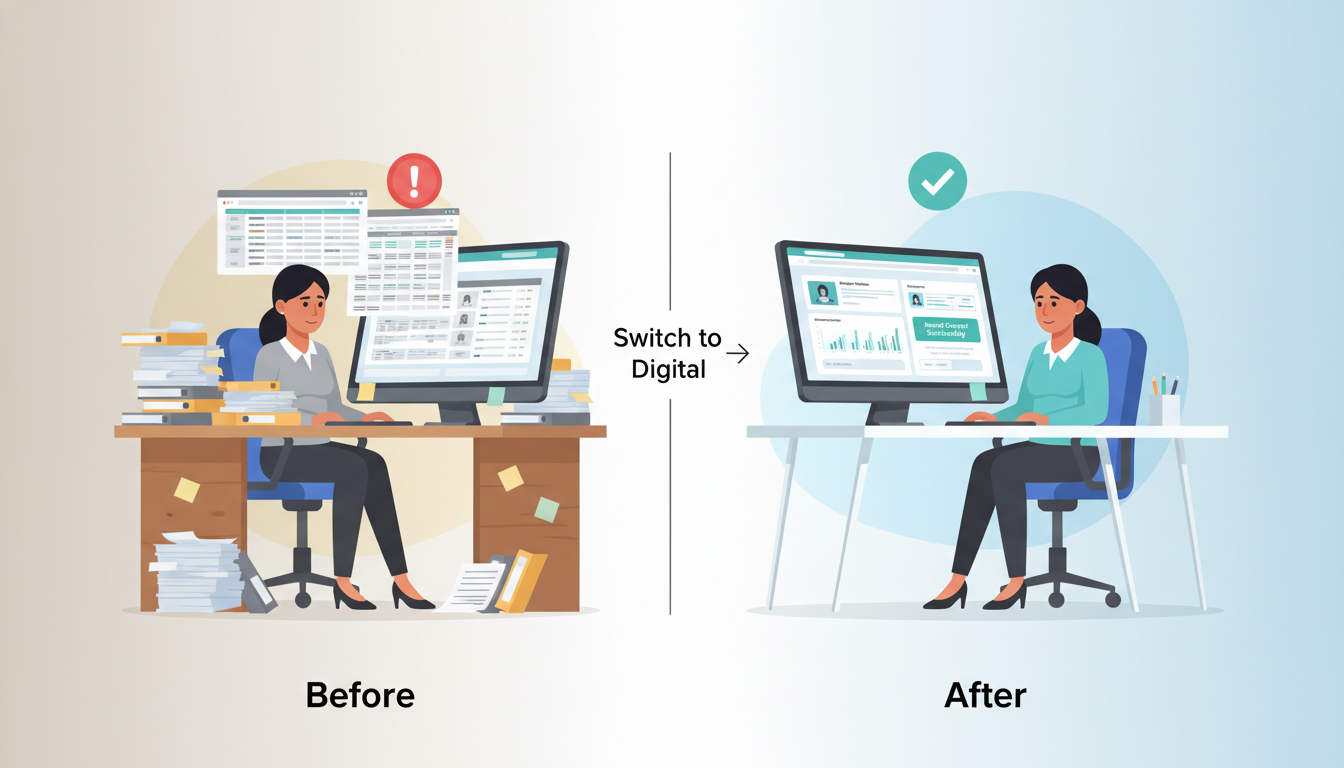
Your HR team is drowning. They spend hours fixing typos, hunting down missing files, and re-entering the same data twice. Sound familiar?
Manual HR processes are quietly bleeding your business dry. A single data entry mistake can trigger a payroll error, a compliance fine, or a frustrated employee walking out the door. These are not small risks. They are business-critical problems hiding in plain sight.
The good news? There is a better way. Employee database management software gives you one clean, centralized system for all your staff information. No more spreadsheet chaos. No more duplicate records. Just fast, accurate, and scalable HR automation that grows with your team.
This guide walks you through everything. From setting clear goals to creating your very first digital employee record, you will leave here ready to transform how your workplace runs.
Why Manual HR Systems Are Holding You Back
Let’s be honest. Spreadsheets were never built for people management.
They break under pressure. One wrong formula and your entire payroll report falls apart. One accidental overwrite and a year of attendance data disappears. The bigger your team grows, the bigger the risk becomes.
Here is what manual workforce management actually costs you:
- Lost time: HR teams spend up to 40% of their week on repetitive data entry tasks.
- Costly errors: Payroll mistakes from bad data cost companies thousands in corrections and penalties.
- Zero visibility: Static spreadsheets give you a snapshot of the past, never a live view of right now.
- Compliance risk: Outdated or missing records can expose your business during audits.
These are not edge cases. They are everyday realities for teams still living in manual processes. The longer you wait, the worse it gets.
Key Steps for Successful Implementation
1. Define Objectives and Assemble Your Team
Start with the “why.” Before you touch any software, get clear on what you actually want to fix.
Do you want faster onboarding? Better attendance tracking? Cleaner payroll data? Write it down. Specific goals lead to smarter decisions down the line.
Then build your crew. You will need an HR lead, an IT point of contact, and a manager from each key department. This is not a one-person job. Shared ownership means faster adoption and fewer surprises.
2. Audit and Clean Your Data
Old data is dangerous. Before migrating anything, go through your existing files with a fine-tooth comb.
Look for duplicate employee IDs, missing contact details, and outdated designations. Clean data in means clean data out. Streamlined data entry only works when the foundation is solid.
Archive records you no longer need. Flag anything incomplete for review. This step is unglamorous, but it protects everything you build next.
3. Choose and Customize the System
Not all employee database management software is built the same. Look for a platform that fits your size, your industry, and your workflow.
Must-have features include custom fields, role-based access, shift management, and integration support. Once you have chosen your system, customize it. Map your departments, designations, and locations before you add a single employee.
A well-configured system from day one saves you weeks of cleanup later.
4. Integrate with Existing Systems
Your HR software should talk to your other tools. Think payroll platforms, attendance hardware, leave management apps, and communication tools.
Disconnected systems create the same chaos you were trying to escape. Prioritize integrations that eliminate double entry. If data flows automatically between your tools, your team gets hours back every week.
5. Train and Communicate
Even the best software fails without buy-in. Train your HR team thoroughly. Then train your managers. Then communicate clearly to all employees about what is changing and why.
Use short walkthroughs, video guides, and quick-reference cheat sheets. The goal is confidence, not confusion. People support what they understand.
6. Monitor and Optimize
Go live, but do not walk away. Track your key metrics in the first 30, 60, and 90 days.
Are errors going down? Is onboarding faster? Are reports more accurate? Review what is working and what needs tweaking. HR automation is a journey, not a one-time setup.
Common Pitfalls to Avoid
1. Lack of Clear Objectives
Jumping in without a goal is a recipe for frustration. Teams that skip the planning stage often end up with a system that no one uses correctly.
Revisit your objectives at every major milestone. Keep asking: is this solving the problem we set out to fix?
2. Poor Data Migration
Rushing the migration is one of the most common and costly mistakes. Dirty data carried over from old systems will corrupt your new setup from day one.
Always run a test migration before going live. Verify records manually. Do not assume the data is clean just because it looked fine in the old spreadsheet.
3. Ignoring Compliance
Digital employee records must comply with local data protection and labor laws. This is non-negotiable.
Work with your legal or compliance team early. Make sure your software supports the required data retention policies, access controls, and audit logs for your region.
4. Overcomplicating the System
More features do not always mean better outcomes. A system loaded with unused tools confuses users and slows adoption.
Start simple. Activate the core features first. Add complexity only when your team is ready and the business case is clear.
Transitioning from Manual Spreadsheets to Automated Systems
1. Eliminating Human Error
Human error is not a people problem. It is a process problem. When you rely on manual entry, mistakes are inevitable.
Employee database management software removes the conditions that create those mistakes. Auto-populated fields, validation rules, and unique ID checks catch errors before they ever hit your database. Your records stay accurate without anyone having to double-check everything manually.
The result? HR teams that spend less time fixing mistakes and more time doing meaningful work.
2. Real-Time Visibility
Static spreadsheets show you where you were. Workforce management software shows you where you are right now.
Live attendance feeds, real-time headcount dashboards, and instant department-level reports give managers the data they need the moment they need it. No more waiting for end-of-week summaries. No more emailing HR to ask a simple question.
Decision-making becomes faster. Bottlenecks become visible before they become crises.
3. Centralization
When employee data lives in ten different places, nobody can find anything. Join dates in one sheet. Contact info in another. Role history buried in an email thread from 2021.
Centralized digital employee records fix this completely. Every piece of information, from onboarding date to current designation, lives in one searchable location. Any authorized user can pull up a full employee profile in seconds.
That is not just convenient. That is how a scalable, professional organization operates.
Step-by-Step Tutorial: Creating Your First Digital Record
Ready to see how it actually works? Here is a clean walkthrough of creating your first employee profile inside a typical employee database management software system.
Step 1: Initiate the Record
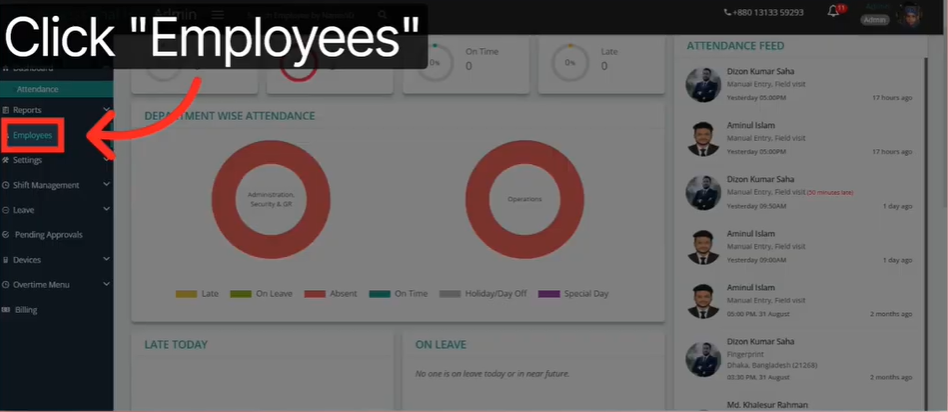
Log into your main dashboard. Look for the “Employees” section in the left-hand sidebar. This is your hub for all digital employee records.
Click the “Create Employee” button. A new entry form will open. This is where the magic starts.
Step 2: Input Core Identity Data
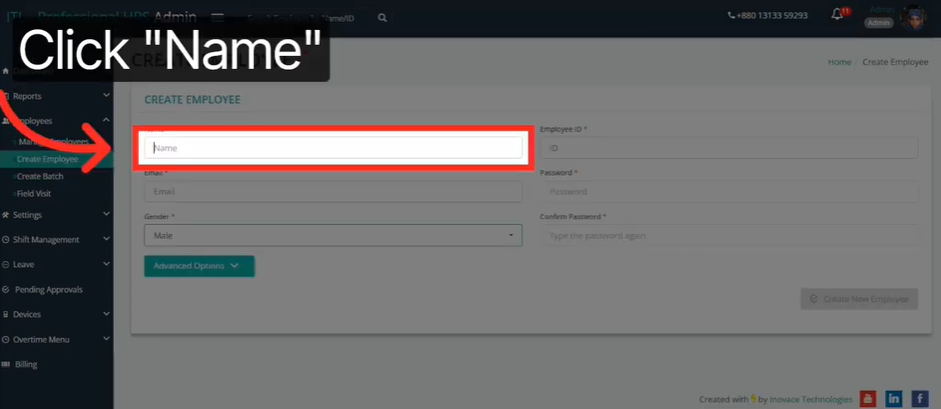
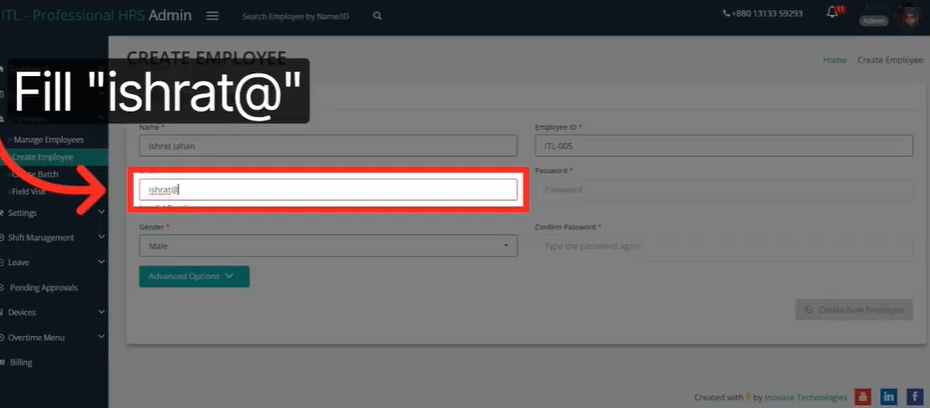
Fill in the foundational details first. These are the non-negotiables:
- Full Name: Use the official name as it appears on legal documents.
- Unique Employee ID: This is your identifier. Make it consistent with your naming convention.
- Official Email: Use the company email, not a personal one.
Set the employee’s initial security password and select their gender. This gives them immediate access to the system from day one. Streamlined data entry here prevents confusion down the line.
Step 3: Configure Advanced Professional Details
Click “Advanced Options” to unlock the deeper settings. This is where you build the professional context of the record.
Set the official Join Date. This date is your anchor for seniority calculations, probation periods, and anniversary tracking. Assign a Designation, such as Assistant Manager or Senior Analyst. Then select the correct Department, whether that is Administration, Finance, or Security.
Getting these right from the start keeps your reporting clean and your org chart accurate.
Step 4: Map the Logistics
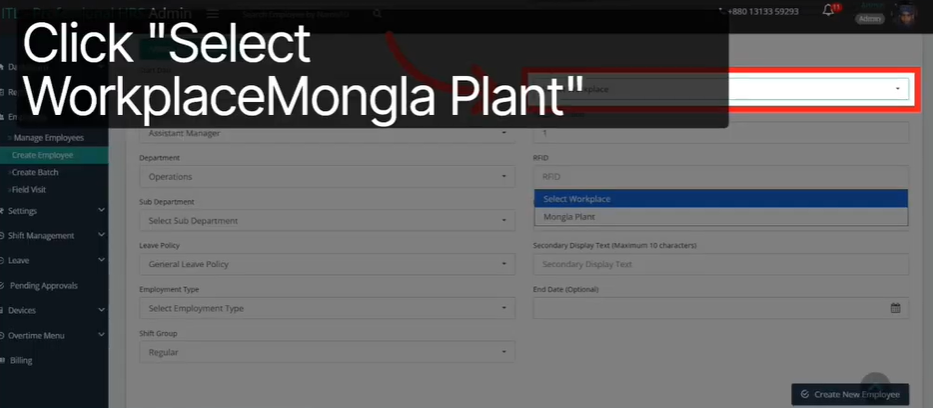
Now you place the employee in the physical and operational context of your business.
- Workplace: Assign the correct plant, branch, or office location. This is critical for site-specific reports.
- Shift Group: Select the right shift, such as Regular Shift, Night Shift, or Rotational. This automates attendance tracking and overtime calculations without any manual input.
- Display Text (Optional): If your workplace is multilingual, you can add localized display labels to make the system accessible to everyone.
This step is where HR automation really kicks in. The system starts doing work for you the moment this data is saved.
Step 5: Finalize and Save
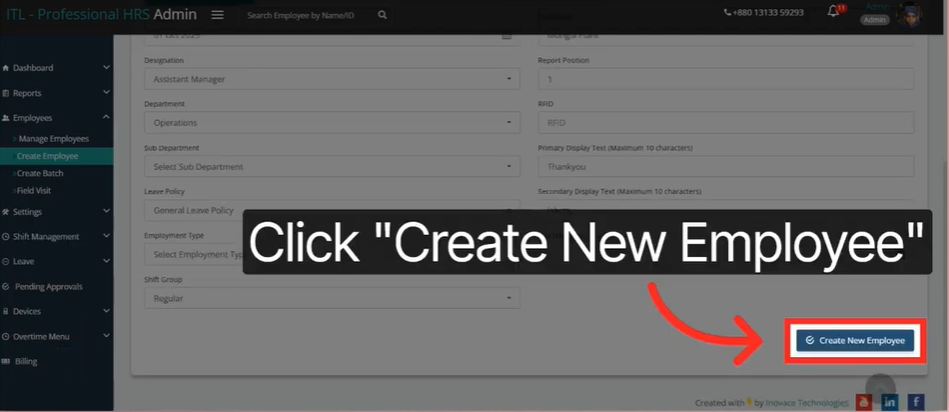
Before you hit save, do a final review. Check every field. Confirm the name spelling, the ID format, the email address, and the shift assignment.
Then click “Create New Employee.” The record goes live instantly. It is now part of your official workforce database, visible to all authorized users in real time.
Congratulations. Your first digital employee record is live.
Leveraging Advanced Options for Granular Workforce Control
1. Site-Specific Management
Large organizations operate across multiple locations. Managing them as one blob of data creates confusion and bad reports.
Assigning a Workplace to each employee lets you filter reports by location. You can pull attendance data for your Karachi branch separately from your Lahore plant. You can compare headcount across sites in seconds. Site-specific management is the foundation of smart multi-location workforce management.
2. Shift Optimization
Not everyone works the same hours. And manual tracking of who worked what shift is a nightmare.
Shift Groups solve this. When you assign an employee to a shift profile, the system automatically tracks their expected hours, calculates overtime, and flags attendance anomalies. This is pure HR automation doing what it does best: taking the repetitive work off your plate entirely.
The result is faster, more accurate payroll with far less human involvement.
3. Localized Context
Diversity in the workplace is a strength. But your software needs to reflect that.
Display text options allow HR teams to add localized field labels and descriptions. Whether your workforce speaks English, Urdu, Arabic, or French, the system can meet them where they are. Accessibility drives adoption. Adoption drives results.
Ensuring Data Security During the Onboarding Process
1. Secure Credentialing
Every employee record starts with a password. This is not optional. It is your first line of defense.
Setting individual credentials during the creation phase ensures that each employee has private, secure access. Nobody can see another person’s personal data. Sensitive records stay protected from day one.
Employee database management software with proper credentialing also creates an auditable access trail. You always know who logged in, when, and what they did.
2. Audit Readiness
Compliance audits are stressful. But they do not have to be.
When every employee record is created through a validated system with required fields and approval steps, your data is always audit-ready. The “Create New Employee” validation step ensures that only authorized HR personnel can add or modify records. No rogue entries. No missing fields. No surprises during an audit.
This is what trustworthy digital employee records look like in practice.
3. Role-Based Hierarchy
Departments and designations are more than labels. They are the foundation for your entire permission structure.
When you correctly assign roles during onboarding, you can later set access permissions based on those roles. A department manager sees only their team’s data. An HR admin sees everything. A payroll officer sees what they need and nothing more.
This role-based approach protects sensitive data and keeps your system clean and secure.
Conclusion
The Recap
Employee database management software is not just a tech upgrade. It is a shift in how your organization thinks about people data.
When you centralize your records, automate your HR automation workflows, and remove manual entry from the equation, everything runs cleaner. Onboarding gets faster. Payroll gets more accurate. Managers get the visibility they need to lead well.
You built your team with care. Now build the systems that support them just as carefully.
The Bigger Picture
Moving beyond manual entry is the first step toward a scalable business. The companies that grow fast and stay organized are the ones that invest in the right infrastructure early.
Workforce management is not just about tracking people. It is about empowering them to do their best work inside a system that actually works.
Your Next Step
You now have everything you need. You understand the risks of manual systems. You know the key steps to a successful implementation. You have seen exactly how to create your first digital employee record from start to finish.
Now it is your turn. Open your dashboard. Click “Create Employee.” Start your digital transformation today.
Because the best time to fix your HR systems was yesterday. The second best time is right now.
Ready to take the next step? Start your free trial and create your first digital employee record in under five minutes.
FAQ
1. What is employee database management software?
It is a digital system that stores, organizes, and manages all your staff information in one secure, searchable location.
2. How does HR automation reduce errors in data entry?
HR automation replaces manual input with validated fields and auto-populated data, eliminating the typos and duplicate entries common in spreadsheets.
3. Why should businesses switch to digital employee records?
Digital employee records are easier to update, audit-ready, and accessible in real time, unlike static files that go outdated instantly.
4. What does workforce management software include?
It typically covers attendance tracking, shift assignments, department mapping, role-based access, and payroll integration, all in one platform.
5. How does streamlined data entry improve the onboarding process?
Streamlined data entry lets HR teams create a complete employee profile in minutes, with built-in validation ensuring no critical field is ever missed.