

You open your laptop on Monday morning. You need to know who was late last week. But the data is scattered everywhere. You spend an hour digging through spreadsheets. Sound familiar?
Employee late report tracking does not have to be painful. With the right attendance system, you can pull up late reports in seconds. No digging. No stress. Just clean, accurate data ready to go.
This guide walks you through everything. You will learn what late reports are, why they matter, and how to generate them step by step. Whether you are an HR manager or a team lead, this is for you.
By the end, you will feel confident running attendance late tracking software like a pro. Let us get started.
What Is an Employee Late Report and How Does It Work?
1. What Is an Employee Late Report?
An employee late report is a record of all employees who arrived after their scheduled start time. It captures who was late, by how much, and when. HR teams and managers use it to monitor attendance patterns and enforce workplace policies.
It is one of the most important tools in any attendance system. It turns raw clock-in data into clear, actionable insights. And it helps you make fair, consistent decisions about attendance management.
2. What Data Does a Late Report Include?
A standard employee late report includes the following details:
- Employee name, ID, or RFID number
- Scheduled shift start time vs. actual arrival time
- Late duration in minutes or hours
- Department and designation
- Total working hours logged for the day
Each data point serves a purpose. Together, they give you a complete view of each late incident. You have everything you need to follow up or take action.
3.What Is the Difference Between a Late Report and a Daily Late Report?
These two reports serve different purposes. Here is a simple breakdown:
Late Report:
- Shows all late entries across a selected date range
- Great for weekly or monthly reviews
- Helps identify long-term attendance trends
Daily Late Report:
- Focused on a single day
- Shows per-employee arrival time and late duration
- Best for daily team management and quick check-ins
Think of the late report as the big picture. Think of the daily late report as the zoom-in. Use both together for the clearest view of your team’s attendance.
4. How Does Attendance Software Detect and Log Lateness Automatically?
The system compares each employee’s actual clock-in time to their scheduled shift start. If they arrive after the scheduled time, the system logs them as late. It calculates the exact late duration automatically.
This all happens without any manual input. The attendance late tracking software does the comparison in real time. The moment a late entry is recorded, it appears in your report dashboard.
There is no delay and no room for error. There is no delay and no room for error. The system is consistent and objective. Every late entry is treated the same way, no matter who the employee is.
Why Employee Late Report Tracking Is Critical for HR Efficiency
1. The Hidden Productivity Cost of Untracked Lateness
Every minute of untracked lateness adds up. If five employees arrive 15 minutes late every day, that is over 1,800 hours lost every year. That is a real cost to your business. And most companies never even measure it.
When lateness goes untracked, it becomes a habit. Employees notice when there are no consequences. Over time, this affects team morale and overall output. Employee late report tracking puts a stop to that pattern early.
You cannot fix what you cannot measure. Tracking late arrivals gives you the data to take action. It shifts attendance from a guessing game to a clear, managed process.
2. How Automated Late Reports Replace Manual Spreadsheets
Manual tracking is slow and full of errors. Someone has to pull records, count minutes, and format everything by hand. That takes time that HR teams simply do not have. Attendance late tracking software automates all of it.
With an automated system, late entries are logged instantly. Reports are generated with one click. You can filter by date, department, or employee without touching a single formula. The system does the heavy lifting for you.
This is not just about saving time. It is about accuracy. Automated reports remove human error from the equation. Your data is clean, consistent, and always ready when you need it.
3. Who Benefits Most
This is not just a tool for big HR departments. Small business owners benefit just as much. Team leads, operations managers, and admins all need reliable attendance data to do their jobs well.
If you manage people, you need daily late report HR management tools. They keep you informed without taking up your whole morning. Everyone wins when the data is easy to access and easy to understand.
Key Features of a Smart Attendance Late Tracking System
1. Daily vs. Overall Late Report Views
A good system gives you two views. The overall late report shows you a full picture across a date range. You can see patterns, trends, and recurring offenders at a glance. This is great for monthly reviews.
The daily late report goes deeper. It shows you exactly who was late on a specific day. You get arrival time, late duration, and working hours all in one place. This view is perfect for daily check-ins.
Having both options means you are always in control. You choose the level of detail you need. The system adjusts to your workflow, not the other way around.
2. Filtering by Date Range, Department, Designation, and Shift
Not every report needs to cover the whole company. Sometimes you just need data for one department. Or one shift. Or one specific week. That is where filters come in.
Employee attendance filter by date range lets you narrow your focus fast. Pick a start date and an end date. Hit apply. Your report updates instantly. No manual sorting needed.
You can also filter by department, designation, or shift type. This makes it easy to spot which teams or roles have the most lateness. You get targeted insights without wading through irrelevant data.
3. Real-Time Late Log Monitoring
Late logs update in real time. The moment an employee clocks in late, the system records it. You do not have to wait until end of day to know what happened. The data is live and always current.
This is especially useful for shift-based work. If someone misses the start of a shift, you know immediately. You can take action right away. Real-time monitoring keeps you one step ahead.
For HR teams managing large teams, this feature is a game changer. You stop reacting to problems after the fact. You start managing attendance proactively. That is a big difference.
4. Working Hour Reports for Full Productivity Tracking
Late reports tell you when someone arrived late. Working hour reports tell you how long they actually worked. Together, these two tools give you a complete picture of employee attendance.
You can see if a late arrival made up the time. You can check if working hours are consistent across the team. This data supports fair, evidence-based performance conversations. No guesswork involved.
Using both reports together makes your daily late report HR management much more powerful. You move from tracking a single metric to understanding the full attendance story for each employee.
Step-by-Step Tutorial: How to Generate and Track Late Reports
Here is exactly how to generate and manage employee late report tracking in your attendance system. Follow these steps in order.
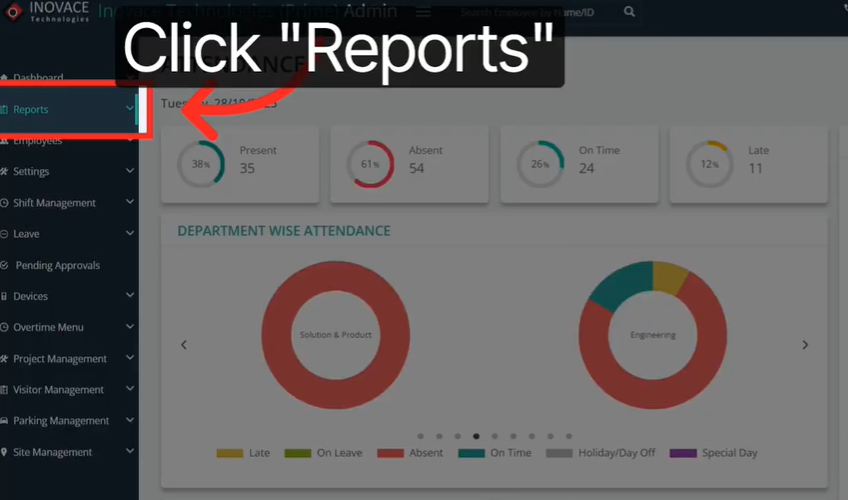
Step 1: Open the Reports Section
Click on Reports in the left side menu. This is your main hub for all attendance data. You will find all report types here in one place.
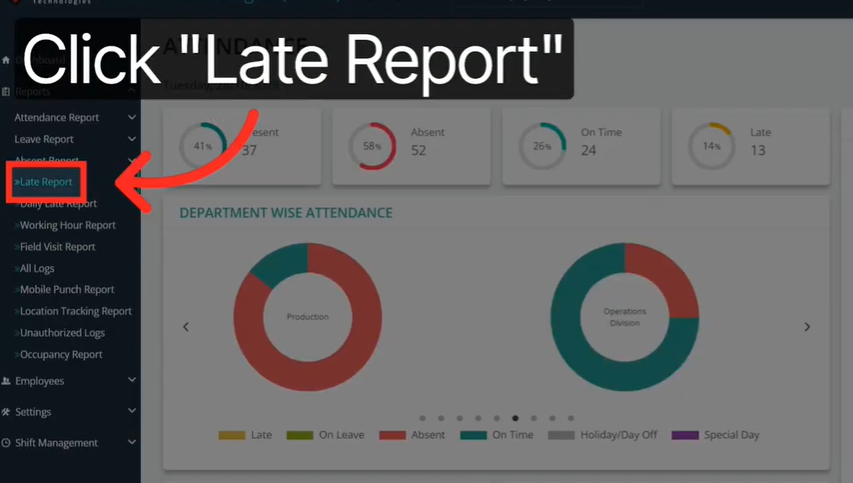
Step 2: Select Late Report
Click on Late Report from the menu options. This opens your overall late entries view. You can see all recorded late arrivals across your team from here.
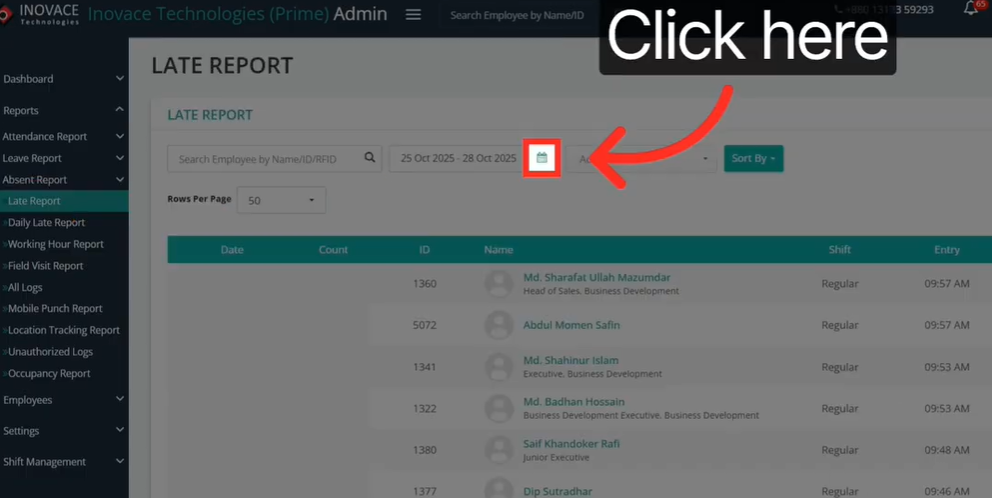
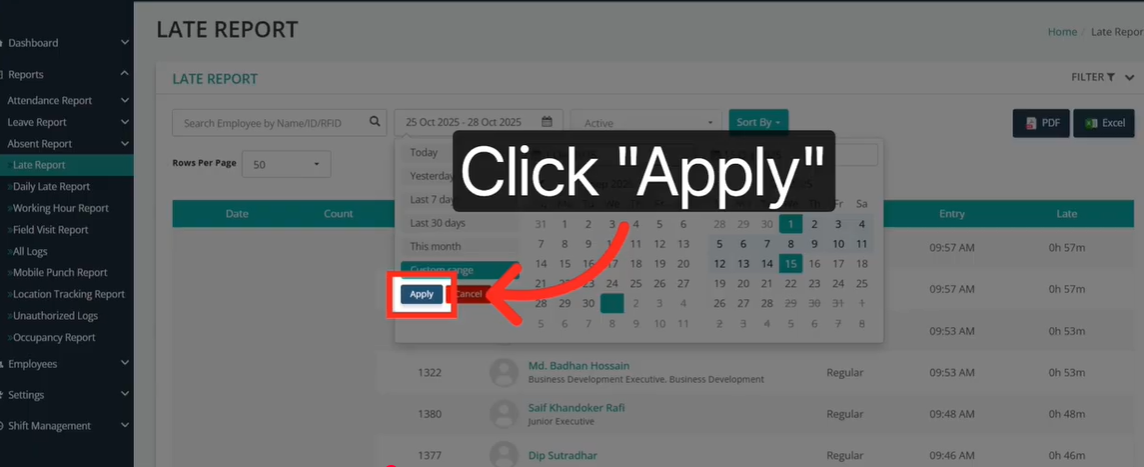
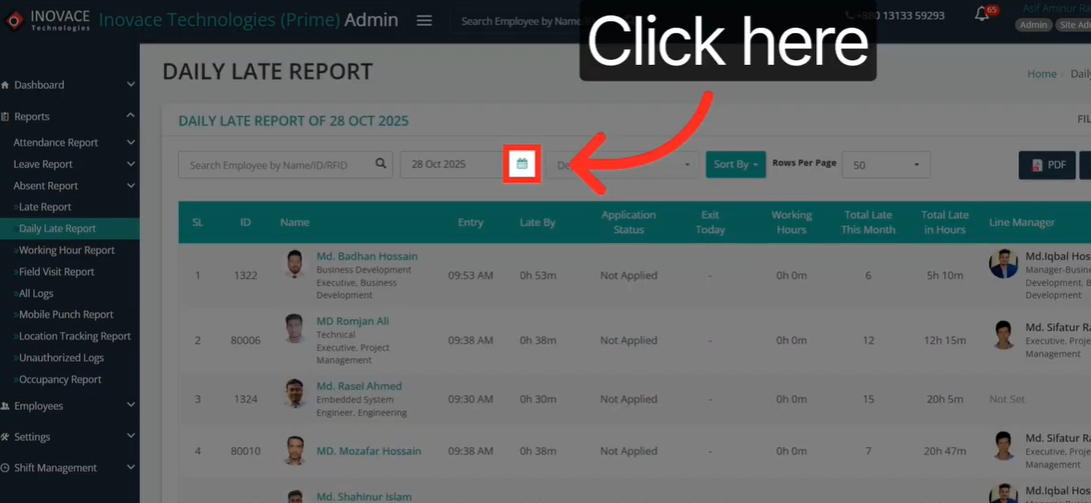
Step 3: Click the Calendar Icon
Look for the calendar icon at the top of the report. Click it to open the date range selector. This is how you control the time period your report covers.
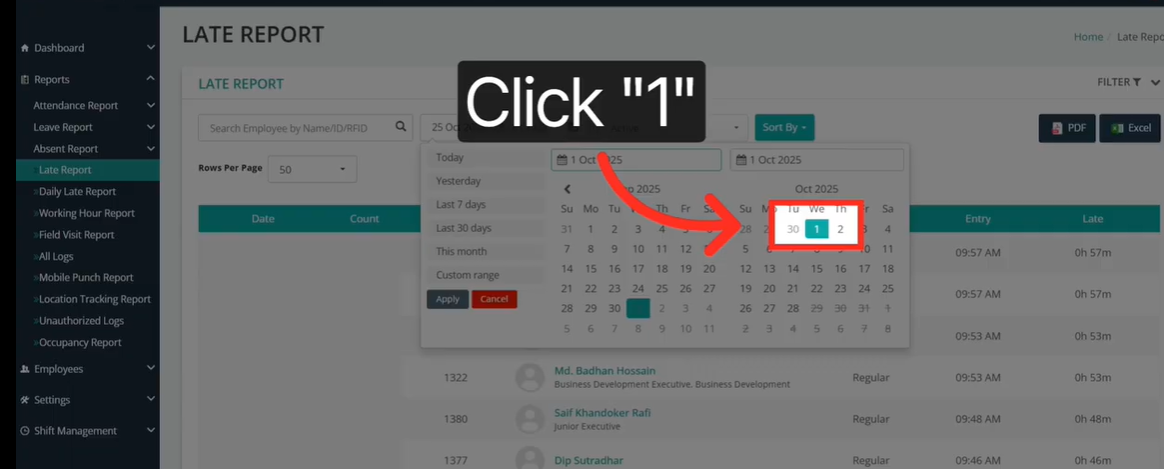
Step 4: Choose Your Start and End Dates
Select your preferred start and end dates. For example, choose the 1st to the 15th of the month. This focuses your employee attendance filter by date range to only that period.
Step 5: Click Apply
Hit the Apply button to load your filtered report. The system instantly pulls all late entries within your selected date range. Your report is now ready to review.
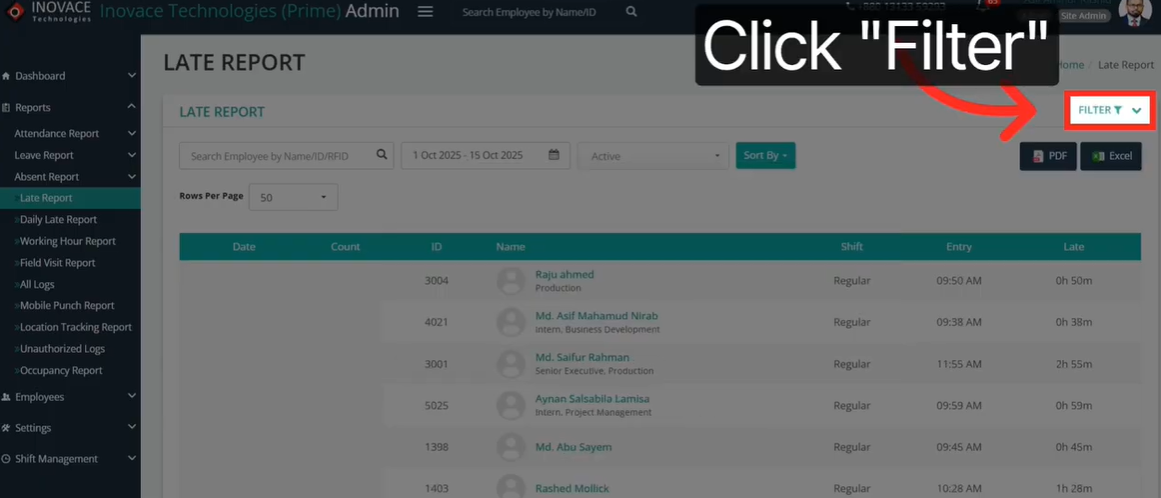
Step 6: Click the Filter Button for Advanced Options
Click the Filter button at the top of the report. This opens additional filtering options. You can now narrow your results even further with specific criteria.
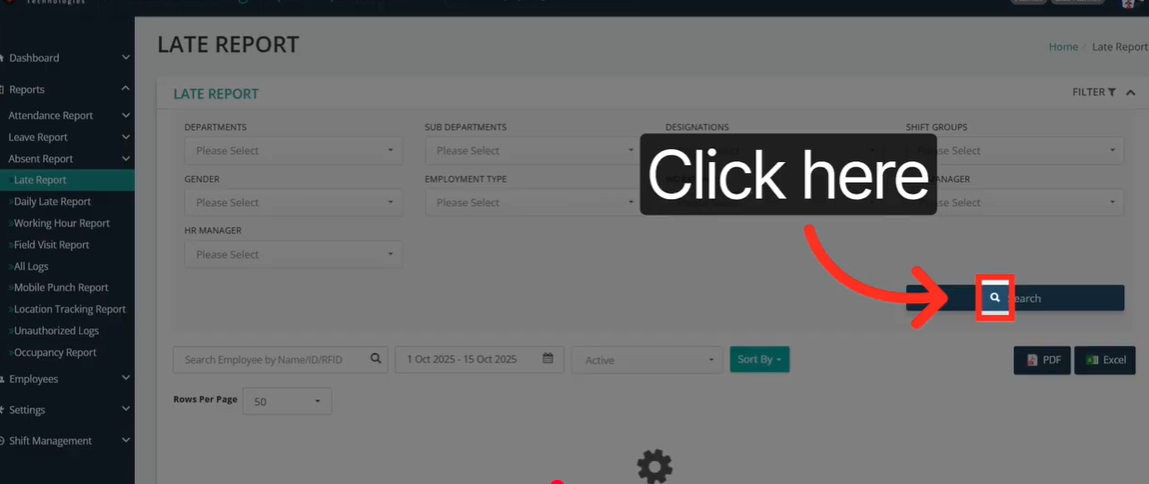
Step 7: Filter by Department, Designation, or Shift
Use the dropdowns to filter by department, designation, or shift type. This is perfect when you only need data for one part of your organization. Select your criteria and apply the filter.
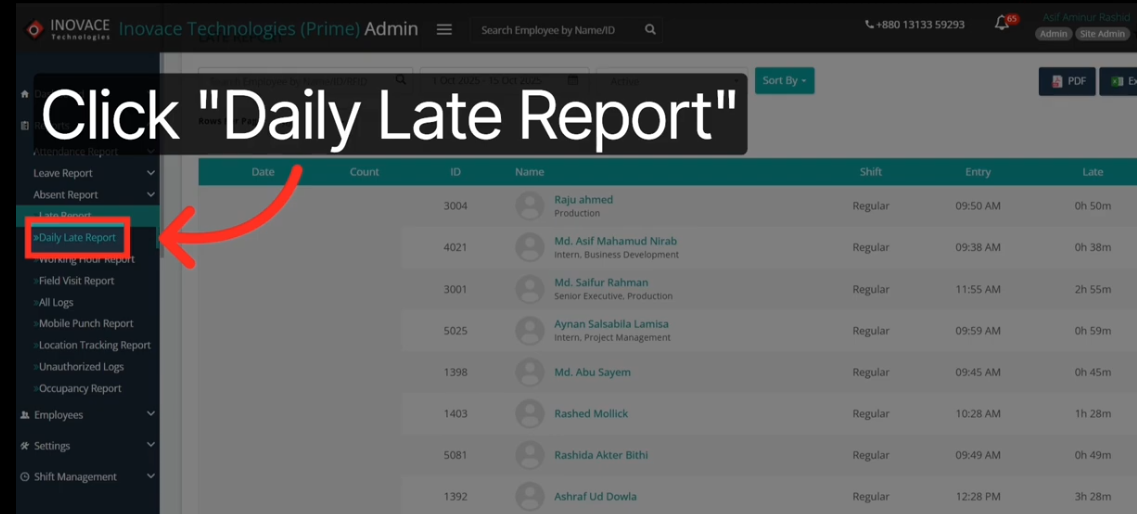
Step 8: Switch to Daily Late Report View
Click on Daily Late Report from the menu. This switches you to a day-by-day breakdown. You can now see individual attendance details for each working day.
Step 9: Review Arrival Time, Late Duration, and Working Hours
Check the data columns carefully. You will see each employee’s arrival time, how many minutes or hours they were late, and their total working hours for that day. This is your core daily late report HR management view.
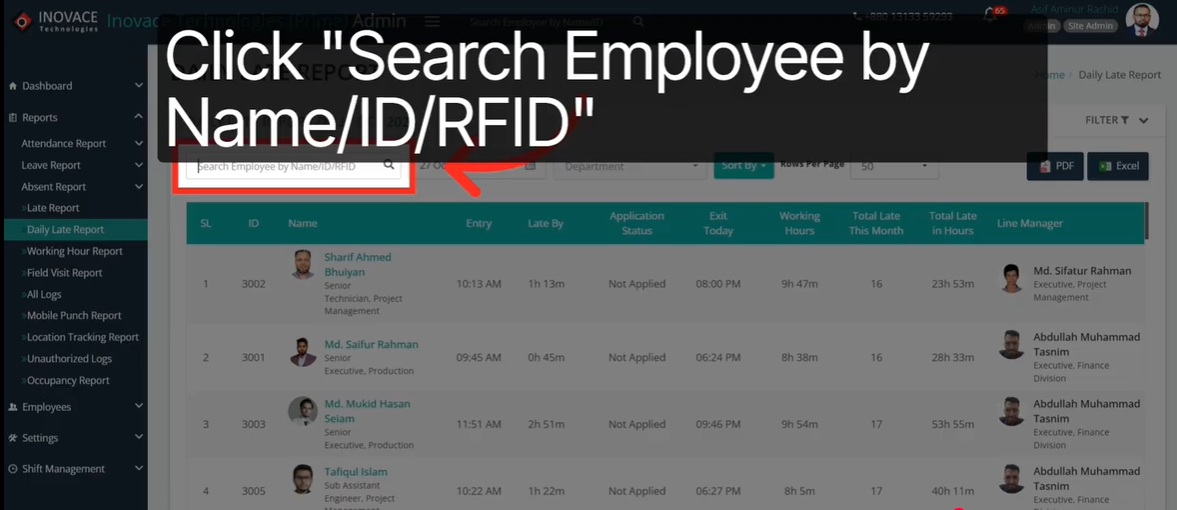
Step 10: Search for an Employee by Name, ID, or RFID
Use the search bar at the top of the report. Type in the employee’s name, ID number, or RFID. The system filters down to just that person’s records instantly.
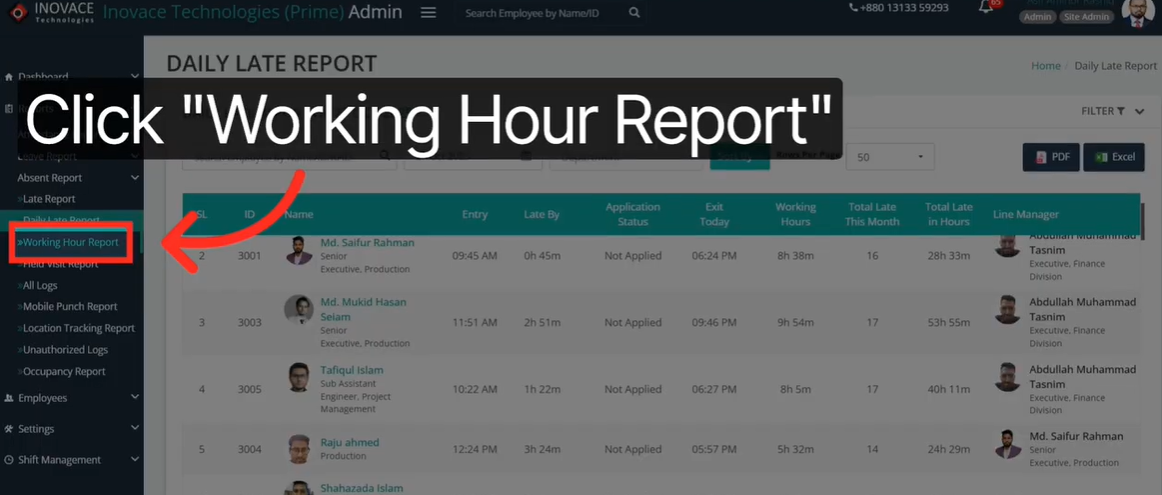
Step 11: Access the Working Hour Report
Navigate to the Working Hour Report section. This shows total hours worked per employee. Use it alongside the late report for a full picture of attendance and productivity.
How to Use Late Report Data to Improve Team Attendance
1. Setting Attendance Policies Based on Report Trends
Data is only useful if you act on it. Use your employee late report tracking data to spot trends. If one department is consistently late, dig deeper. There may be a scheduling or transport issue worth addressing.
Build your attendance policy around what the data shows. Set clear thresholds for acceptable lateness. Communicate those thresholds to your team. When policies are backed by data, they feel fair.
Review your late reports monthly. Look for changes in patterns over time. Adjust your policies as your team grows or your work structure changes. Stay responsive to what the numbers are telling you.
2. Using Shift-Based Filters to Identify Patterns
Not all shifts are equal. Some shifts may have higher lateness rates than others. Use the shift filter in your attendance late tracking software to compare shift performance side by side.
If the morning shift has more late arrivals than the afternoon shift, that is a pattern worth investigating. Maybe the start time is too early. Maybe the commute is harder. The data helps you ask the right questions.
Shift-based filtering gives you targeted insights. You are not looking at the whole company. You are looking at one specific group. That makes your findings much more actionable.
3. Communicating Lateness Data Fairly With Employees
Use daily late report HR management data to have honest, evidence-based conversations. Do not rely on memory or hearsay. Show the employee their actual record. Let the numbers speak for themselves.
Keep the tone constructive. The goal is improvement, not punishment. Ask if there are any barriers affecting their punctuality. Sometimes a small schedule adjustment makes a big difference.
When employees know you have accurate data, they take attendance more seriously. Transparency builds trust. And trust builds a better workplace culture for everyone on the team.
Conclusion
Employee late report tracking does not have to be complicated. The right system makes it fast, accurate, and completely stress-free. You get the data you need without wasting time on manual work.
From filtering by date range to pulling up a daily late report, every step is built to save you time. You stay on top of attendance without it taking over your day. That is how smart HR management works.
The steps in this guide work for teams of any size. Whether you manage five people or five hundred, the process is the same. Clean data leads to better decisions. Better decisions lead to a stronger team.
Start using your attendance system to its full potential today. Your team will notice. And so will your results.
Ready to Simplify Attendance Tracking?
Stop wasting time on manual reports. Generate accurate late reports in seconds with a smarter attendance system built for modern teams.
Watch the full step-by-step video tutorial to see exactly how it works. Then try it yourself and feel the difference.
FAQs
Can I filter late reports by a single department?
Yes. Use the Filter button in your report view. Select your target department from the dropdown. The report will update to show only that department’s late entries.
What is the difference between a Late Report and a Daily Late Report?
A late report covers a full date range and shows overall patterns. A daily late report focuses on one specific day. Use both for a complete view of your team’s attendance habits.
How do I find one employee’s attendance record quickly?
Use the search bar at the top of the daily late report section. Type in the employee’s name, ID, or RFID number. The system filters results instantly and shows only their records.
Does the system show real-time late logs?
Yes. The attendance late tracking software logs late entries the moment an employee clocks in. There is no waiting for end-of-day updates. Your data is always current and accurate.