The Roster Spreadsheet Is Costing You a Weekend Every Month
Every company that runs shifts has the same file. A spreadsheet, a tab per month, one person who owns it. Building next month takes most of a weekend. Then someone asks for a swap and the whole grid has to be checked again by hand.
The errors are always the same: two people on one slot, one person on two shifts, a night shift nobody was assigned. You find out at 6 AM when the shift starts short. And a spreadsheet tells no one anything, so somebody still answers ‘what is my shift tomorrow?’ forty times a week.
3.5 hrs
lost today on manual data entry
12
payroll mistakes found in attendance sheets this month
Four Pieces That Replace the Roster Spreadsheet
These are real screens from the Tipsoi platform. Shift Management is built from four connected parts.
Shifts: Define the Rules Once
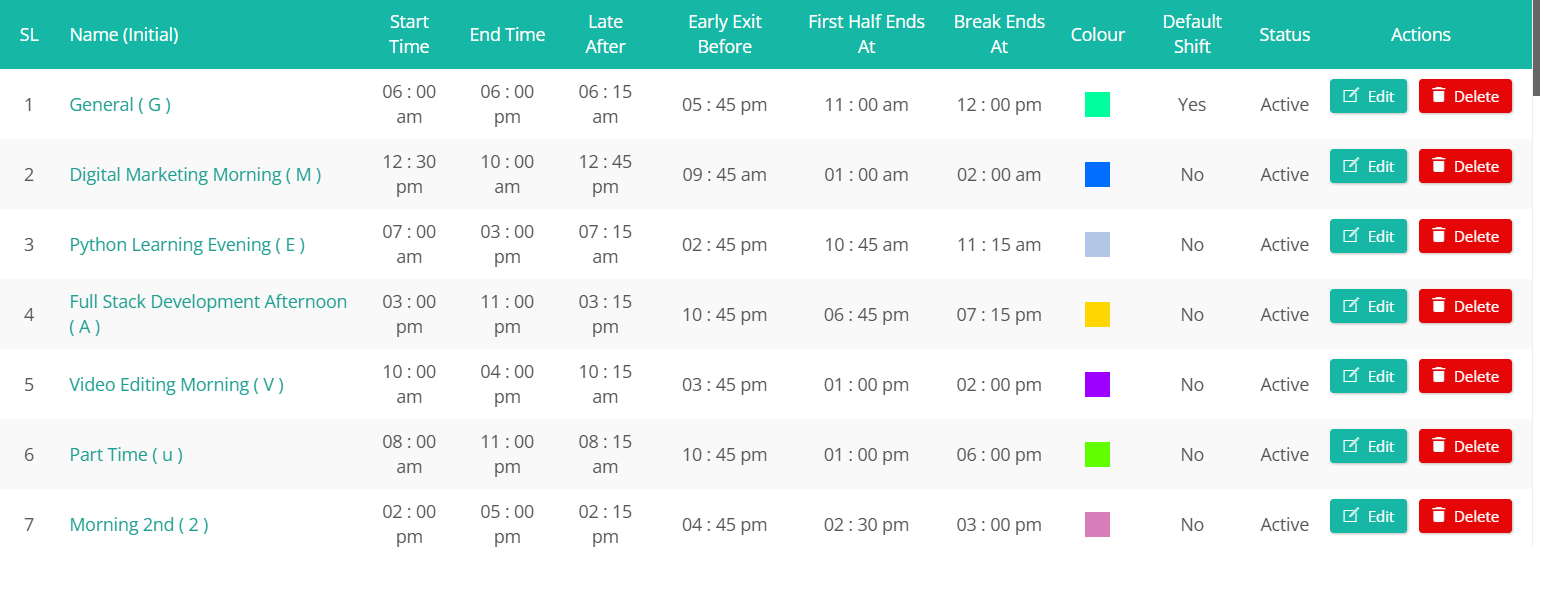
Late After decides when someone is actually marked late, so a 6:00 AM shift can forgive arrivals until 6:15. Early Exit Before catches people leaving early, First Half Ends At sets the half-day mark, and each shift gets its own colour so the roster is readable at a glance.
Night shifts work correctly. A shift running from evening into the next morning counts as one working day, so hours land on the right date.
Shift Groups: Assign Fifty People at Once
Whole teams share a schedule, so you assign the shift to a group instead of to each person. Change it once and everyone moves together.
Each group carries its own weekly off days too — one team off Friday, another Saturday, another four days a week. Groups mirror the departments already set up in Employee Management Software
Roster: Three Views of One Schedule
A colour-coded grid where every cell is a one-letter shift code. Basic View summarises each group’s current shift and next off day. Advanced View opens the full year. Employee View drops to the person level, with search by name or ID and month-by-month navigation.
Repeat carries a pattern forward instead of filling every day by hand. Nothing goes live until you press Save Changes. Once saved, the roster becomes the standard attendance is judged against. The late count on your Centralized Dashboard then reflects each person’s real shift. Approved time off from the Leave Management System already shows on the grid.
Dynamic Shift Groups: For Teams That Rotate
A normal group runs one shift. A rotating crew needs several. A Dynamic Shift Group holds a set of allowed shifts plus default off days, so the roster only offers that team the shifts they actually work.
Nobody gets assigned a shift their team never runs. And because hours are measured against the assigned shift, extra hours pass cleanly to Overtime Management
How Rostering Works in Tipsoi
Step-1
Create your shifts. Add each shift with its timing, Late After rule, half-day point, and colour. Most companies need fewer than ten.
Step-2
Group your people. Use a Shift Group for a fixed schedule, or a Dynamic Shift Group if the team rotates.
Step-3
Fill the roster and save. Assign shifts by clicking cells, use Repeat to carry the pattern forward, then Save Changes.
Built for Businesses That Never Fully Close
Factories running three rotating shifts, hospitals covering every night, retail chains scheduling by branch, and security firms staffing many client sites. Attendance on those sites is confirmed by AI Face Recognitiondevices, so the published roster and real attendance stay in sync.