

You hired a great sales team. You trained them well. You gave them targets. But do you actually know where they are right now?
For most managers, that question creates a knot in the stomach. You trust your team. But trust without visibility is just hope. And hope is not a strategy. Chasing your reps for updates wastes everyone’s time. Manual attendance sheets are easy to fake. And end-of-day summaries miss all the important details that happen in between.
That is exactly where Tipsoi sales team tracking steps in. It gives you real-time visibility, solid data, and the peace of mind you deserve. No more guesswork. No more uncomfortable conversations. Just clean, verified field data that you can act on right away.
This guide covers everything. You will learn how the platform works, what features matter most, and how to generate sales team location reports in just a few clicks. Whether you are a first-time user or looking to get more out of the platform, this walkthrough has you covered.
Tracking Your Sales Team in Real-Time
Managing a field sales team is not easy. Your reps are spread across different areas. They visit multiple clients every day. And you are sitting at your desk hoping everything goes as planned.
With Tipsoi, you stop hoping and start knowing. The platform gives you live tools to monitor your team without micromanaging. It respects your team’s workflow while keeping your data accurate and clean.
Here is what makes it powerful.
1. Mobile Punch with GPS
Every time a sales rep logs in, Tipsoi captures their exact GPS location. It happens automatically. No manual input needed from the employee. No guesswork on your end.
This feature is the backbone of Tipsoi sales team tracking. You see where your team clocked in, down to the exact coordinates. You can compare that location to the client address they were supposed to visit. Everything is logged and time-stamped.
This means no more “I was there, I promise” moments. The data speaks for itself. Your team stays accountable, and you stay confident in the reports you share upward.
2. Geo-Fencing
Geo-fencing takes GPS a step further. You define a geographic boundary around a client site or office. When a rep punches in outside that boundary, the system flags it.
This is a smart layer of protection for businesses using field visit tracking software. It ensures that check-ins are genuine. If someone tries to log attendance from their car two streets away, the system catches it instantly.
Geo-fencing saves you from approving fake field visits. It keeps your attendance records clean. And it builds a culture of honest reporting across the entire team. When everyone knows the system is watching fairly, the whole team performs better. No special treatment. No exceptions. Just consistent, verifiable data for every check-in.
3. Multimedia Documentation
Numbers tell part of the story. Photos tell the rest. Tipsoi lets your field agents capture live photos during check-in. These images are time-stamped and location-tagged automatically.
As a manager, you can pull up any photo from any visit at any time. You see the employee, the location, and the exact moment it happened. This is more than attendance tracking. It is real-time employee monitoring with visual proof. It removes all doubt and replaces it with facts.
This feature is especially useful for verifying client visits, retail store checks, or any situation where physical presence matters. One click and you have the evidence you need. No disputes. No confusion.
4. Live Dashboard
You should not have to hunt for information. The Tipsoi live dashboard brings everything to one screen. Attendance feeds update in real time. Department-wise stats show you who is active and who is not.
You see your entire field team at a glance. Who checked in. Who is still out. Who has the most visits completed today. It is all there without digging through spreadsheets or waiting for end-of-day reports.
This is what modern field visit tracking software should feel like. Clean. Fast. Actionable. The dashboard is designed for busy managers who need answers in seconds, not hours.
Key Benefits for Sales Managers
The features above are great. But what do they actually do for you as a manager? Let us talk about the real-world impact. Because at the end of the day, you care about results.
1. Eliminate Buddy Punching
Buddy punching is a quiet problem. One team member checks in for another who has not shown up yet. It happens more than most managers realize. In fact, the American Payroll Association estimates that buddy punching costs U.S. businesses billions in lost wages every year. And it silently damages your attendance data and payroll accuracy.
Tipsoi sales team tracking solves this with a two-layer defense. First, GPS confirms the physical location. Second, the live photo confirms the actual person. Both must match for the attendance to count.
You do not need to confront anyone. The system handles it. Your team knows the rules are clear, and the technology enforces them fairly. That is a much better situation for everyone.
2. Route Optimization
Where does your sales rep actually go in a day? What path do they take between client visits? Is there a smarter route they could follow?
These are questions you can now answer. Tipsoi stores historical movement data for every field agent. You can review their paths on a map and spot inefficiencies. Maybe two clients are right next to each other but the rep visits them on different days. Small fixes like that add up to big time savings.
Over weeks and months, this data helps you build smarter travel schedules. Your team spends less time on the road and more time in front of clients. That directly boosts productivity and sales performance.
3. Performance Analytics
Who is your top-performing field agent? Who visits the most clients? Who logs the most productive hours? With manual tracking, answering these questions takes hours of spreadsheet work. And according to HubSpot’s sales research, sales reps spend only about 33% of their time actually selling. The rest is lost to admin tasks. Automated reporting fixes that.
With Tipsoi, the data is already there. Automated reports show total visits, check-in times, hours in the field, and location histories. You can identify your strongest performers quickly and reward them properly.
You can also spot team members who need extra support. Maybe their visit count is low. Maybe their locations do not match their assigned territory. You see it early and act fast. That is real-time employee monitoring working for your team’s growth.
Step-by-Step Video Tutorial: Generating Location and Field Visit Reports
Now let us walk through the platform step by step.Watch it alongside this guide and you will be generating reports in minutes.
Step 1: Access the Dashboard
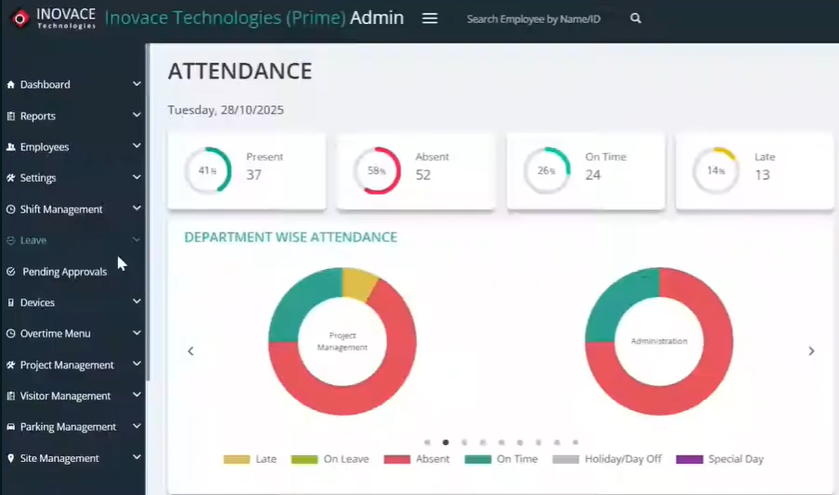
Start by logging into the Inovace Technologies Prime Admin interface. This is your central hub. Everything starts here. Once you are logged in, you will see the main dashboard with key stats and navigation options on the left side.
Take a moment to look around. The layout is clean and straightforward. You will find all major features in the left sidebar. This is designed for admins who need to move fast and stay organized.
Step 2: Navigate to Reports
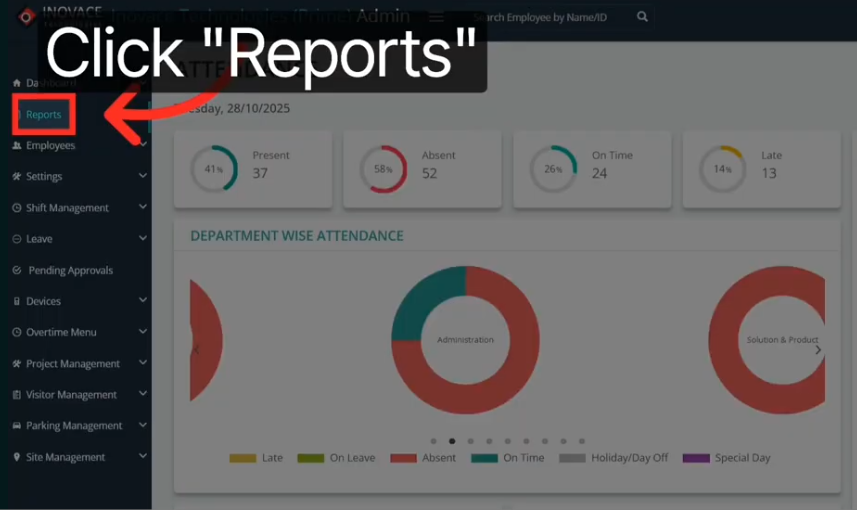
Look at the left-hand sidebar. You will see a tab labeled “Reports.” Click on it. This is where all your tracking data lives. From here, you can access the Mobile Punch Report, the Location Tracking Report, and more.
The Inovace Technologies tutorial shows this clearly. The Reports section is your analytics engine. Every field visit, every GPS punch, every captured image flows into this section for your review.
Screenshot tip: Show the sidebar with the “Reports” tab clearly highlighted.
Step 3: Set Your Date Filters
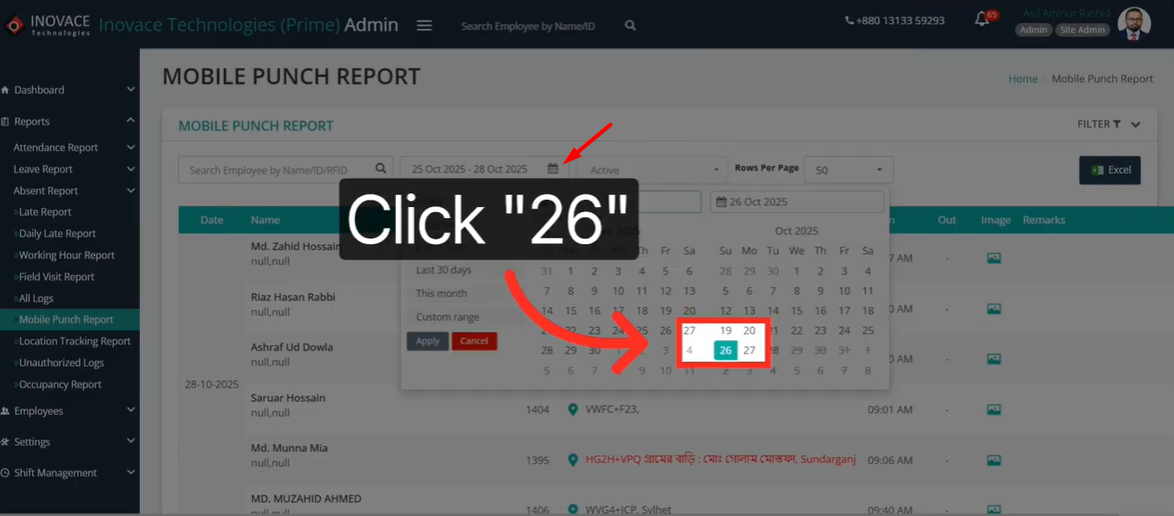
Before you can view useful data, you need to filter by date. Click the calendar icon at the top of the report. A date picker will appear. Select your desired date range. For example, you might choose October 26 to October 27.
This step is important. Sales team location reports without proper date filters show you too much data at once. Filtering keeps your view focused. You see exactly what you need for a specific review period.
Once you confirm your date range, the system will load the attendance and location records for that window. It only takes a second.
Step 4: Review Employee Data
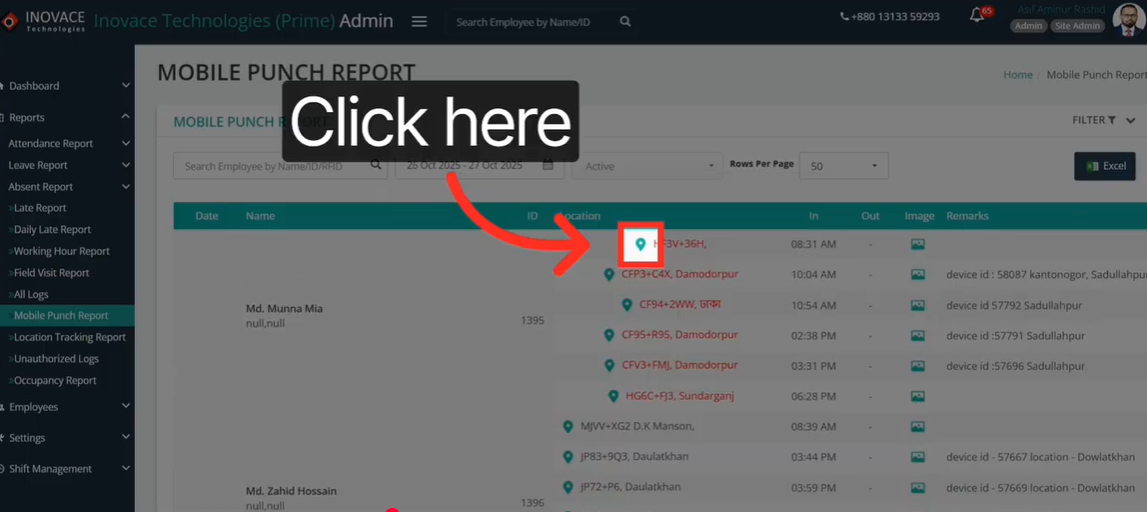
Now you see your data. The report table shows each employee with their login and logout times. This is where Tipsoi sales team tracking really shines.
Here is what you can do in this view:
- Check login and logout times for each field agent.
- Click the location pin icon to see the exact GPS coordinates of where they clocked in.
- Click the image icon to view the live photo captured at check-in. This confirms visual presence at the location.
- Open the Location Tracking Report for any employee to see their full movement history on a map.
The Location Tracking Report is a game changer. It shows a visual path of everywhere the employee traveled during the selected period. You see each stop, each route, and each timestamp. All on an interactive map.
Step 5: Export with One Click
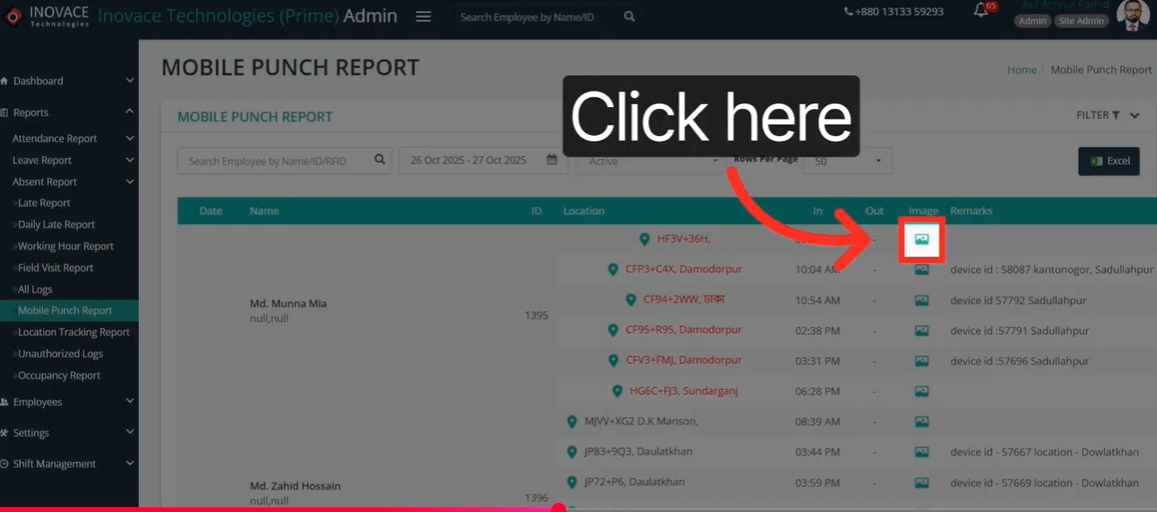
Need to share this data? Easy. Look for the green “Excel” button in the top right corner of the report table. Click it. Your data exports instantly into a spreadsheet format.
This is one of the most useful features for managers who use field visit tracking software for payroll, HR reviews, or performance evaluations. You do not need to copy data manually. One click and the file is ready to share.
Export reports weekly for payroll. Export them monthly for performance reviews. Or pull them anytime you need to present data to leadership. The process takes less than ten seconds.
Step 6: Toggle Fullscreen Map View
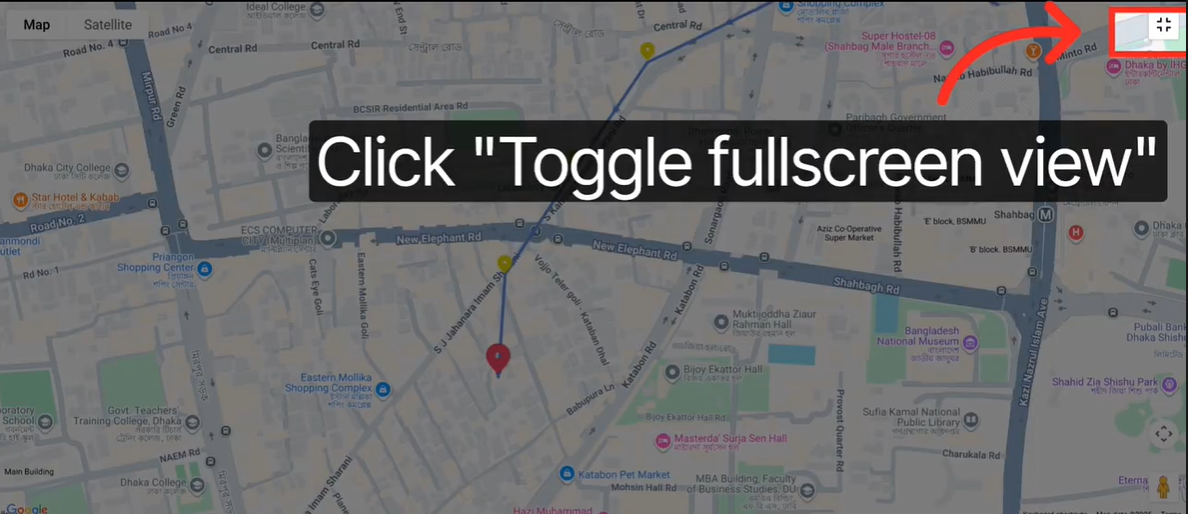
The map view is already useful at its default size. But for a deeper look at an employee’s daily route, go fullscreen. Find the “Toggle Fullscreen” icon on the map. Click it. The map expands to fill your entire screen.
Now you can trace the movement path with full detail. You see the roads taken, the time spent at each location, and the full scope of the day’s field activity. This is real-time employee monitoring turned into a visual story.
Use this view when reviewing a specific rep’s performance. Use it during team meetings to show movement patterns. It makes the data easy to understand for everyone in the room.
Why Tipsoi Stands Out
There are many tracking tools out there. But most of them are either too complex, too expensive, or just not built for sales teams in growing markets. Tipsoi is different.
It was built by Inovace Technologies with a clear focus on usability and accuracy. The platform is lightweight. It works smoothly on mobile devices. And it gives managers the exact data they need without overwhelming them with noise.
The combination of GPS punch, geo-fencing, photo verification, and route mapping makes it one of the most complete field visit tracking software solutions available. You get everything in one place. No integrations needed. No third-party tools required.
For businesses managing 10 or 100 field agents, the platform scales easily. Set it up once and it runs on autopilot. Your team gets a smooth mobile experience. You get clean, reliable data every single day. And as your team grows, the system grows with you without adding complexity to your workflow.
Who Should Use Tipsoi?
Tipsoi sales team tracking is built for any business with employees working in the field. If your team visits clients, distributors, retail outlets, or project sites, this platform is for you.
It works especially well for:
- Sales managers who need daily visibility into field activity.
- HR teams who want accurate attendance records without manual submission.
- Operations teams that need to verify field visits for compliance or billing.
- Business owners who want to protect their investment and ensure ROI on every field hour.
If you have ever wondered whether your team is where they are supposed to be, you already know you need this tool. And the best part? Your team barely notices the process. It runs in the background. It takes seconds to clock in. And it protects honest, hard-working employees just as much as it holds others accountable.
Final Thoughts
Tracking a field sales team does not have to be stressful. You do not need to call your reps every hour. You do not need to guess whether client visits happened. And you do not need to rely on spreadsheets that are already outdated by the time you open them.
Tipsoi sales team tracking gives you a live, accurate, and visual picture of your entire field operation. From the moment your rep clocks in to the last visit of the day, every detail is captured and ready for your review. The system works quietly in the background while your team focuses on selling.
Sales team location reports are just a few clicks away. Export them, analyze them, and use them to build a stronger, smarter field team. Share them with HR for payroll. Share them with leadership for performance reviews. The data does the heavy lifting so you do not have to.
Follow the steps in this guide, watch the walkthrough, and you will be up and running in no time. The setup is simple and the results are immediate.
Real-time employee monitoring changes the way you manage. It creates a culture of accountability without fear. Your team knows the system is fair. They know presence is recognized and rewarded. That builds trust in both directions.
Your sales team is out there working hard. Give yourself the tools to see it, measure it, and build on it. Stop managing in the dark. Start leading with data.
Ready to get started? Try Tipsoi today and take full control of your field operations.
FAQ
1. What is Tipsoi sales team tracking?
Tipsoi is a field management platform by Inovace Technologies. It tracks your sales team’s location, attendance, and field visits in real time using GPS and photo verification.
2. How do I generate sales team location reports in Tipsoi?
Log into the admin dashboard, click “Reports” in the sidebar, set your date filter, and view each employee’s GPS check-in data. You can export everything with one click.
3. What makes Tipsoi better than other field visit tracking software?
Tipsoi combines GPS punch, geo-fencing, live photo capture, and route mapping in one lightweight platform. No complex setup. No extra integrations needed.
4. How does real-time employee monitoring help sales managers?
It gives managers a live view of who is active, where they are, and how many visits they have completed. Decisions become faster and more data-driven.
5. Can I follow an Inovace Technologies tutorial to learn the platform?
Yes. The official tutorial video walks you through every step, from accessing the dashboard to toggling the fullscreen map view. It is beginner-friendly and takes under two minutes to watch.