

Managing a remote team sounds great on paper. No commute, flexible hours, access to global talent. But if you’ve ever led a distributed team, you already know the truth: productivity doesn’t just happen on its own.
Communication breaks down. People work in different time zones. Tasks fall through the cracks. And somehow, everyone seems busy, but the actual output is slower than expected.
Here’s the good news: remote team productivity is a skill you can build. With the right systems, tools, and habits in place, distributed teams can actually outperform their in-office counterparts, and the data backs this up.
According to ActivTrak, remote employees save an average of 72 minutes a day from eliminated commutes, with about 40% of that time redirected to productive work. That’s a real advantage, but only if you know how to use it.
In this guide, you’ll learn 15 proven strategies to boost remote team productivity, the best tools to support your team in 2026, how to measure what actually matters, and answers to the most common questions managers ask.
What Is Remote Team Productivity and Why Does It Matter?
Remote team productivity is the ability of a distributed team to consistently deliver quality output, collaborate effectively, and stay aligned, without being in the same physical location.
It’s not just about how many hours someone works. It’s about whether the right work is getting done, at the right quality, without burning people out.
Why it matters more than ever:
As of 2026, over 40% of U.S. jobs are remote or hybrid. Remote roles now make up more than 15% of all job listings, triple the share from 2020. And according to FlexJobs’ 2026 State of the Workplace Report, more than half of employees are willing to change careers just to work remotely.
Companies that get remote productivity right gain a major competitive advantage. Those that don’t end up with high turnover, missed deadlines, and a culture that slowly falls apart.
Remote vs. In-Office Productivity: What the Data Says
Here’s something that surprises a lot of managers: remote workers aren’t less productive. In many cases, they’re more productive.
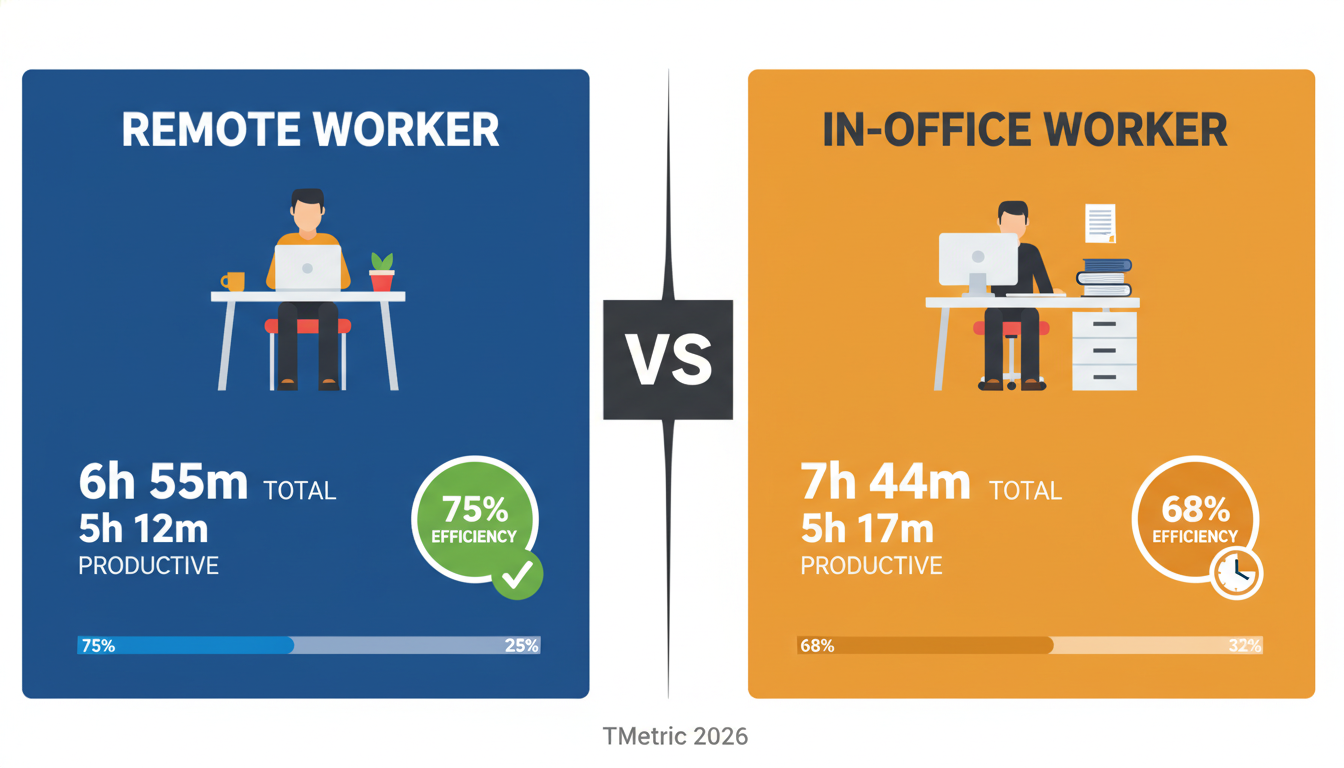
Research from TMetric shows remote workers clock 6 hours 55 minutes total, with 5 hours 12 minutes of that being genuinely productive time. In-office workers spend 7 hours 44 minutes at their desks, but only 5 hours 17 minutes is actually productive, with the rest eaten up by overhead, idle time, and meetings.
So if you’re measuring hours, the office looks better. If you’re measuring results, remote wins.
Gallup research adds another layer to this: the benefits of remote work vary heavily depending on the manager’s quality. Teams with strong, trust-based management consistently perform better, whether remote or in-office.
The Challenges That Kill Remote Team Productivity
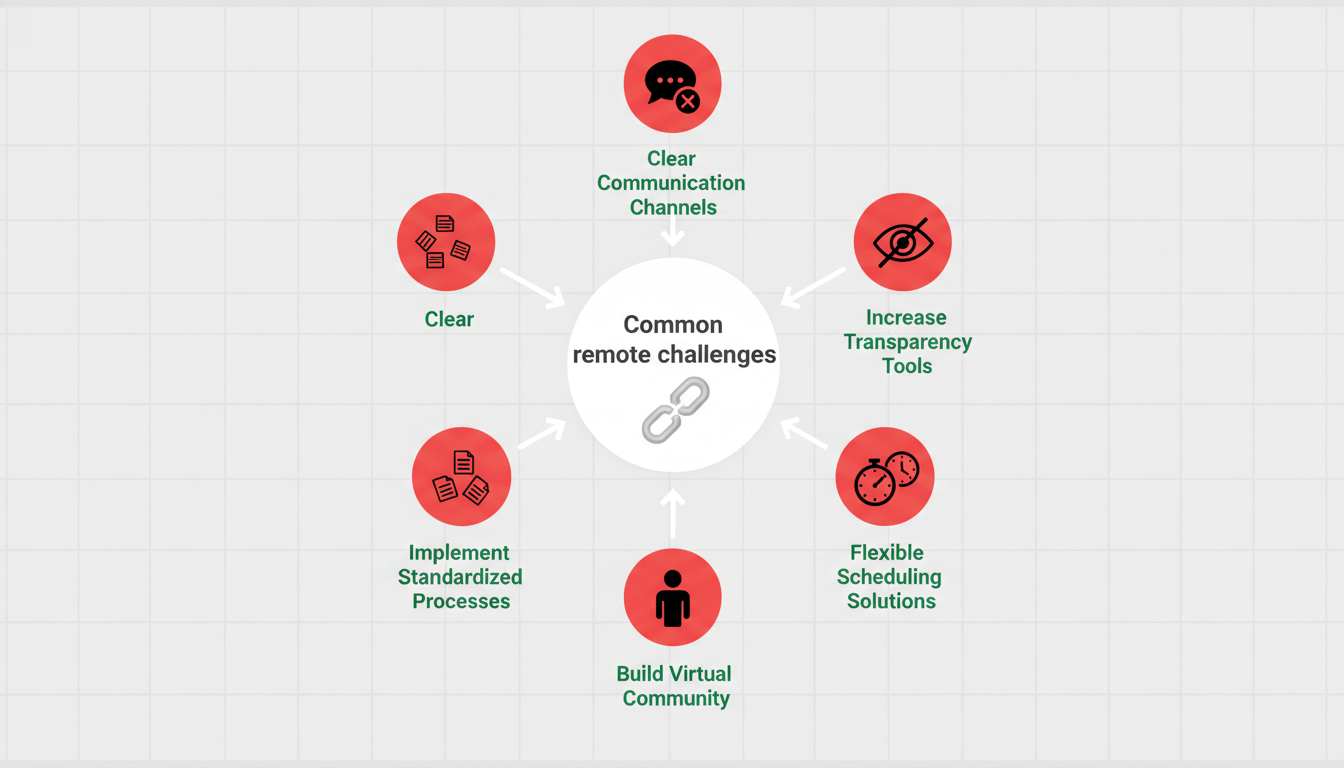
Even with all its advantages, remote work creates real obstacles:
Communication gaps, when people aren’t in the same room, small misunderstandings become big problems fast.
Lack of visibility, managers can’t see what’s happening, which sometimes leads to either micromanagement or a total loss of oversight.
Time zone friction: global teams often struggle to find overlapping hours that work for everyone.
Isolation and disengagement, remote workers can feel disconnected from the team, which Gallup links directly to lower productivity.
Without clear systems, without defined workflows and communication norms, even high-performing people lose direction.
The good news? All of these are solvable. Here’s how.
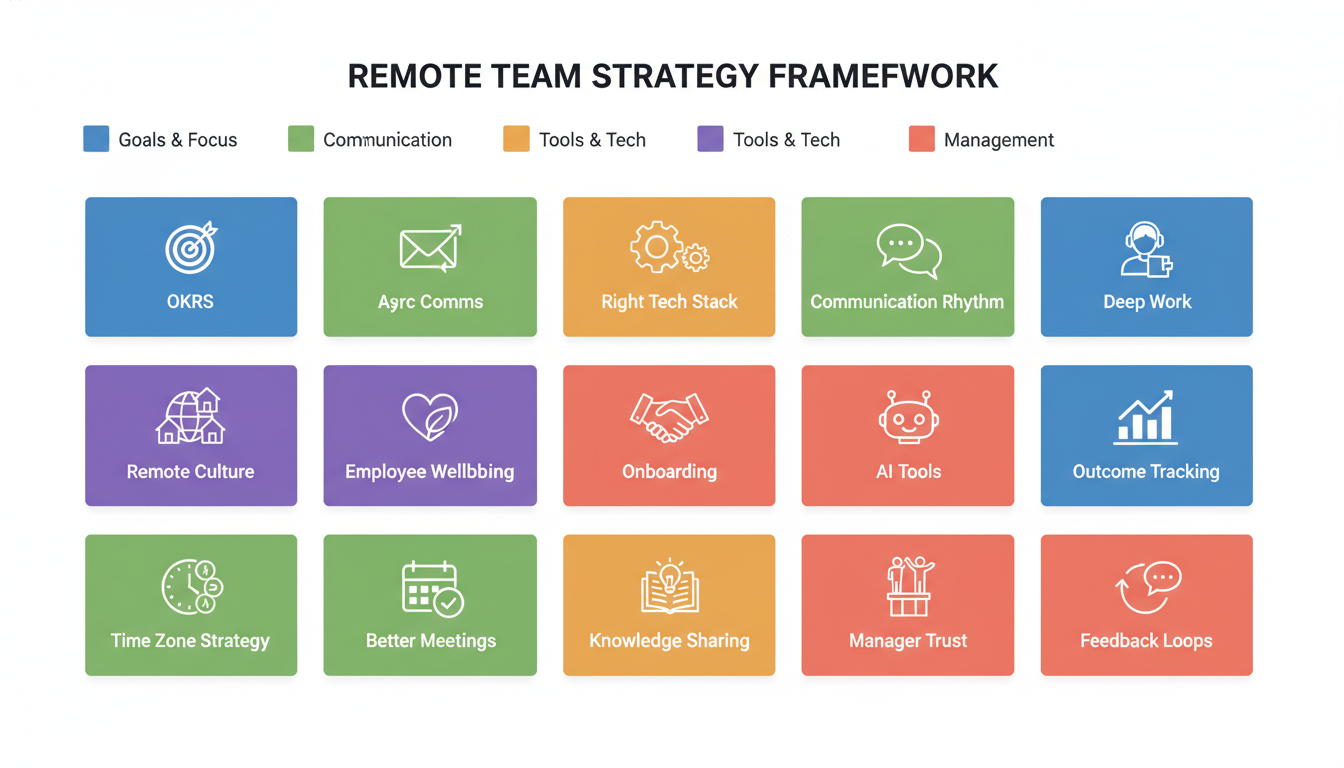
15 Proven Strategies to Boost Remote Team Productivity
1. Set Clear Goals with OKRs
The number one reason remote teams underperform isn’t tools or time zones, it’s unclear goals.
When people don’t know exactly what success looks like, they default to staying busy. That’s the enemy of real productivity.
Use OKRs (Objectives and Key Results) to set clear, measurable goals at the company, team, and individual level. Each objective should have 2–3 key results that tell you whether it’s been achieved, no guesswork, no vague targets.
Review OKRs weekly in brief check-ins and formally every quarter. When everyone knows what they’re working toward and why it matters, remote teams become incredibly focused.
2. Master Asynchronous Communication
Not every conversation needs to happen in real time. In fact, one of the biggest productivity killers in remote work is the expectation of instant replies.
Asynchronous communication means sharing information in a way that doesn’t require everyone to be available at the same moment, such as a recorded video, a detailed Slack message, a documented decision in Notion.
Companies that adopt an async-first approach help remote teams waste 45% less time in meetings and boost individual output by 20% through flexible scheduling, according to 2026 data from Desklog.
Tools like Loom (async video), Notion (documentation), and Slack (threaded messaging) make this possible. The key is establishing norms: what goes in a thread, what gets a recorded video, and what actually needs a live call.
3. Choose the Right Tech Stack
You can’t run a high-performing remote team on email and spreadsheets. The right technology is the foundation of everything.
For most remote teams, the core stack looks like this:
- Project management: Asana, Monday.com, or Trello to track tasks, deadlines, and ownership
- Communication: Slack or Microsoft Teams for daily messaging
- Video calls: Zoom or Google Meet for live discussions
- Documentation: Notion, Confluence, or Google Workspace for shared knowledge
- Time and attendance: A reliable remote attendance tracking system to monitor working hours without micromanaging
The goal is one source of truth for every type of work, not ten different places where information lives.
4. Establish a Communication Rhythm
Remote teams don’t need more meetings. They need the right meetings, at the right cadence.
A simple rhythm that works for most teams:
- Daily async update, each person posts a 3-bullet status: what they did, what they’re doing, any blockers
- Weekly team standup (30 minutes max), align on priorities for the week
- Bi-weekly 1-on-1s, manager and team member connect on progress, feedback, and wellbeing
- Monthly team retrospective, what’s working, what isn’t, what to change
When everyone knows when they’ll be heard and what’s expected, the anxiety of “am I out of the loop?” disappears.
5. Protect Deep Work Time
Notifications are the silent killer of remote productivity. When someone gets pulled out of focused work every 15 minutes, their output drops dramatically, and so does their energy.
Help your team protect deep work time by:
- Blocking 2–4 hour focus windows on their calendars each day
- Turning off non-urgent notifications during those blocks
- Setting clear availability signals (green/yellow/red status in Slack)
- Letting the team know when they’re unavailable and for how long
Deep work is where the best output gets created. Protect it like it’s a meeting with your most important client.
6. Build a Strong Remote Culture
Culture doesn’t require a physical office. But it does require intentional effort.
Remote culture is built through small, consistent actions:
- Celebrate wins publicly in a shared channel
- Start meetings with a personal check-in before diving into work
- Create a non-work channel where people can share memes, wins, and random thoughts
- Run virtual team events, even a casual 30-minute coffee chat, can strengthen relationships
According to Gallup, company culture has a stronger influence on job satisfaction than work location. Remote employees don’t need ping-pong tables. They need to feel like they belong to something.
7. Prioritize Employee Wellbeing
Burnout is one of the biggest threats to remote team productivity, and it’s easy to miss because you can’t see it happening.
Remote workers often struggle to disconnect. When your home is your office, the workday never really ends. Over time, this leads to exhaustion, lower quality work, and eventually, turnover.
To prevent it:
- Respect working hours and don’t send messages outside them unless urgent
- Encourage real lunch breaks and actual days off
- Check in on how people are doing, not just on their tasks
- Watch for signs of disengagement, isolation, or overwork
Only 33% of global employees feel their wellbeing is “thriving,” according to 2026 research from TeamOut. That number is even lower for remote workers who feel isolated. Wellbeing isn’t a nice-to-have; it’s a productivity strategy.
8. Onboard Remote Employees Effectively
The first 90 days make or break a remote hire. Without a structured onboarding plan, new employees take 8–12 months to reach the productivity levels of their experienced colleagues.
A strong remote onboarding process includes:
- A 30-60-90 day plan with clear goals for each phase
- A dedicated onboarding buddy who’s available for questions
- Access to all tools, documentation, and systems on Day 1
- Regular check-ins with their manager in the first few weeks
- A virtual “meet the team” session in the first week
Don’t just hand them a laptop and a Slack invite. Build a structured experience that sets them up to succeed from the start.
9. Use AI Tools to Reduce Friction
AI is no longer optional for remote teams; it’s a genuine productivity multiplier.
In 2026, the best remote teams are using AI to:
- Summarize meeting recordings automatically (Otter.ai, Zoom AI Companion)
- Draft routine communications and updates
- Auto-schedule meetings across time zones
- Generate first drafts of documents and reports
- Flag overdue tasks and potential bottlenecks in project management tools
AI tools don’t replace human judgment; they handle the repetitive, time-consuming parts so your team can focus on work that actually requires their expertise.
10. Track Remote Employees the Right Way
Tracking productivity in a remote team doesn’t mean spying on people. It means having visibility into whether work is moving forward, without micromanagement.
The best approach is outcome-based tracking: instead of monitoring screen activity, you monitor task completion, project velocity, and goal progress.
Tools that help you track remote employees effectively include Hubstaff, Toggl Track, and ActivTrak, all of which give you insight into where time is going without invading your team’s privacy.
A word of caution: 97% of remote companies use some form of monitoring software, but 7 in 10 report that employees have quit because they felt over-monitored. The goal is transparency, not surveillance.
11. Handle Time Zone Differences Strategically
Time zone friction is real, but it’s manageable with the right approach.
The “golden hours” rule: find the 2–4 hours where your team’s time zones overlap, and treat those hours as sacred for live collaboration. Everything else goes async.
A few other time zone strategies that work:
- Rotate meeting times so the same person isn’t always stuck with an inconvenient slot
- Record all live meetings for people who couldn’t attend in real time
- Build a shared team calendar that shows everyone’s working hours at a glance
- Default to async for everything that doesn’t require real-time discussion
12. Run Effective Remote Meetings
Remote meetings have a bad reputation, and often for good reason. They run long, they lack focus, and half the participants are mentally checked out.
Fix it with a simple structure:
- No agenda, no meeting, every meeting gets a written agenda shared at least 24 hours before
- Time cap, 25 or 50 minutes maximum (use the calendar trick of ending before the hour)
- Document outcomes, every meeting ends with a summary of decisions and action items sent to the whole team
- Camera optional, forcing cameras leads to “Zoom fatigue” and resentment
If something can be handled in a Slack thread or a Loom video, it doesn’t need to be a meeting.
13. Encourage Knowledge Sharing
In a remote team, knowledge silos are deadly. When important information lives in one person’s head, and they’re unavailable, the whole team grinds to a halt.
Build a culture of documentation:
- Every project gets a shared wiki page with decisions, resources, and context
- Weekly “knowledge share” sessions where team members present what they’ve learned
- A standard template for documenting processes, so nothing gets lost when someone leaves
The goal is to make the team’s collective knowledge accessible to everyone, at any time, from anywhere.
14. Build Manager Trust, Not Micromanagement
Gallup is clear on this: high-quality management is the single most important factor in remote team performance. Better than tools, better than perks, better than office setup.
Trust means:
- Measuring what people produce, not how many hours they sit online
- Giving people autonomy over how they structure their workday
- Having regular conversations about growth and challenges, not just status updates
- Giving feedback that’s specific, timely, and constructive
When managers build trust, remote employees feel empowered. When they micromanage, productivity drops and turnover rises.
15. Iterate With Feedback Loops
The best remote teams don’t assume they’ve got everything figured out. They continuously ask: what’s working, what isn’t, and what should we change?
Build feedback loops into your team’s rhythm:
- Monthly anonymous pulse surveys to gauge team morale and satisfaction
- Quarterly retrospectives to review systems, tools, and processes
- Regular 1-on-1s where honest feedback is safe and encouraged
When your team knows their input actually leads to change, engagement goes up. And engaged teams are consistently more productive.
Best Tools for Remote Team Productivity in 2026
Here’s a quick overview of the tools that make the biggest difference:
Communication, Slack, and Microsoft Teams remain the standard for remote team messaging. Both offer threaded conversations, integrations with hundreds of apps, and async-friendly features.
Project Management Asana, Monday.com, and Trello are the most widely used. Asana works best for complex projects with many dependencies; Trello is simpler and great for smaller teams; Monday.com sits in the middle with strong reporting features.
Video and Async Video Zoom are still the leaders for live meetings. Loom is the go-to for async video. Record a quick walkthrough instead of scheduling a call.
Documentation Notion has become the default for remote team wikis and documentation. Confluence is popular in larger engineering teams. Google Workspace works well for teams already in the Google ecosystem.
HR and People Management: Managing a distributed workforce also means managing HR processes across locations. A modern cloud HR system helps you handle everything from leave management to performance reviews in one place, no matter where your team is based.
Time Tracking Hubstaff, Toggl, and Clockify are the most popular options. All three offer lightweight, non-intrusive tracking that focuses on outcomes rather than surveillance.
How to Measure Remote Team Productivity
Tracking productivity for remote teams requires a mindset shift. Hours worked is a poor proxy for actual output. Here’s what to measure instead.
Outcome-Based vs. Activity-Based Metrics
Activity-based metrics (time online, messages sent, keystrokes) tell you someone is busy. Outcome-based metrics tell you whether that busyness is creating value.
If you’re still measuring how many hours someone sits at their computer, you’re measuring the wrong thing. Shift to measuring what they deliver.
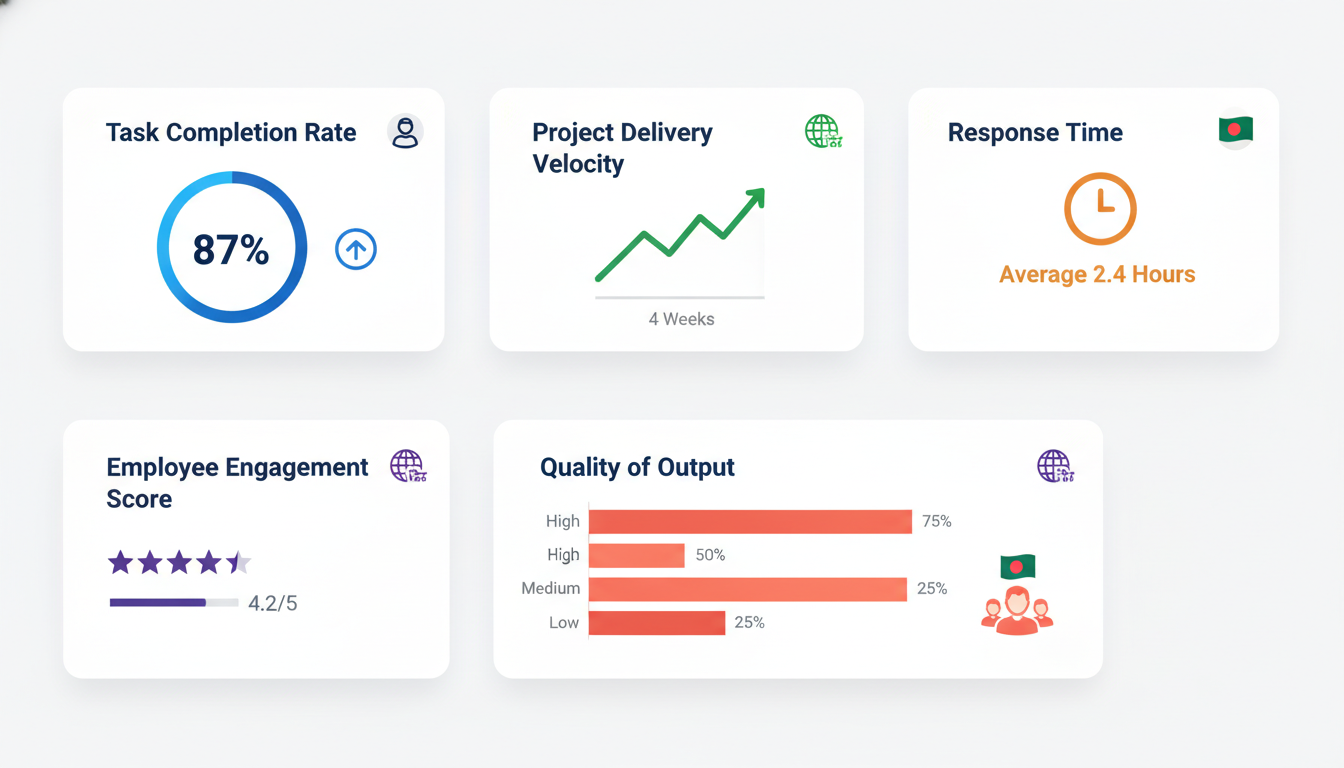
5 KPIs Every Remote Manager Should Track
Task completion rate: What percentage of assigned tasks are completed on time? This is your baseline for individual and team reliability.
Project delivery velocity: How long does it take your team to move a project from start to finish? Track this over time to spot slowdowns.
Response time, not to enforce fast replies, but to identify patterns. If someone consistently takes 24+ hours to respond, something may be wrong.
Employee engagement score: run a monthly pulse survey. Engagement is one of the strongest predictors of future productivity. Gallup data shows teams with strong engagement achieve up to 21% higher profitability.
Quality of output, this one’s harder to quantify but crucial. Set quality standards for deliverables and review them consistently.
Tools for Tracking Remote Productivity
ActivTrak gives managers visibility into how teams spend their time without invasive monitoring. Hubstaff offers time tracking with optional GPS and activity levels. Toggl Track is lightweight and great for teams that want simple, self-reported time tracking.
FAQ: Common Questions About Remote Team Productivity
How do you improve productivity in a remote team?
Start with clear goals. Set OKRs at the team and individual level, establish a consistent communication rhythm, protect deep work time, and use the right tools for the job. Productivity improves when people know exactly what’s expected of them and have the systems to deliver it.
What are the biggest challenges to remote team productivity?
The most common challenges are communication gaps, unclear goals, time zone friction, lack of visibility into progress, and isolation leading to disengagement. Most of these come back to systems; teams that build strong processes early avoid most of these problems.
Are remote workers more or less productive than office workers?
Based on 2026 data, remote workers tend to deliver similar or better output in less time than office workers, even though they log fewer total hours. The key variable is management quality and the clarity of goals, not the location itself.
What tools help remote teams stay productive?
The essentials are: a project management tool (Asana, Monday.com), a communication platform (Slack, Teams), a video tool (Zoom, Loom), a documentation system (Notion), and a way to track time and attendance without micromanaging.
How do managers build trust with remote employees?
By measuring outcomes instead of activity, giving team members autonomy over their schedule, providing regular and specific feedback, and showing genuine interest in their well-being, not just their output.
Final Thoughts
Remote team productivity isn’t magic, and it isn’t luck. It’s the result of clear goals, consistent communication, the right tools, and a management style built on trust rather than surveillance.
The teams that perform best aren’t the ones with the most Slack channels or the longest work hours. They’re the ones with strong systems, clear expectations, and managers who actually care about the people on their team.
Start with two or three strategies from this guide. Build them into habits. Then layer in more over time. You don’t need to transform everything overnight; you just need to start.
If you’re managing a distributed workforce and want to build the right infrastructure around it, take a look at how modern tools can help you track remote employees, manage attendance with a remote attendance tracking system, and streamline people operations with a cloud HR system, all from one place, no matter where your team is.