

Managing employee attendance accurately creates daily headaches for businesses. Paper timesheets get lost, buddy punching costs companies thousands, and manual data entry wastes hours each week. Biometric time tracking systems solve these problems by using unique physical characteristics like fingerprints or facial features to verify employee identity and record work hours automatically.
This guide walks you through implementing a biometric attendance system from initial planning to daily operation. You’ll learn what these systems do, why companies choose them, and exactly how to set one up in your workplace.
What Is Biometric Time Tracking for Employees?
Biometric time tracking uses measurable physical traits to identify employees when they clock in and out of work. Instead of swiping a card or entering a PIN, workers scan a fingerprint, look at a camera, or place their hand on a reader. The system matches this unique identifier against stored employee data and records the time automatically.
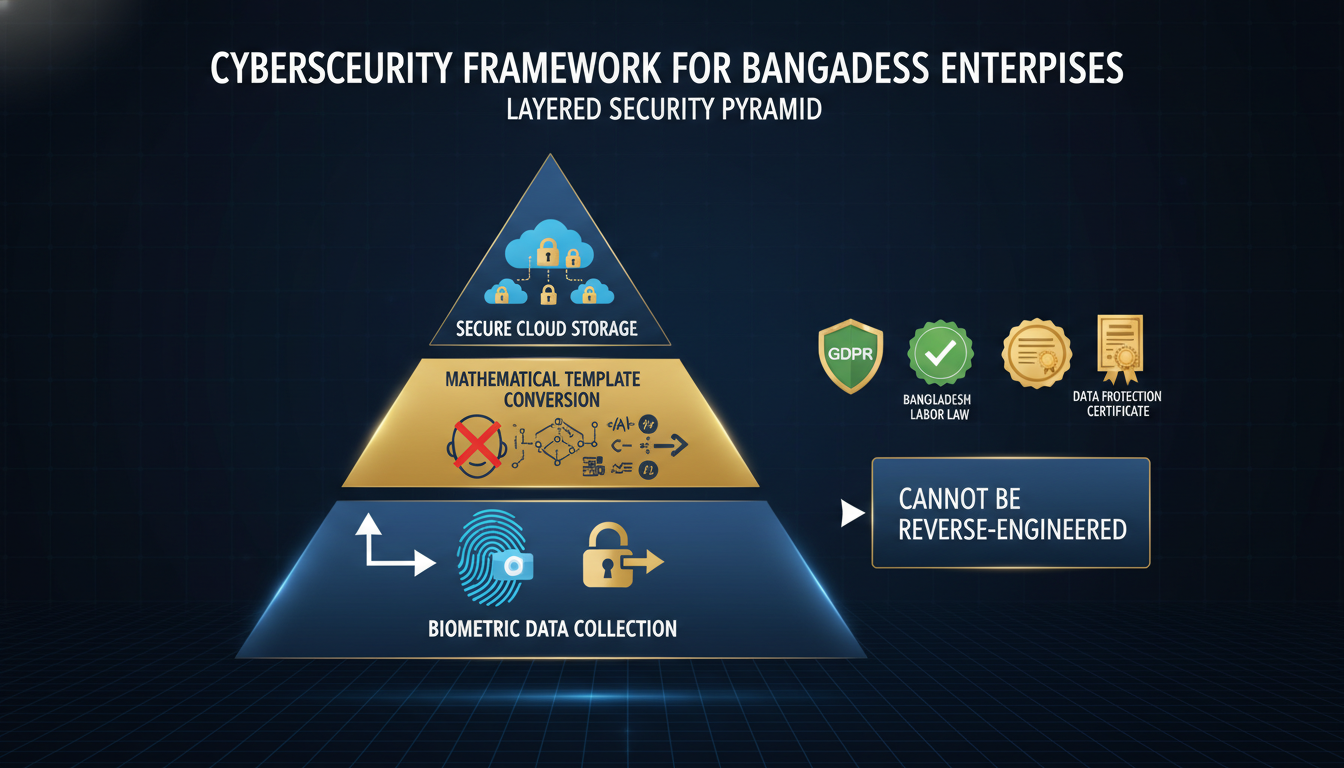
The most common biometric methods include fingerprint scanning, facial recognition, iris scanning, hand geometry, and voice recognition. These systems connect to software that tracks hours worked, calculates overtime, and generates reports. The biometric data gets converted into a mathematical template that can’t be reverse-engineered into the original image.
According to the American Payroll Association, organizations using automated time tracking systems reduce payroll processing time by up to 80% compared to manual methods.
Why Businesses Use Biometric Attendance Systems?
Companies implement biometric time tracking to solve specific operational and financial problems. The return on investment typically comes from several areas working together.
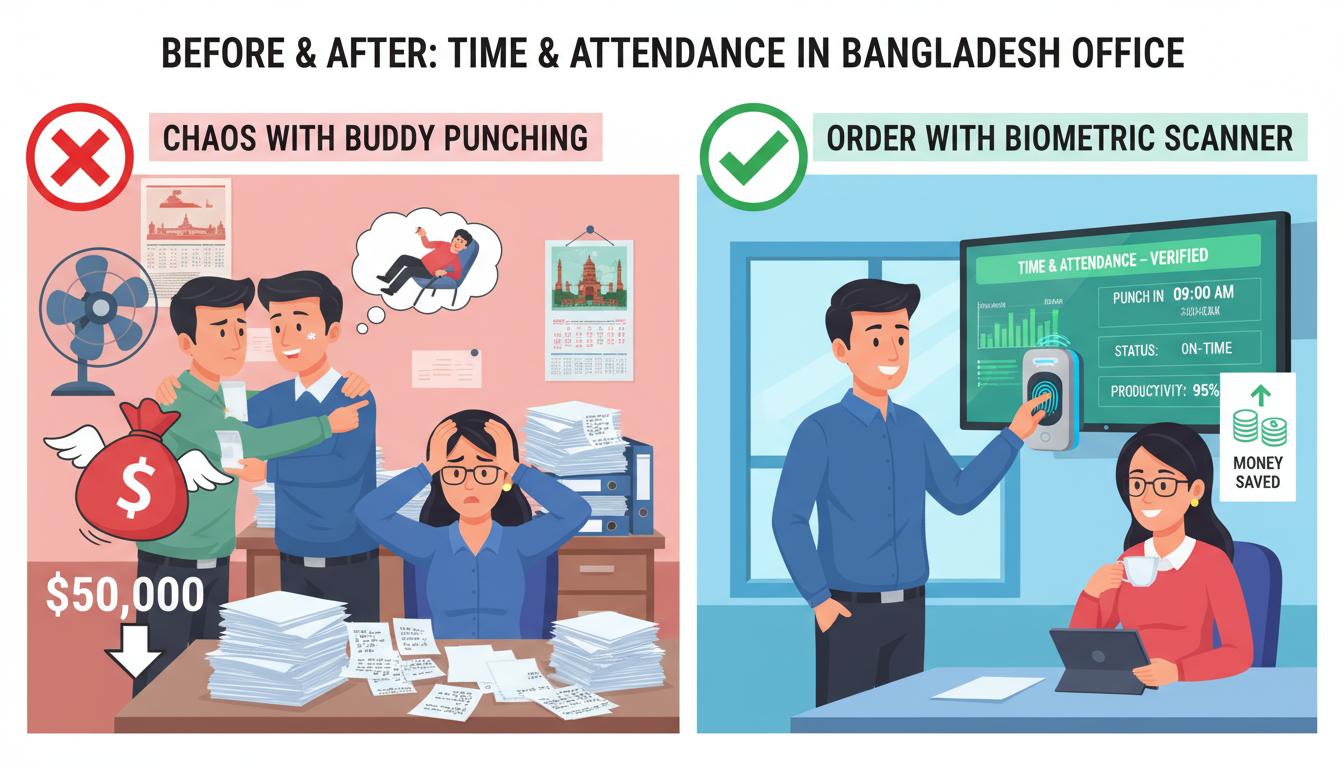
Eliminating buddy punching is the primary driver for many organizations. The ADP Research Institute found that approximately 19% of employees admit to clocking in or out for colleagues. For a 100-person company where this happens just once per week, the annual cost can exceed $50,000 in paid time for work not performed.
Reducing administrative burden saves hundreds of hours annually. HR staff no longer manually review timesheets, fix errors, or chase down missing punch cards. The system captures clean data automatically that feeds directly into payroll software.
Improving accuracy prevents both overpayment and underpayment disputes. Employees can’t forget to clock in or accidentally round their hours. The system creates a precise, tamper-proof record that protects both the company and workers.
Meeting compliance requirements matters especially in industries with strict labor regulations. Healthcare facilities, government contractors, and companies in states with specific timekeeping laws need detailed, accurate records.
Core Features of a Biometric Time and Attendance System Businesses
Understanding what makes an effective biometric time tracking system helps you evaluate vendors and avoid missing critical capabilities.

Multi-modal biometric options give flexibility for different work environments. While fingerprint scanning works well in offices, construction sites might need facial recognition since workers wear gloves. Quality systems support multiple biometric types or allow you to mix methods across locations.
Cloud-based data management centralizes information from multiple sites in real time. Managers can view who’s on-site across all locations from any device. Updates to employee records, shift schedules, or pay rules sync automatically to all devices.
Robust integration capabilities connect your time tracking to existing business systems. The best solutions offer pre-built connectors for major payroll providers like ADP, Paychex, and QuickBooks.
Flexible scheduling and rules engines handle complex workforce situations. The system should accommodate multiple shifts, overtime rules, break requirements, and location-specific regulations.
Mobile and remote capabilities matter increasingly as work becomes less location-dependent. Some systems offer smartphone apps with photo verification for remote clock-ins. GPS stamping confirms the employee’s location.
Comprehensive reporting and analytics transform raw attendance data into actionable insights. Standard reports show daily attendance, late arrivals, overtime trends, and absenteeism patterns.
How Biometric Time Tracking Transforms Real Workplaces?
A 500-employee distribution center was losing approximately $150,000 annually to time theft and payroll errors. After implementing fingerprint scanners at all entry points, buddy punching stopped immediately. Late arrivals dropped by 43% within two months. The system paid for itself in under four months.
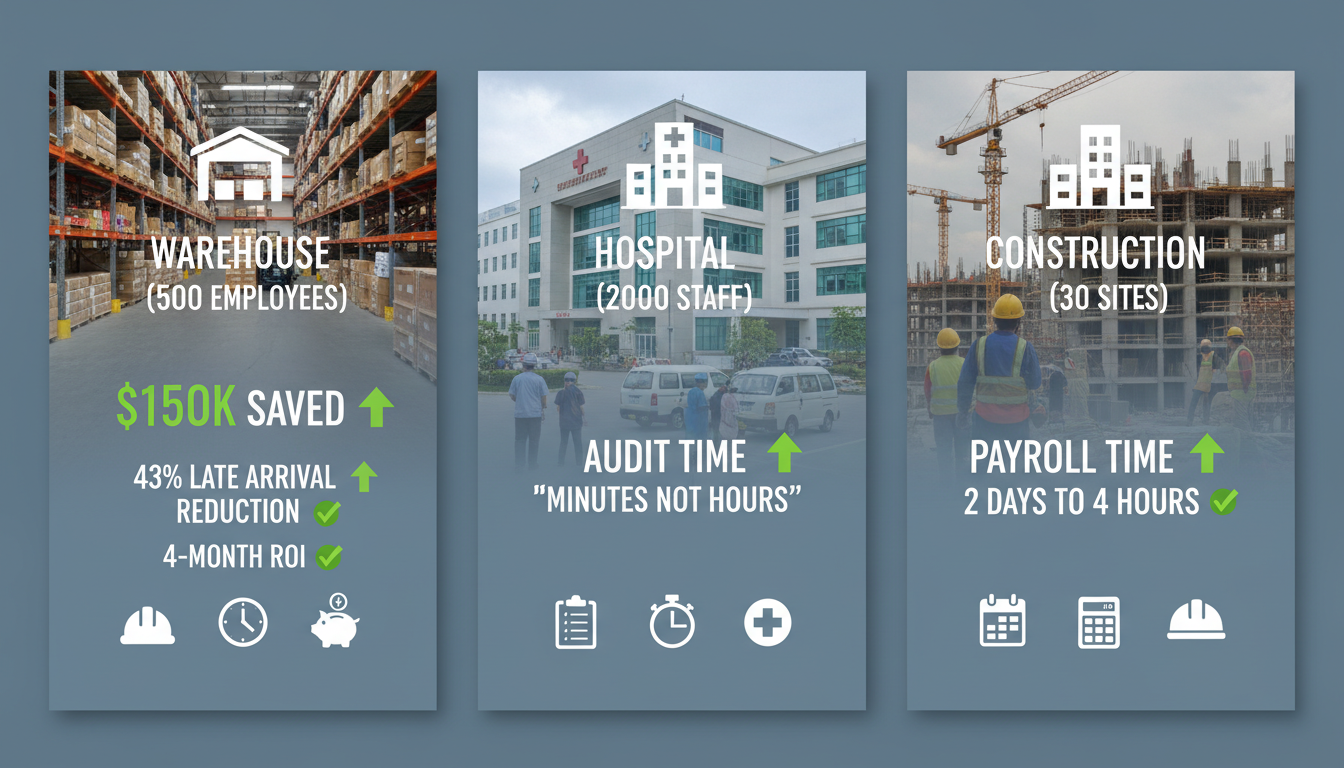
A hospital network with 2,000 staff across six facilities struggled with staffing verification. They installed facial recognition systems that also controlled access to medication storage areas. Now they can generate audit reports in minutes showing exactly who was on-site, when they arrived, and which restricted areas they accessed.
A construction company with crews at 30+ job sites used paper timesheets that foremen submitted weekly. They deployed ruggedized facial recognition tablets at each site with cellular connectivity. Workers clock in at the job location each morning, and the GPS stamp confirms they’re on-site. Payroll processing time dropped from two days to four hours.
Simplifying Employee Time Tracking With Advanced Biometric Systems
Modern biometric systems remove friction from the daily time tracking process for both employees and managers.
The employee experience becomes almost invisible. Workers approach the reader, complete their biometric scan in 1-2 seconds, and receive immediate confirmation. No cards to remember, passwords to reset, or forms to complete.
Manager workflows shift from administrative to strategic. Instead of collecting timesheets, supervisors receive alerts when someone misses a shift or when overtime exceeds thresholds. They approve exceptions with a few clicks rather than signing stacks of paper.
Payroll processing becomes largely automated. At the end of each pay period, verified hours export directly to your payroll system with all overtime, shift differentials, and special pay codes already calculated.
Planning and Setup for Biometric Time Tracking
Proper planning prevents expensive mistakes and ensures smooth implementation.
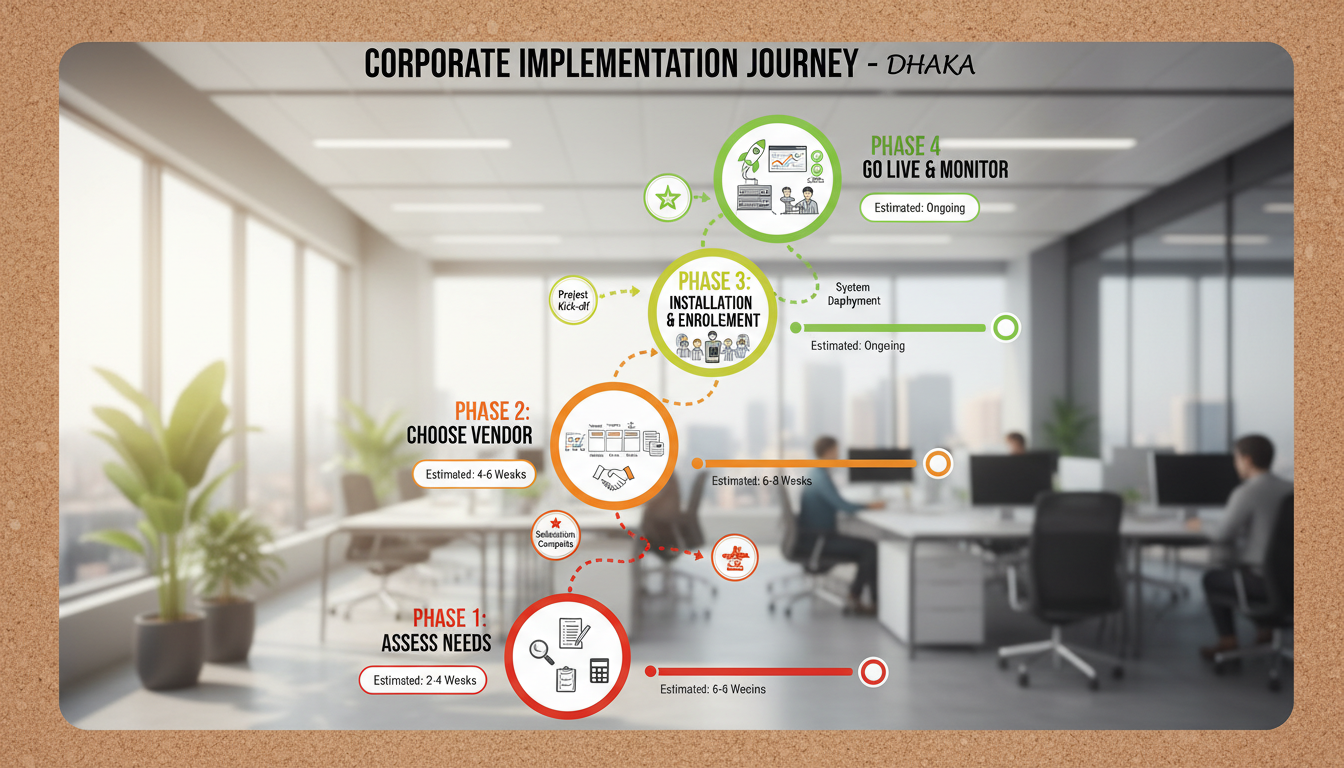
Assess Needs
Start by documenting your current time tracking problems and goals. Count how many employees need to clock in at each location. Note whether they work at fixed locations or move between sites.
Calculate your current costs for time tracking including staff hours spent on timekeeping, payroll errors, estimated time theft, and any fines from compliance issues. This baseline lets you measure ROI after implementation.
Review legal requirements for your industry and locations. Some jurisdictions require employee consent for biometric data collection. Healthcare and government contractors face additional regulations.
Choose a Vendor
Request proposals from at least three vendors. During evaluation, prioritize vendors who offer free trials or demos with your actual employees testing the system.
Check references from companies similar to yours in size and industry. Ask specific questions about implementation challenges, ongoing support quality, and any hidden costs they discovered.
Compare total cost of ownership including hardware, software licenses, installation, training, ongoing support, and update fees. Some vendors charge per employee monthly while others charge per device.
Hardware / Software Installation
Plan device placement carefully. Readers should be near entry points but positioned where employees can queue without blocking normal traffic. Consider lighting for facial recognition systems and weather protection for outdoor installations.
Network infrastructure needs attention before devices arrive. Biometric readers need power and connectivity, whether ethernet, WiFi, or cellular. Test network reliability at each planned device location.
Software configuration happens in parallel. Set up your employee database, department structure, shift schedules, and pay rules before going live. Import existing employee data from your HRIS or payroll system.
Employee Enrollment and Training for Biometric Time Tracking
Getting employees comfortable with the new system prevents adoption problems and privacy concerns.
Enroll Employees
Schedule enrollment sessions well before the go-live date. Rushing through enrollment creates frustrated employees and poor quality biometric templates that cause recognition failures later.
Collect multiple samples from each employee. Fingerprint systems typically need 2-3 scans of the same finger plus a backup finger in case of injury. This redundancy prevents lockouts and improves matching accuracy.
Test each enrollment immediately. Have employees scan several times to verify the system recognizes them consistently. Fix any problems while IT staff and the vendor are available.
Educate Staff
Explain clearly what biometric data the system collects and how it’s used. Address privacy concerns directly. Emphasize that the actual fingerprint image isn’t stored but only a mathematical template that can’t recreate the original print.
Show employees how to use the system through hands-on practice. Clock in, clock out, clock in from lunch. Let them make mistakes during training rather than during their actual shift.
Distribute quick reference guides showing the clock-in process in pictures and simple steps. Post these guides near each biometric reader.
Integration and Daily Operation of Biometric Time Tracking Systems
Making biometric time tracking work smoothly requires connecting it properly to your other systems and establishing clear processes.
Integrate Systems
Connect your biometric system to payroll software first since this integration delivers the biggest time savings. Most modern systems offer pre-built connectors for major payroll providers that map employee IDs, department codes, and pay rules automatically.
HR system integration keeps employee data synchronized. When someone gets hired, promoted, transferred, or terminated, those changes should flow to the time tracking system automatically.
Scheduling software integration closes the loop by letting the biometric system validate punches against expected shifts. The system can alert supervisors immediately when someone clocks in for a shift they’re not scheduled for.
Clock-In / Out
Establish clear policies about when and where employees should clock in. Do they scan when entering the building or when reaching their work station? What about breaks?
Set tolerance windows to reduce unnecessary exceptions. Most systems let you define grace periods, such as allowing employees to clock in 5 minutes early or 5 minutes late without triggering alerts.
Create escalation procedures for failed scans. If someone tries three times and the system won’t recognize them, what happens? Typical approaches include supervisor override, backup PIN entry, or temporary manual time entry.
Data Sync
Configure automatic synchronization schedules between your biometric system and other platforms. Most organizations sync to payroll systems at least daily, often multiple times per day for real-time accuracy.
Establish data validation rules that flag obvious errors before they reach payroll. Check for impossible situations like someone clocking in at two locations simultaneously or shift lengths exceeding 24 hours.
Set up automated backups of all time tracking data. Even cloud-based systems should export data regularly to your own storage.
Monitoring and Maintenance of Biometric Attendance Systems
Ongoing attention keeps your biometric system accurate and reliable over time.
Monitor & Report
Review key performance indicators weekly. Track metrics like average time to clock in, percentage of failed scans, backup method usage, and exception rates.
Analyze attendance patterns for operational insights. Generate monthly reports showing overtime trends by department, peak absence days, late arrival patterns, and scheduling gaps.
Audit system access and changes quarterly. Review who has administrative access to the biometric system and whether that access is still appropriate.
Regular Maintenance
Clean biometric readers on a schedule appropriate to your environment. Dusty warehouses might need daily cleaning while office environments work fine with weekly maintenance.
Update firmware and software according to vendor recommendations. Security patches need prompt installation, but schedule major version updates during low-activity periods.
Inspect hardware regularly for physical damage. Cracked screens, loose mounting, exposed wiring, or worn surfaces can cause intermittent failures.
Contingency Plan
Document procedures for common failure scenarios. What happens during power outages, internet failures, or complete hardware failure? Most organizations default to supervisor-attested paper timesheets during major outages.
Stock spare hardware for critical locations. If you have 50 devices deployed, keep at least one spare of each model.
Maintain vendor support contracts that guarantee response times matching your uptime requirements.
Key Considerations When Implementing Biometric Time Tracking
Several critical factors can make or break your biometric time tracking implementation.
Data Privacy
Understand biometric data laws in every jurisdiction where you operate. Illinois, Texas, and Washington have specific biometric privacy laws requiring informed written consent before collecting data.
Draft clear privacy policies explaining what biometric data you collect, how you use it, how long you retain it, and whether you share it with third parties. Have employees sign acknowledgment forms before enrollment.
Choose vendors who encrypt biometric templates both in storage and in transit. The mathematical templates stored in the system should use one-way hashing that prevents reconstruction of the original biometric data.
Accuracy
Test accuracy with your actual employee population before full deployment. Vendor claims of 99.9% accuracy might not reflect your reality. Employees working with chemicals might have worn fingerprints.
Plan for false rejection scenarios where the system fails to recognize legitimate employees. This frustrates workers and slows down clock-in lines during shift changes.
Environmental factors affect different biometric technologies differently. Bright sunlight degrades facial recognition. Dirty fingers reduce fingerprint accuracy.
Scalability
Choose systems that grow with your business without requiring replacement. Cloud-based platforms typically scale more easily than on-premise servers.
Consider future needs beyond just more employees. Will you expand internationally and need multi-language support? Might you acquire companies and need to merge employee databases?
Evaluate pricing models at different scales. Per-employee-per-month pricing works well initially but can become expensive as you grow.
Is Biometric Time Tracking Right for Your Business?
Different organization types benefit from biometric systems in different ways.
Small Businesses
Companies with 10-50 employees often question whether biometric systems make financial sense. The return on investment depends more on your specific problems than company size. A 25-person company losing $20,000 annually to time theft justifies the investment.
Budget matters significantly at smaller scales. Cloud-based systems with monthly subscriptions offer lower upfront costs than purchasing hardware outright.
Medium Companies
Organizations with 50-500 employees typically see the clearest ROI from biometric time tracking. You’re large enough that time theft and administrative burden create real costs but small enough that implementation remains manageable.
Multiple locations or shifts strengthen the business case. When managers can’t personally observe every employee’s arrival and departure, biometric verification becomes more valuable.
Large Enterprises
Companies with 500+ employees usually implement biometric time tracking as part of broader workforce management initiatives. The system integrates with scheduling, labor forecasting, absence management, and compliance reporting.
Customization and flexibility become essential at enterprise scale. Different business units might need different rules, schedules, and workflows.
Conclusion
Biometric time tracking systems transform attendance management from a manual, error-prone process into an automated solution that saves time and money. By eliminating buddy punching, reducing administrative work, and ensuring accurate records, these systems typically pay for themselves within months.
Success requires three key elements: choosing the right technology for your environment, properly training and enrolling employees, and integrating seamlessly with your payroll systems. Address privacy concerns transparently by explaining what data you collect and how you protect it.
Calculate what your current timekeeping problems cost in lost productivity and time theft. If that number exceeds the system investment, biometric time tracking is worth implementing. The technology works the question is whether you’re ready to upgrade from manual processes to automated accuracy and efficiency.
Frequently Asked Questions
How much does a biometric time tracking system cost?
iometric systems typically cost $50-200 per employee for initial setup including hardware, software, and implementation. Monthly subscription fees range from $2-10 per employee depending on features. Cloud-based systems generally cost less upfront than on-premise installations.
Can employees refuse to use biometric time tracking?
Employee rights depend on your location and industry. Some states require written consent before collecting biometric data. Best practice involves explaining the system clearly, addressing privacy concerns, and offering reasonable accommodations when employees have legitimate objections.
What happens if an employee injures their finger or changes appearance?
Quality biometric systems enroll backup identification methods during initial setup. Employees typically register multiple fingers for fingerprint systems or create backup PINs. Most organizations also maintain supervisor override procedures for unusual situations.
How long does biometric enrollment take per employee?
Enrolling one employee takes 2-5 minutes including explanation and testing. Fingerprint enrollment is fastest at about 2-3 minutes per person. Rushing enrollment creates poor quality templates that cause recognition problems later.
Are biometric systems sanitary and safe?
Modern biometric systems are safe when maintained properly. Regular cleaning with approved disinfectants keeps them sanitary. Many organizations installed contactless facial recognition systems during the COVID-19 pandemic for hygiene concerns.
Implementing biometric time tracking transforms how organizations manage attendance from a manual headache into an automated process. The key to success lies in careful planning, choosing the right technology for your environment, and preparing employees through clear communication and training.