

Implementing a biometric attendance system can feel overwhelming, especially if you’re doing it for the first time. But the process doesn’t have to be complicated. When done right, biometric attendance eliminates buddy punching, reduces payroll errors, and gives you accurate data on who’s working and when.
This guide walks you through everything you need to know about implementing biometric attendance in Bangladesh from choosing the right technology to ensuring legal compliance. Whether you run a garment factory in Gazipur, a corporate office in Dhaka, or a retail chain across the country, you’ll find practical steps to get your system up and running.
How Biometric Attendance Systems Work in Bangladesh
Biometric attendance systems identify employees based on unique physical characteristics. Instead of punch cards or passwords, the system scans a fingerprint, face, or iris and matches it against stored templates in a database.
Here’s the basic flow: An employee approaches the device and provides their biometric data. The scanner captures this data and converts it into a digital template. The system compares this template with stored records. If there’s a match, the system logs the attendance with a timestamp. The data then syncs with your attendance management software, which calculates work hours, overtime, and generates reports.
In Bangladesh, most organizations use these systems to track entry and exit times, monitor shift compliance, and integrate attendance data with payroll systems. The technology works well in environments where accuracy matters—factories with thousands of workers, banks with strict compliance requirements, or offices managing remote teams.
Types of Biometric Attendance Technologies Used in Bangladesh
Fingerprint Scanners
Fingerprint scanners are the most common choice in Bangladesh. They’re affordable, easy to use, and reliable for most environments. The device captures the unique patterns of ridges and valleys on your fingertip.
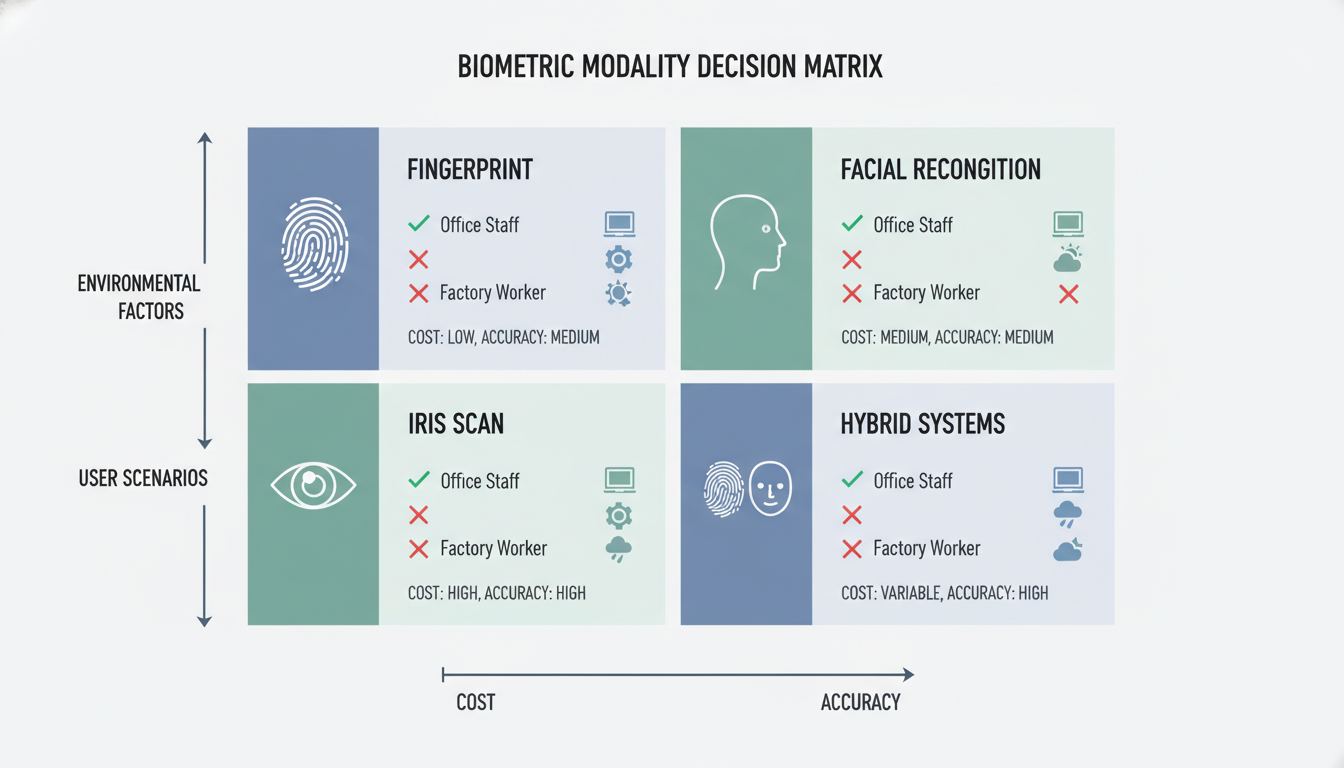
These scanners work well in offices, retail stores, and small factories. However, they can struggle in environments where employees have worn or damaged fingerprints common in construction, agriculture, or manufacturing where workers handle rough materials daily.
Facial Recognition
Facial recognition systems use cameras to map facial features and match them against stored images. Modern systems can identify people even with glasses, facial hair changes, or different expressions.
This technology is gaining popularity in Bangladesh because it’s contactless—important after COVID-19—and works quickly for large groups. Companies like Grameenphone and BRAC Bank have started using facial recognition for attendance in their larger offices.
Iris Recognition
Iris scanners photograph the colored ring around your pupil. This method is extremely accurate because iris patterns are unique and don’t change over time.
In Bangladesh, iris recognition is less common because the devices cost more. You’ll typically see them in high-security environments like pharmaceutical companies, government facilities, or data centers where accuracy is critical and budget allows.
Hybrid Systems
Hybrid systems combine two or more biometric methods. For example, a device might use both fingerprint and facial recognition. If the fingerprint fails (due to dirt or wear), the system falls back to face scanning.
These systems cost more but reduce false rejections. They’re useful in factories where some workers have damaged fingerprints but you still need accurate tracking.
Benefits of Using Biometric Attendance Systems
Biometric attendance solves real problems that manual systems create. You eliminate buddy punching when one employee clocks in for another. This practice costs businesses millions in Bangladesh every year through inflated payroll.
The systems also reduce administrative work. Instead of manually entering timesheet data or correcting errors, your HR team gets automated reports. This saves hours each week and reduces payroll mistakes.
Accuracy improves significantly. You get exact timestamps for every entry and exit. This helps you calculate overtime correctly, track late arrivals, and identify patterns like frequent absences. Integration with payroll systems makes salary processing faster, with attendance data flowing directly into payroll software.
For compliance, biometric systems create audit trails. You can prove which employees were present on specific dates helpful for labor inspections, legal disputes, or internal investigations.
Challenges and Common Myths About Biometric Attendance
Some employees worry about privacy. They think biometric data might be misused or shared. The reality is that most systems don’t store actual fingerprints or photos. They store encrypted mathematical templates that can’t be reverse-engineered into the original image.
Another concern is hygiene, especially with fingerprint scanners. Regular cleaning and maintenance address this. Facial recognition systems eliminate the issue entirely since they’re contactless.
People also believe these systems are too expensive. While the initial investment is higher than punch cards, you save money by reducing time theft and payroll errors. Most businesses in Bangladesh see a return on investment within 6 to 12 months.
Key Software and Hardware Requirements for Biometric Attendance
On the hardware side, you need biometric scanning devices, fingerprint readers, facial recognition cameras, or iris scanners. Choose devices based on your environment and budget. You’ll also need a stable power supply and, for networked systems, ethernet cables or WiFi connectivity.
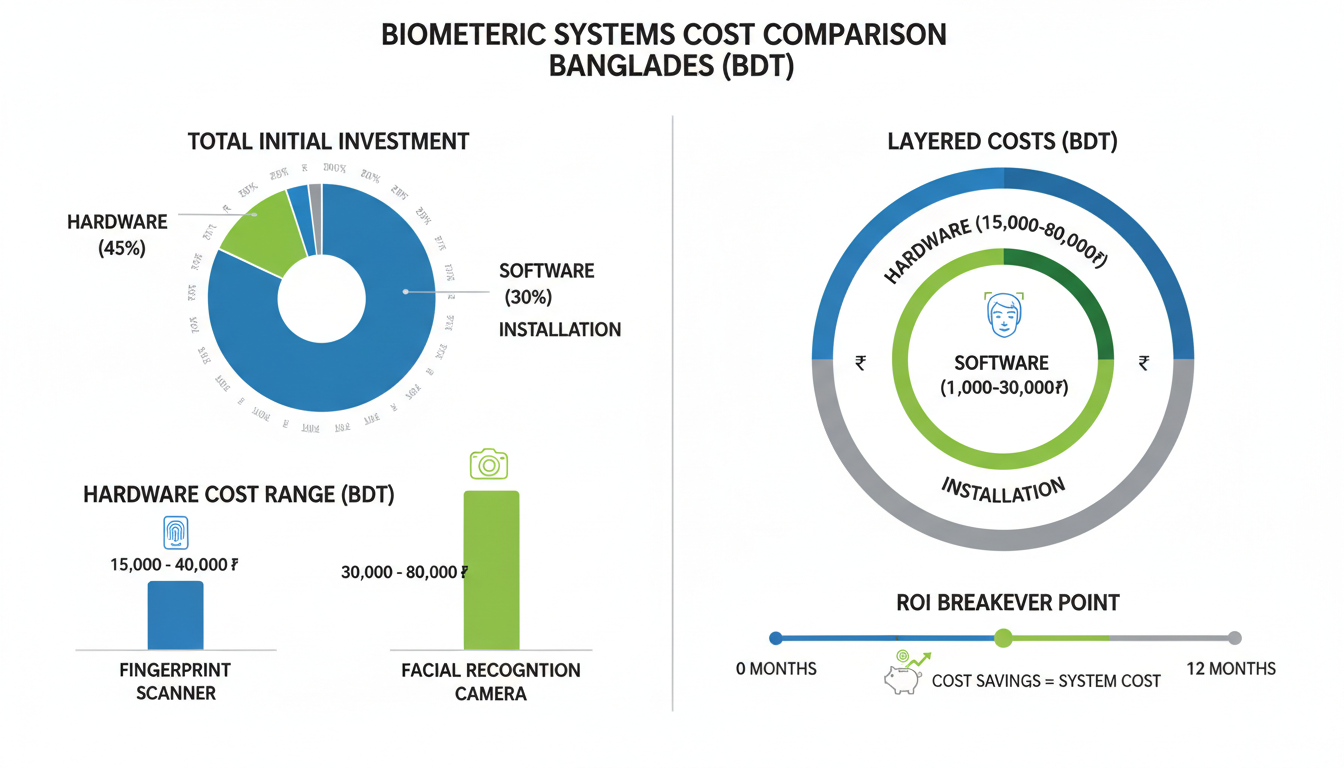
The software component includes the attendance management platform. This software stores employee data, processes biometric templates, logs attendance records, and generates reports. Look for software that integrates with your existing payroll system, popular options in Bangladesh include ZKTeco, Virdi, and FingerTec.
You’ll need a server or cloud storage to maintain the database. Cloud-based systems cost less upfront and don’t require IT infrastructure, but they depend on internet connectivity. Local servers give you more control but require maintenance.
Online vs Offline Biometric Attendance Systems: Connectivity Considerations
Online systems require constant internet connectivity. They sync data to the cloud in real-time, allowing managers to monitor attendance from anywhere. This works well for businesses with multiple branches or remote management needs. The downside is that if your internet fails, the system might stop working.
Offline systems store data locally on the device. Employees can clock in and out even without internet. The system syncs data to the central server once connectivity returns. This approach is more reliable in areas with unstable power or internet.
Hybrid systems offer the best of both worlds. They work offline and automatically sync when online. For most businesses in Bangladesh, a hybrid system makes sense you get reliability during outages and convenience when connected.
Needs Assessment and Biometric Modality Selection
Before buying equipment, evaluate your specific needs. How many employees will use the system? Where will they clock in? What’s your budget? What environmental factors matter?
Facial Recognition
Choose facial recognition if you have a large workforce that needs quick processing. It works well when employees wear gloves or have damaged fingerprints. The technology handles high-traffic areas better because multiple people can be identified quickly. Consider it for offices, retail stores, or any environment where contactless operation matters.
Fingerprint Scanners
Pick fingerprint scanners for small to medium-sized teams where cost matters. They’re reliable, affordable, and employees understand how to use them. Avoid them if workers have damaged fingerprints or wear heavy gloves.
Iris Recognition
Use iris recognition when security is critical and budget allows. Government offices, research facilities, and high-security zones benefit from this accuracy. The technology works through glasses and doesn’t change with age, making it reliable long-term.
Mobile Apps
Some modern systems use mobile apps with biometric authentication. Employees clock in using their smartphone’s fingerprint sensor or facial recognition. This works for remote teams or field staff. The challenge is ensuring employees actually are at the work location.
Biometric Attendance Hardware Installation
Location
Install devices at entry and exit points where employees naturally pass. For factories, place them near gates. In offices, near main doors or elevator lobbies. The location should have adequate lighting for facial recognition systems.
Avoid direct sunlight on facial recognition cameras it causes glare and reduces accuracy. Mount devices at a comfortable height, about 4.5 to 5 feet from the floor. Make sure there’s enough space for queues during peak times morning arrivals or shift changes.
Connectivity
For networked systems, ensure stable ethernet or WiFi connection. Ethernet is more reliable, especially in industrial environments with interference. Run cables through conduits to protect them from damage.
For power, use dedicated circuits with surge protection. In Bangladesh, power fluctuations are common, so install a UPS (uninterruptible power supply) to prevent data loss during outages.
Biometric Attendance Software Configuration and System Integration
System Setup
After installing hardware, configure the software. Start by creating your organizational structure—departments, shifts, and work schedules. Define shift timings, break periods, and grace time for late arrivals.
Set up user accounts for administrators and managers. Assign appropriate access levels—HR might see all data while department managers only see their teams.
Define Rules
Create attendance rules that match your policies. Define what counts as late (5 minutes? 15 minutes?). Set overtime calculation methods—after 8 hours? After the scheduled shift end?
Configure leave types—sick leave, casual leave, annual leave. The system should automatically account for approved leaves when calculating attendance.
Payroll Integration
Connect the attendance system with your payroll software. Most modern systems offer APIs or direct integrations with popular payroll platforms used in Bangladesh. Map attendance data fields to payroll fields. Test the integration thoroughly before going live.
Employee Enrollment for Biometric Attendance Systems
Data Capture
Enrollment is when you collect each employee’s biometric data. Schedule enrollment sessions department by department to avoid chaos.
For fingerprint systems, scan multiple fingers typically the index and middle finger of both hands. This creates redundancy if one finger is injured or worn. For facial recognition, capture the employee’s face from multiple angles under different lighting conditions.
Digital Templates
The system converts the captured biometric data into encrypted templates. These templates are mathematical representations, not actual images. Store them securely in the database linked to employee IDs.
Verify each enrollment. Have the employee test the system immediately after enrollment to confirm their data was captured correctly.
Redundancy
Enroll backup biometric identifiers. If using fingerprint, scan multiple fingers. Some systems allow enrollment of both fingerprint and face for the same employee. This redundancy ensures that temporary issues don’t prevent clocking in.
Training and Pilot Phase for Biometric Attendance Implementation
Pilot Run
Before rolling out company-wide, run a pilot with one department or shift. This helps identify problems in a controlled setting. Monitor the pilot closely. Track how long it takes employees to clock in during peak times.
Gather feedback from pilot participants. Are the devices easy to use? Do they understand the process? Use the pilot phase to refine your processes.
Employee Communication
Explain why you’re implementing biometric attendance. Be transparent about benefits—accurate payroll, fair overtime calculation, reduced disputes.
Address privacy concerns directly. Explain that the system stores encrypted templates, not actual fingerprints or photos. Provide hands-on training. Show employees how to use the devices.
Maintenance and Legal Compliance for Biometric Attendance Systems
Regular Cleaning
Fingerprint scanners accumulate dirt, oil, and residue that reduce accuracy. Clean sensors weekly with a soft, lint-free cloth and isopropyl alcohol. For facial recognition cameras, clean the lens monthly.
Software Updates
Keep the software current. Vendors release updates that fix bugs, improve security, and add features. Back up your database regularly. If something goes wrong, you can restore data without losing attendance records.
Legal Adherence
Comply with labor laws regarding attendance records. In Bangladesh, the Bangladesh Labour Act, 2006 requires maintaining accurate attendance registers. Retain attendance data for the legally required period—typically 3 years in Bangladesh.
Legal Compliance and Data Privacy Considerations
Bangladesh Data Protection Laws
Bangladesh is developing comprehensive data protection legislation. While the Digital Security Act, 2018 addresses some aspects, specific biometric data regulations are evolving.
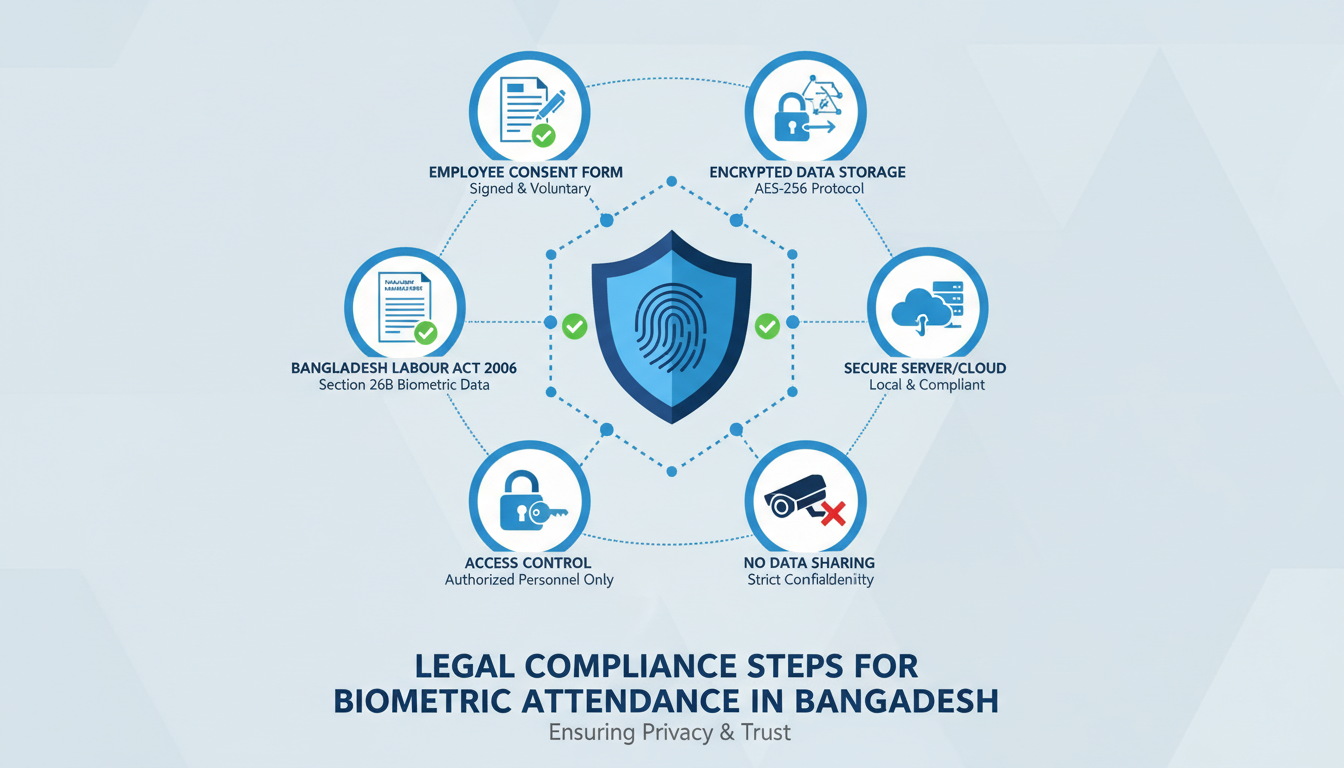
Follow best practices even in the absence of detailed laws. Treat biometric data as sensitive personal information requiring special protection. The Bangladesh Labour Act, 2006 and Bangladesh Labour Rules, 2015 govern workplace attendance tracking.
Employee Consent Requirements
Obtain written consent before collecting biometric data. The consent form should explain what data you’re collecting, how it will be used, where it will be stored, and who has access.
Allow employees to review and update their biometric data. If someone’s fingerprints change due to injury or their appearance changes significantly, they should be able to re-enroll.
Data Storage and Security
Encrypt biometric templates in the database. Even if someone gains unauthorized access to your system, they shouldn’t be able to use the data. Limit access to biometric data. Only authorized personnel should view or modify this information.
Use secure connections for data transmission. Have a data breach response plan. Don’t share biometric data with third parties without explicit consent.
Future Trends in Biometric Attendance Technology in Bangladesh
Contactless technology is becoming standard. COVID-19 accelerated the shift toward facial recognition and palm vein scanning. These technologies will continue gaining market share in Bangladesh.
Mobile-first solutions are emerging. Instead of fixed hardware, employees use smartphones with biometric authentication. GPS verification ensures they’re at the correct location.
Artificial intelligence is improving accuracy. Modern systems use machine learning to recognize employees even with masks, glasses, or aging. Cloud-based systems are replacing local servers, helping businesses avoid upfront infrastructure costs.
Multi-modal biometric systems are becoming affordable. Devices that combine fingerprint and facial recognition are dropping in price, making them accessible to medium-sized businesses.
Conclusion
Implementing biometric attendance in Bangladesh doesn’t have to be complicated when you follow a systematic approach. From selecting the right technology whether fingerprint, facial recognition, or hybrid systems to ensuring legal compliance with the Bangladesh Labour Act, each step builds toward a more efficient and accurate attendance management system.
The key to success lies in three areas: choosing technology that fits your work environment and budget, properly enrolling and training employees while addressing privacy concerns, and maintaining the system regularly with software updates and hardware cleaning. Most businesses in Bangladesh see ROI within 6-12 months through reduced time theft and lower administrative costs.
As biometric technology evolves with contactless solutions and AI-powered accuracy, now is the ideal time to transition from manual attendance tracking to automated systems. Start with a pilot program, gather feedback, and scale gradually to ensure smooth adoption across your organization.
Frequently Asked Questions
How much does a biometric attendance system cost in Bangladesh?
Basic fingerprint systems start around 15,000 to 25,000 BDT per device. Facial recognition systems range from 30,000 to 80,000 BDT. Software costs vary—some vendors charge per user per month (100-300 BDT), while others offer one-time licenses (50,000-200,000 BDT). For a 100-employee company, expect total first-year costs of 150,000-400,000 BDT.
Can biometric data be stolen or misused?
The templates stored in biometric systems cannot be converted back into actual fingerprints or photos. They’re encrypted mathematical representations. However, protect against misuse with strong access controls, encryption, and regular security audits.
What happens if an employee’s fingerprint doesn’t scan properly?
Enroll multiple fingers during setup to prevent this issue. If all enrolled fingers fail, use a backup authentication method—PIN code, ID card, or manual verification by a supervisor. About 2-5% of people have fingerprints that scan poorly due to age, genetics, or occupation.
Do I need internet connectivity for biometric attendance?
Not always. Offline systems store data locally and work without internet. They sync to the central server when connectivity returns. For Bangladesh, where internet can be unreliable in some areas, offline or hybrid systems are safer choices.
How long does it take to implement a biometric attendance system?
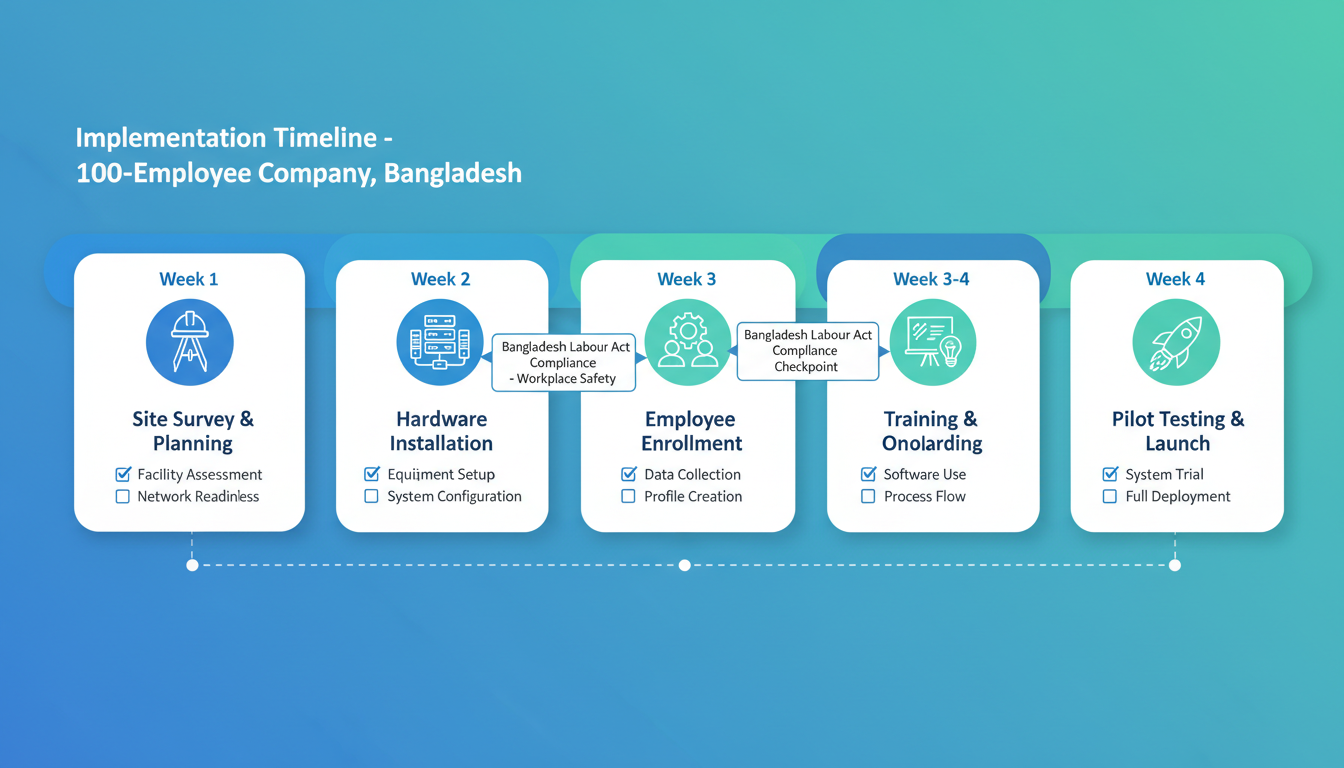
For a small business (50-100 employees), implementation takes 2-4 weeks. This includes site assessment, installation, software setup, employee enrollment, and training. Larger organizations (500+ employees) need 6-12 weeks.
Is biometric attendance legal in Bangladesh?
Yes, biometric attendance is legal and increasingly common. The Bangladesh Labour Act permits various attendance tracking methods as long as accurate records are maintained. However, you must handle biometric data responsibly obtain employee consent, protect the data, and use it only for attendance purposes.