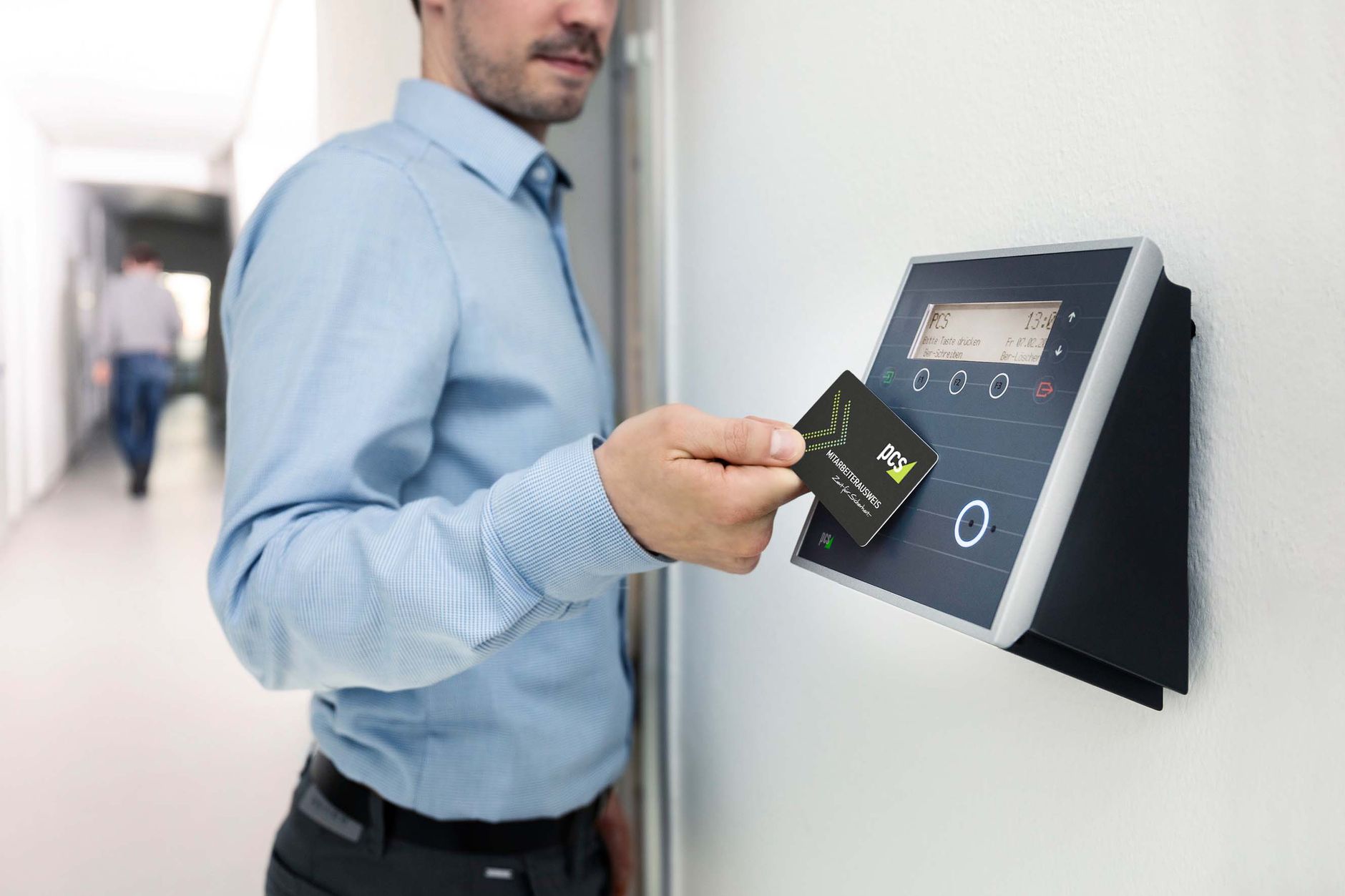

IoT in workforce management connects your attendance and tracking devices to the internet. They then feed live data straight to your HR system. Instead of a standalone punch clock, each device becomes a sensor. It captures who arrived, where, and when. Then it syncs that record to the cloud in seconds. For a Bangladeshi business running several sites, this is the gap between guessing and knowing.
I work with HR teams every week, and one question keeps returning. People hear “IoT” and picture factories full of robots. The reality is simpler and closer to home. Your fingerprint reader, face terminal and GPS app are already IoT devices. Each one talks to a central platform. This guide explains how the pieces fit, what they cost, and where they break.
Key stats at a glance
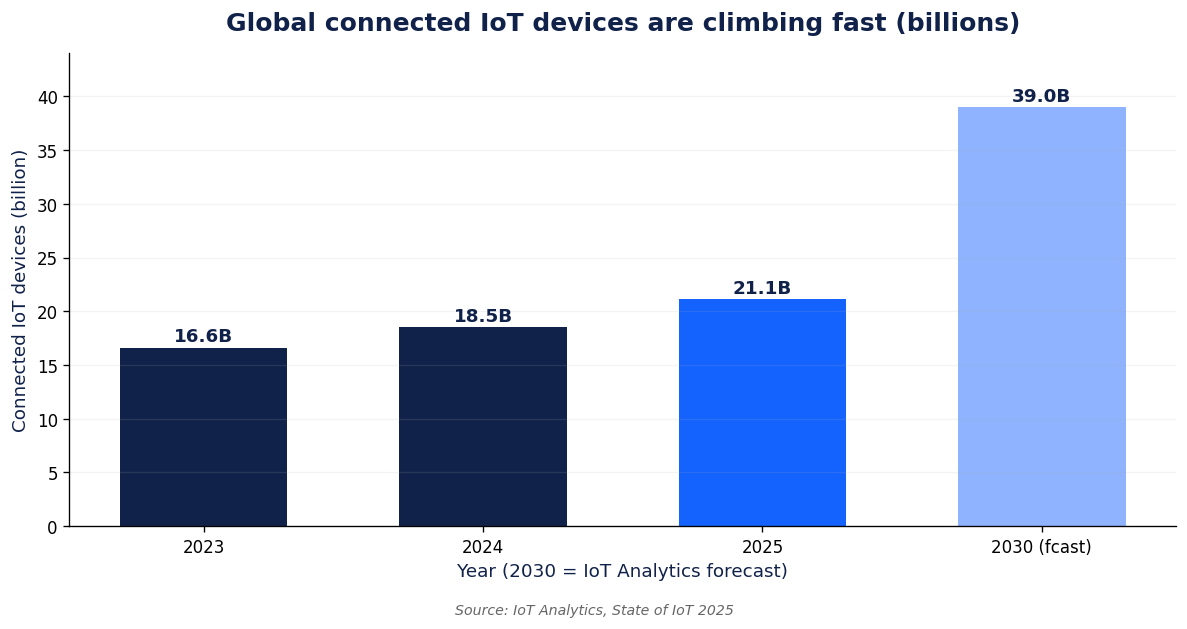
21.1 billion connected IoT devices worldwide in 2025
~4 million RMG workers in Bangladesh needing accurate tracking
Seconds, not days, to sync a punch to the cloud
TL;DR: IoT in workforce management links physical devices, fingerprint readers, face terminals, RFID cards and GPS trackers, to a cloud HR platform over WiFi, LAN or mobile data. It gives real-time attendance, less buddy punching, and cleaner payroll. The trade-offs are network dependence, device cost, and data security. Pick devices by site type, not by hype.

What is IoT in workforce management?
IoT stands for the Internet of Things. It describes ordinary objects fitted with sensors and a network link. They collect and share data without a person typing anything. Gubbi and colleagues (2013) defined it as a network of connected devices that sense the physical world.
Apply that to your staff, and the idea becomes concrete. A device reads a fingerprint or a face. It timestamps the event. Then it pushes that record to a central system over the internet. No paper register. No USB stick walked to the accounts room. The data is simply there.
So IoT in workforce management is not one product. It is a way of wiring your existing devices together. The value sits in the connection, not the plastic box.
New to the hardware? Our explainer on what a biometric attendance system is covers the basics first.
How does IoT in workforce management actually work?
Every IoT workforce setup has three layers. Get these right and the rest follows.
The device layer is the hardware on your wall or in a pocket. Fingerprint scanners, facial terminals, RFID card readers and GPS phones sit here. Each one senses a person and creates a record.
The network layer carries that record. It might use wired LAN, office WiFi, or a 4G SIM at a remote site. When the link drops, a good device stores the punch and syncs later. That is why an offline attendance system matters in Bangladesh, where power and internet still wobble.
The platform layer is the cloud software. It turns raw punches into rosters, overtime and payroll. This is where IoT devices earn their keep. Managers see a live board of who is in, across every branch, from one screen.
Which IoT devices are used to manage a workforce?
Not every device suits every site. Here is how the common options compare for Bangladeshi teams.
| IoT device | What it captures | Typical connectivity | Best for |
|---|---|---|---|
| Fingerprint terminal | Fingerprint and time | LAN or WiFi | Offices, small factories |
| Face recognition terminal | Face scan and time | WiFi or LAN | Touch-free, high-traffic gates |
| RFID card reader | Card tap and time | LAN or WiFi | Large factories, fast queues |
| GPS mobile app | Location and time | 4G mobile data | Field staff, delivery, sales |
| Access control lock | Entry event and door | LAN or WiFi | Secure zones, server rooms |
Research backs the card approach for crowds. Koppikar and colleagues (2019) built an RFID attendance monitor that logged staff automatically at a reader. A 2023 study by Shrivastava and colleagues extended the idea with low-cost microcontrollers. It showed the hardware is cheap to deploy.
For teams that move, a fixed terminal is useless. That is where field force tracking with GPS takes over. It logs attendance by location instead of a wall unit.
What do Bangladeshi businesses gain from IoT attendance devices?
The wins are practical, not futuristic. First, attendance turns real-time. You stop waiting for a monthly register and see today at a glance. Our biometric attendance system guide explores this in depth.
Second, buddy punching drops. A face or fingerprint cannot be handed to a friend. So proxy attendance nearly disappears.
Third, payroll gets cleaner. Hours flow straight into salary math. Overtime disputes shrink as a result.
Fourth, scale stops hurting. With around 4 million garment workers alone, employers here cannot count heads by hand. IoT devices treat 50 staff and 5,000 staff the same way. The workload on your HR desk barely moves as you grow.
What are the risks and limits of IoT devices?
Here is my contrarian view. IoT is not a magic upgrade. Vendors who promise zero friction are selling a story. Three real limits deserve your attention.
Network dependence. A cloud device needs a link to sync. Choose hardware that buffers punches offline. Otherwise a load-shedding afternoon becomes a payroll gap.
Data security. Biometric data is sensitive and permanent. Tawalbeh and colleagues (2020) document how IoT deployments widen the attack surface for privacy breaches. Ask vendors where fingerprints are stored and how they are encrypted.
Upfront cost. Terminals, cabling and setup cost money before you save any. The payback is real, but it arrives over months. Budget honestly.
How do you choose IoT workforce devices for your site?
Match the device to the place, not to the brochure. Use this quick guide.
| Your situation | Sensible IoT choice | Why |
|---|---|---|
| Single office, stable WiFi | Fingerprint or face terminal | Simple, low cost, quick install |
| Large factory, big rush hours | RFID card readers | Taps clear queues in seconds |
| Field or delivery team | GPS mobile app | Tracks people who never touch a wall unit |
| Frequent power or net cuts | Offline-capable terminal | Stores punches, syncs when back online |
Before you buy, confirm three things. Does the device store data when the internet fails? Does it fit your existing HR platform? Can it grow with your headcount without a rip-and-replace? If a vendor dodges these, keep looking.
Where Tipsoi fits
Tipsoi ties these IoT devices to one cloud platform built for Bangladesh. Fingerprint, face and RFID terminals feed a live dashboard. Field staff check in by GPS from the mobile app. Offline buffering keeps records safe through load-shedding. The point is not the gadget on the wall. It is the clean, connected data behind it, ready for payroll without manual chasing.
Key takeaways
- IoT in workforce management connects attendance devices to a cloud HR platform for live data.
- Three layers matter: the device, the network, and the software that turns punches into payroll.
- Fingerprint, face, RFID and GPS each suit a different site; choose by location, not hype.
- Benefits are real-time attendance, less buddy punching, and cleaner payroll at any scale.
- Watch the limits: network dependence, biometric data security, and upfront cost.
Frequently asked questions
Is a biometric attendance machine an IoT device?
Yes, once it connects to a network and syncs data to a central system. A standalone clock that only stores punches locally is not truly IoT. The link to the cloud is what makes it one.
Does IoT workforce tracking work without internet in Bangladesh?
Good devices keep working offline. They store each punch on the device, then sync when the connection returns. This matters during load-shedding, so confirm offline buffering before you buy.
What network do IoT attendance devices need?
Most use office WiFi or a wired LAN. Remote sites often use a 4G SIM instead. Field apps run on the worker’s mobile data. Pick the link that matches each location.
Are IoT workforce devices secure?
They can be, but security depends on the vendor. Ask where biometric data is stored, whether it is encrypted, and who can access it. Treat fingerprint and face data as permanent and sensitive.
How much do IoT workforce management devices cost in Bangladesh?
Costs vary by device type and site count. A single fingerprint terminal is modest. A multi-site RFID rollout costs more. Weigh the hardware against the payroll hours you save each month.
Can IoT devices track field and remote staff?
Yes. GPS-based mobile apps log attendance by location for people who never reach a fixed terminal. This suits delivery, sales and construction teams across scattered sites.
References
- Gubbi, J., Buyya, R., Marusic, S., and Palaniswami, M. (2013). Internet of Things (IoT): A vision, architectural elements, and future directions. doi.org/10.1016/j.future.2013.01.010
- Koppikar, U., Hiremath, S., Shiralkar, A., and colleagues (2019). IoT based Smart Attendance Monitoring System using RFID. doi.org/10.1109/icait47043.2019.8987263
- Shrivastava, A., Suji Prasad, S. J., Yeruva, A. R., and colleagues (2023). IoT Based RFID Attendance Monitoring System using Arduino ESP8266. doi.org/10.1080/01969722.2023.2166243
- Tawalbeh, L., Muheidat, F., Tawalbeh, M., and Quwaider, M. (2020). IoT Privacy and Security: Challenges and Solutions. doi.org/10.3390/app10124102
- IoT Analytics (2025). State of IoT 2025: number of connected IoT devices. iot-analytics.com/number-connected-iot-devices
- BGMEA (2025). Bangladesh RMG employment and export data. bgmea.com.bd