

Cloud computing in HR software is now the default way most companies run their people operations. Instead of a server in your office, your HR data lives on a provider’s secure servers. You reach it through a browser or app. In this guide I explain what cloud computing in HR software really means. You will learn how it works, and what to check before you buy in Bangladesh.
I work with HR teams across Bangladesh every week. The same questions come up: Is cloud safe? Will it cost more? What happens if the internet goes down? Let me answer these plainly, with real data and no hype.
Key stats at a glance
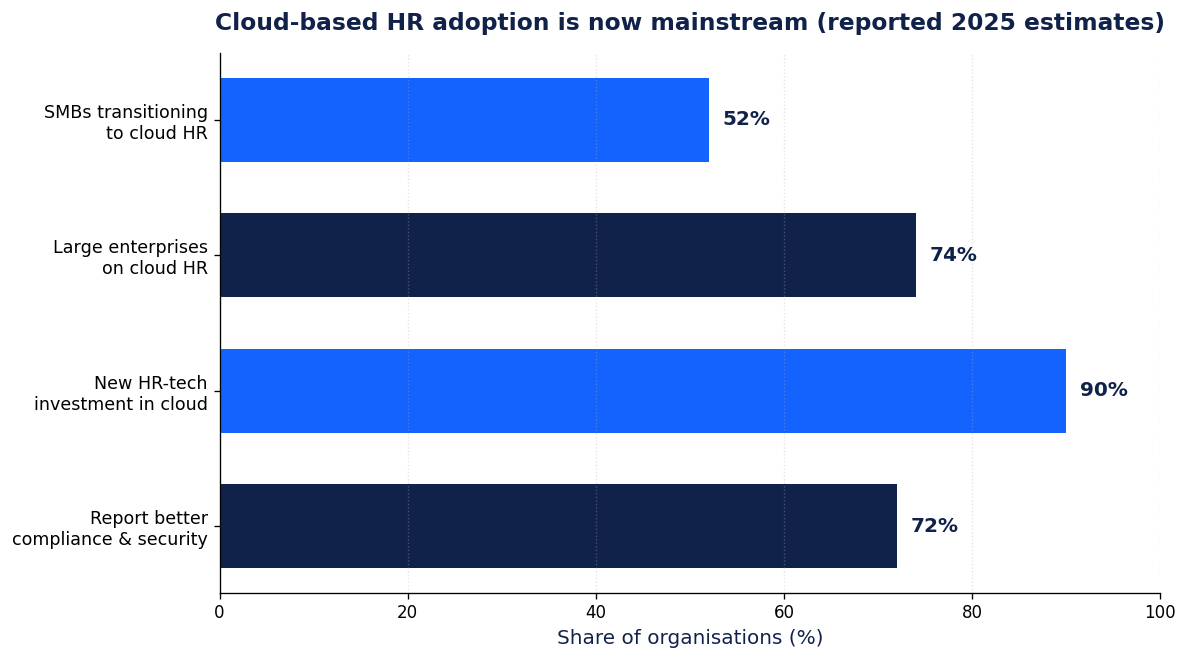
~74% of large enterprises now use cloud HR (reported 2025 estimate)
~99.9% uptime is the typical cloud HR service level target
US$4.44M global average data breach cost in 2025 (IBM)
Nov 2025: Bangladesh enacted the PDPO data protection law
What cloud computing in HR software actually means
Cloud computing in HR software means your HR system runs on internet-hosted servers, not on a machine you own. You pay a subscription and log in from anywhere. The vendor handles hosting, backups, security patches, and upgrades.
This model is often called SaaS, or software as a service. Popular HR tools like payroll, attendance, and leave management now ship this way. Academic work has tracked this shift in small and medium firms for over a decade (Wang, Wang and Bi, 2016).
The opposite model is on-premise. There you buy a licence, install it on your own server, and your IT staff maintain it. Many older Bangladeshi factories still run this way.
How cloud HR software works in practice
The idea is simple once you see the parts. Three pieces do the work.
- The provider’s data centre. Your employee records, payroll runs, and attendance logs are stored and processed here.
- The network. Your office reaches the system over the internet, usually through a browser or a mobile app.
- Your devices. Laptops, phones, and biometric machines send data up and pull reports down.
A good cloud HR platform syncs in real time. When a worker punches in on a device, the record appears in the dashboard within seconds. Managers approve leave from a phone. Payroll pulls the same clean data at month end.
Cloud computing in HR software is now the standard for new HR technology. Gartner reports that cloud accounts for almost all new HCM implementations. By 2025, roughly half of midmarket and large firms had invested in cloud HCM.
Cloud vs on-premise HR software: a quick comparison
Both models can run payroll and attendance well. The difference is who carries the cost, the risk, and the upkeep. This table shows the trade-offs I walk clients through.
| Factor | Cloud (SaaS) HR software | On-premise HR software |
|---|---|---|
| Upfront cost | Low, paid monthly or yearly | High, one large licence plus server |
| Maintenance | Handled by the vendor | Handled by your own IT team |
| Updates | Automatic, included | Manual, often paid extra |
| Scalability | Add users in minutes | Needs new hardware to grow |
| Remote access | Built in, works from anywhere | Usually office network only |
| Data location | Provider decides, unless you ask | Fully in your building |
| Uptime duty | The vendor guarantees it | You own every outage |
| Best for | Growing SMEs and multi-site firms | Firms with strict local-only rules |
For a deeper breakdown, read our guide on cloud vs on-premise HR software for Bangladeshi companies.
The real benefits for Bangladeshi businesses
The gains are practical, not abstract. Here is what teams notice after moving to cloud computing in HR software.
- Lower upfront cost. You skip the server and the big licence fee. You pay per user as you grow.
- No IT burden. The vendor patches, backs up, and upgrades. Your small team stays focused on people.
- Access from anywhere. Owners check payroll from Dhaka while visiting a plant in Gazipur.
- Faster onboarding. New branches go live in days, not months.
- Cleaner data. One shared record removes the messy spreadsheets that cause payroll disputes.
Research on cloud HRIS adoption points to cost and flexibility as the top drivers for smaller firms. See Johnson and Diman (2017) and Imron and others (2019). That matches what I see on the ground here.
What about security and data safety?
Security is the question I hear most. The honest answer surprises people: a reputable cloud is usually safer than a dusty office server. Good providers encrypt data, run daily backups, and hire full-time security staff. Most small firms cannot match that alone.
The numbers back this up. IBM’s 2025 report puts the global average data breach cost at US$4.44 million. Encryption alone cut breach costs by about US$208,000 on average. Strong access controls and encryption are the baseline you should demand.
Still, the cloud is not magic. You must pick a vendor with clear security practices. The NIST public cloud guidelines remain a solid checklist for what to ask (Jansen and Grance, 2011). For biometric punch data specifically, see our guide on biometric attendance data security in Bangladesh.
The one rule Bangladeshi firms must check first
Here is my contrarian take. Most articles tell you to move everything to the cloud today. I disagree for one clear reason: the law changed.
Bangladesh enacted the Personal Data Protection Ordinance (PDPO) in November 2025. A 2026 amendment then narrowed the rules. Today, restricted personal data and critical infrastructure data must keep a real-time synced copy inside Bangladesh (The Daily Star, 2025).
What does this mean for you? General staff records on a foreign cloud are usually fine. But highly sensitive data may need local storage. Before you sign, ask your vendor two questions. Where is my data stored? Can you keep a copy in Bangladesh if the law requires it?
This is exactly why a local partner matters. A vendor who understands Bangladeshi rules saves you from a costly rebuild later.
What cloud HR software typically costs
Most cloud HR tools charge per employee, per month. Small teams often start low and scale as they hire. Cloud computing in HR software avoids the large server and licence bill of on-premise systems.
Watch for hidden fees though. Setup charges, add-on modules, and support tiers can raise the real price. Always ask for the full per-user cost, not just the headline rate. Our HR software pricing in Bangladesh guide breaks down typical plans and traps.
How to choose the right cloud HR software
Do not chase the longest feature list. Match the tool to your real problems. I use this short checklist with clients.
- Fit for your size. A 30-person firm needs different things than a 3,000-worker factory.
- Local support. Can you reach a human in Bangladesh when payroll breaks at month end?
- Data rules. Does the vendor meet PDPO storage rules for sensitive data?
- Device support. Does it connect to your existing biometric and RFID machines?
- Uptime promise. Ask for the written service level, ideally 99.9% or better.
Still comparing options? Our guide on choosing a cloud-based HR management system walks through each step.
Key takeaways
- Cloud computing in HR software runs your HR system on the vendor’s servers, paid by subscription.
- It cuts upfront cost, removes IT upkeep, and lets you work from anywhere.
- A reputable cloud is usually safer than a lone office server, if it encrypts data.
- Check Bangladesh PDPO rules: sensitive data may need a local synced copy.
- Choose for fit, local support, and data compliance, not the longest feature list.
Frequently asked questions
Is cloud computing in HR software safe for employee data?
Yes, when the vendor encrypts data and runs regular backups. A strong provider often protects data better than a small in-house server. Always ask about encryption and access controls before you buy.
Does cloud HR software work if my internet goes down?
Most systems need a connection to sync in real time. Good platforms cache data on devices and sync once the link returns. Ask your vendor how the system behaves offline.
Is cloud HR software cheaper than on-premise?
Usually yes on day one, because you skip the server and large licence. Over many years the totals can get closer. Compare the full per-user cost, not just the sticker price.
Can I keep my HR data inside Bangladesh on the cloud?
Yes, if your vendor supports local or synced storage. Under the PDPO, restricted personal data must keep a real-time copy in Bangladesh. Confirm this in writing before you sign.
Will cloud HR software connect to my biometric machines?
Good platforms integrate with common biometric and RFID devices. This lets punch data flow straight into payroll. Check device compatibility during your trial.
References
- Wang, X. L., Wang, L., and Bi, Z. (2016). Cloud computing in human resource management (HRM) system for small and medium enterprises (SMEs). The International Journal of Advanced Manufacturing Technology. doi.org/10.1007/s00170-016-8493-8
- Johnson, R. D., and Diman, K. (2017). An Investigation of the Factors Driving the Adoption of Cloud-Based Human Resource Information Systems by Small- and Medium-Sized Businesses. doi.org/10.1108/978-1-78714-315-920161001
- Imron, M. I. R., Hidayanto, A. N., and Fitriani, W. R. (2019). Analysis of Cloud-Based Human Resource Information System Adoption Factors Prioritization in Micro, Small, and Medium Enterprises. IEEE. doi.org/10.1109/icacsis47736.2019.8979937
- Jansen, W., and Grance, T. (2011). Guidelines on Security and Privacy in Public Cloud Computing. NIST Special Publication 800-144. doi.org/10.6028/nist.sp.800-144
- IBM (2025). Cost of a Data Breach Report 2025. ibm.com/reports/data-breach
- The Daily Star (2025). Bangladesh’s Personal Data Protection Ordinance 2025: key takeaways. thedailystar.net