

TL;DR: Any stable connection meets attendance device network requirements. A biometric punch is under 1 KB. Use LAN for factories, WiFi for small offices, and 4G for remote sites. Pick a device with an offline buffer, because in Bangladesh the network will drop. The buffer, not the bandwidth, decides whether you lose data.
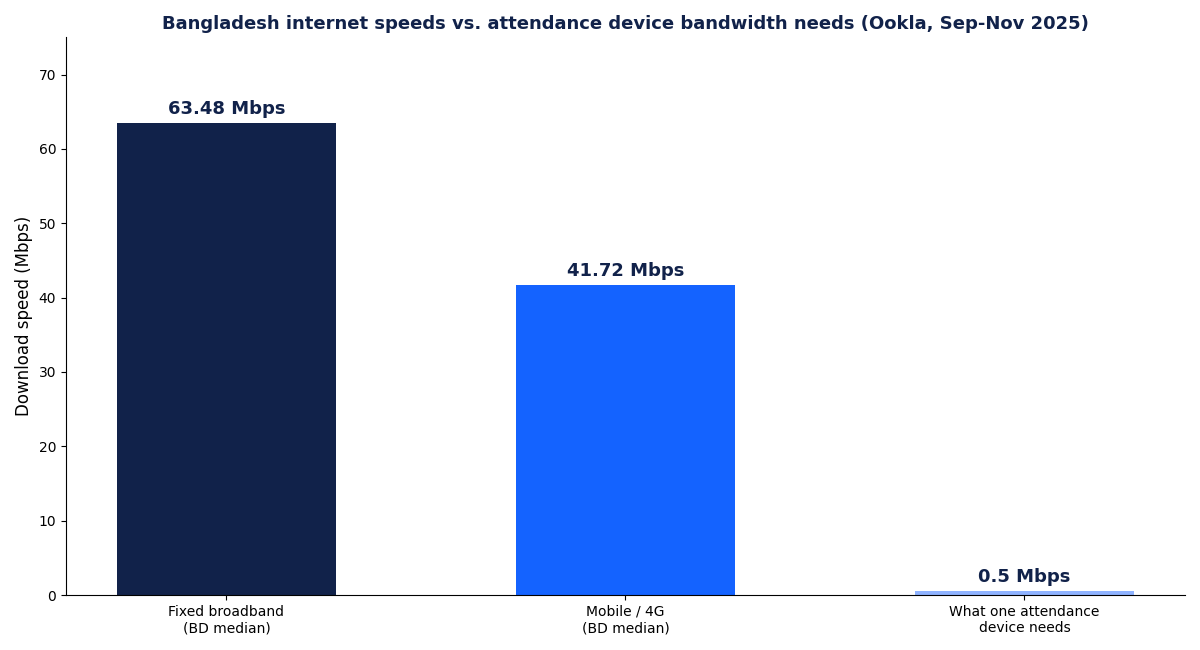
Your attendance device network requirements are far smaller than most buyers expect. One fingerprint punch sends less than 1 KB of data. Bangladesh’s median fixed broadband now runs at 63.48 Mbps. That is roughly 100,000 times more capacity than a device needs. So the real question is not speed. It is which connection type survives your site’s conditions: LAN, WiFi, or 4G.
I have planned device rollouts for factories, head offices, and field sites at Tipsoi. In this guide I will show you exactly how we choose, with real Bangladesh network data.
Key stats at a glance
95%
of Bangladesh’s population covered by 4G
41.72 Mbps
median mobile download speed (Ookla)
<1 KB
data sent per attendance punch
14.77M
fixed broadband lines in Bangladesh
What are the real network requirements for an attendance device?
A biometric attendance device needs three things: a stable link, an open path to its cloud server, and power. Speed barely matters. Each punch is a tiny record with an ID, a timestamp, and a device code. Even a full day of punches from 500 workers stays under a few megabytes.
Research on IoT connectivity backs this up. Machine devices like these are classed as low-throughput, delay-tolerant endpoints [1]. They differ from laptops and CCTV, which actually consume bandwidth. A biometric attendance system shares this profile whether it reads fingerprints, faces, or RFID cards.
Here is my contrarian take. Upgrading your internet package will not improve your attendance system at all. I have seen companies buy 100 Mbps lines for a device that idles at 0.01 Mbps. Spend that money on a backup power source instead.
LAN, WiFi or 4G: which connection fits your site?
Match the connection to the site, not to habit. Each option wins in a different environment. IoT surveys rank wired links first for reliability, then managed WiFi, then cellular [2].
LAN (wired Ethernet)
LAN is the gold standard for factories and large offices. A cable is immune to interference from machinery, walls, and crowded radio bands. With Power over Ethernet, one cable can carry both data and power under the IEEE 802.3af standard. Dust and vibration on a production floor rarely bother a cable. They regularly break WiFi.
WiFi
WiFi suits small and mid-sized offices where cabling is impractical. Keep the device within a strong signal zone and give it a reserved connection on the router. Avoid placing it behind concrete walls or metal shelving. In my experience, most “device offline” tickets at office sites trace back to a moved router.
4G (cellular SIM)
4G is the only practical option for construction sites, tea gardens, and field depots. Coverage now reaches about 95% of Bangladesh’s population. But BTRC inspections still found dead zones and weak signals behind the operators’ claims. Test the actual signal at the mounting point before you commit. A punch record fits comfortably inside even a weak 4G connection.
| Factor | LAN | WiFi | 4G |
|---|---|---|---|
| Reliability | Highest | Good with strong signal | Depends on local coverage |
| Best for | Factories, head offices | Small and mid offices | Remote and temporary sites |
| Setup effort | Cabling required | Minimal | SIM plus signal check |
| Ongoing cost | Lowest | Low | Monthly data SIM |
| Main weakness | Cable runs cost money | Interference, router changes | Dead zones, SIM management |
| Power option | PoE possible | Separate adapter | Separate adapter |
How much bandwidth does a biometric device really use?
Almost none. The chart below compares Bangladesh’s median internet speeds against what one device needs. An attendance punch is smaller than this sentence.
From our Tipsoi deployments, here is what typical traffic looks like:
| Activity | Approximate data | Frequency |
|---|---|---|
| One punch record | Under 1 KB | Per employee, per punch |
| Daily sync, 100 employees | A few hundred KB | Daily |
| Face template update | 1 to 2 MB | On enrollment changes |
| Firmware update | 10 to 50 MB | A few times a year |
Even the heaviest item, a firmware update, downloads in seconds on the 41.72 Mbps national mobile median. Multiple devices can happily share one office line with all your other traffic.
What happens during load shedding and internet outages?
A good device keeps working; a bad one loses punches. This is the single most important buying criterion in Bangladesh. Outages here are a certainty, not a risk.
Look for a device with an offline buffer. It stores punches in local memory and syncs automatically when the link returns. We built Tipsoi around this offline-first model, and our offline attendance system guide explains the mechanics in depth. Pair the device with a small UPS or PoE from a backed-up switch, and load shedding becomes a non-event.
If you are choosing between a standalone machine and a cloud device, read our comparison of fingerprint attendance machines vs cloud-connected systems. Connectivity is the deciding factor there too.
How should you secure the device network?
Treat the device like any other IoT endpoint. Attendance data is personal data. IoT security research lists weak default passwords and flat networks among the top attack paths [3]. Four habits close most gaps.
- Change the default admin password on the device the day you install it.
- Put devices on a separate VLAN or guest network, away from finance PCs.
- Confirm your vendor encrypts data in transit to the cloud.
- Apply firmware updates when the vendor releases them.
How we plan device networks at Tipsoi
We follow a short survey before every installation. It takes under an hour and prevents almost every connectivity complaint later.
- Walk the site. Note wall materials, distances, and the router or switch location.
- Test the signal at the exact mounting point. Not one metre away. Signal drops fast behind concrete.
- Pick the connection: LAN in factories, WiFi in offices, 4G in the field.
- Plan power: PoE or a UPS, sized for your usual load shedding window.
- Confirm the offline buffer and set the sync schedule in the HR software.
The device is only half the system. The HR software in Bangladesh that receives the data decides what your punches become: payroll, leave balances, and overtime.
Common network mistakes we still see
Outages are a certainty in Bangladesh. Design for them, and speed takes care of itself.
Most attendance failures are planning failures, not hardware failures. Five mistakes come up again and again in our support tickets.
- Mounting the device first and checking the signal second. Always test at the exact spot.
- Sharing the device’s WiFi with guests. A password change then knocks the device offline.
- Buying a 4G device for a basement or a lift lobby. Concrete kills cellular signal.
- Skipping the UPS. The network survives load shedding; the device does not.
- Ignoring the SIM balance on 4G units. A dead data pack looks exactly like a dead device.
None of these cost much to fix. All of them cost a month of messy payroll if you find them late. With 114 million mobile internet users, Bangladesh has the coverage. Your job is only to use it well.
Key takeaways
- Attendance device network requirements are tiny. Under 1 KB per punch; 0.5 Mbps is generous.
- Choose by site: LAN for factories, WiFi for offices, 4G for remote locations.
- Bangladesh’s networks are ready. 95% 4G coverage and 63.48 Mbps median broadband.
- Outages, not speed, are the real threat. Demand an offline buffer and backup power.
- Secure the device: new password, separate network segment, encrypted sync.
- Tipsoi devices ship offline-first with automatic sync, which is why we win harsh-environment sites.
Frequently asked questions
How much internet speed does a biometric attendance device need?
Around 0.5 Mbps is more than enough. A punch record is under 1 KB, so any working connection in Bangladesh can carry it.
Will punches be lost when the internet goes down?
Not on a device with an offline buffer. It stores punches locally and syncs them automatically when the connection returns.
Is WiFi or LAN better for an attendance device?
LAN is more reliable and suits factories. WiFi is fine for offices with a strong, stable signal near the device.
Do 4G attendance devices need their own SIM?
Yes. Fit a data SIM from the operator with the best signal at your site. A small monthly data pack covers a full site.
Can several devices share one internet connection?
Yes. Device traffic is so small that a single office line can serve many devices plus normal office use.
Does load shedding stop attendance tracking?
Only if the device has no power backup. With a UPS or PoE from a backed-up switch, it records and syncs as normal.
References
- Ding, J., Nemati, H. M., Ranaweera, C., & Choi, J. (2020). IoT Connectivity Technologies and Applications: A Survey. IEEE Access. https://doi.org/10.1109/access.2020.2985932
- Al-Fuqaha, A., Guizani, M., Mohammadi, M., & Aledhari, M. (2015). Internet of Things: A Survey on Enabling Technologies, Protocols, and Applications. IEEE Communications Surveys & Tutorials. https://doi.org/10.1109/comst.2015.2444095
- Hassija, V., Chamola, V., Saxena, V., & Jain, D. (2019). A Survey on IoT Security: Application Areas, Security Threats, and Solution Architectures. IEEE Access. https://doi.org/10.1109/access.2019.2924045
- The Daily Star (2026). BTRC inspection exposes gap between 4G promise and reality. thedailystar.net
- The Daily Star (2026). Internet subscriber base shrinks by 70 lakh in 6 months (BTRC data). thedailystar.net