

If you run a business in Dhaka, you know how hard it can be to track who came to work and who did not. A biometric attendance system solves this problem. It records attendance automatically using a person’s fingerprint or face. No more paper registers. No more proxy attendance.
But the biometric attendance system installation process needs to be done right. A wrong setup leads to errors, lost data, and wasted money.
This guide covers everything you need to know. From planning to installation to maintenance.
Overview of Biometric Attendance System Installation in Dhaka
What Is a Biometric Attendance System and How It Works
This process is based on biometric authentication technology, which uses unique body features to verify a person’s identity.
A biometric attendance system is a device that reads a person’s unique body features, like fingerprints or face, to mark attendance. When an employee arrives, they place their finger on the scanner or stand in front of the camera. The device checks the data and records the time.
No card. No PIN. Just the person’s body does the work.
The system stores this data and sends it to software on your computer or the cloud. You can then see reports, check who was late, and calculate work hours.
Key Components Included in a Complete Biometric System
A complete biometric attendance system includes these parts:
• The biometric device itself, which reads fingerprints or faces.
• A power adapter to run the device.
• A LAN cable or Wi-Fi module for internet connection.
• Mounting hardware, such as screws and brackets, to fix the device on the wall.
• Attendance management software installed on a computer or server.
• A backup power source, like a UPS, to keep things running during power cuts.
Why Proper Installation Matters for Accurate Attendance Tracking
If the device is placed in the wrong spot, attendance data will be wrong. Poor lighting can make face recognition fail. A loose network cable can stop data from syncing. Bad software setup can cause data loss.
The biometric attendance system installation process must be done carefully. Every step matters. One mistake early on can cause problems for months.
Estimated Installation Time Per Device in Dhaka
For a single device with a simple setup, installation takes about 2 to 4 hours. If there are many devices across multiple floors or locations, it can take a full day or more. Software setup and employee enrollment add extra time.
Pre-Installation Planning for Biometric Systems in Dhaka
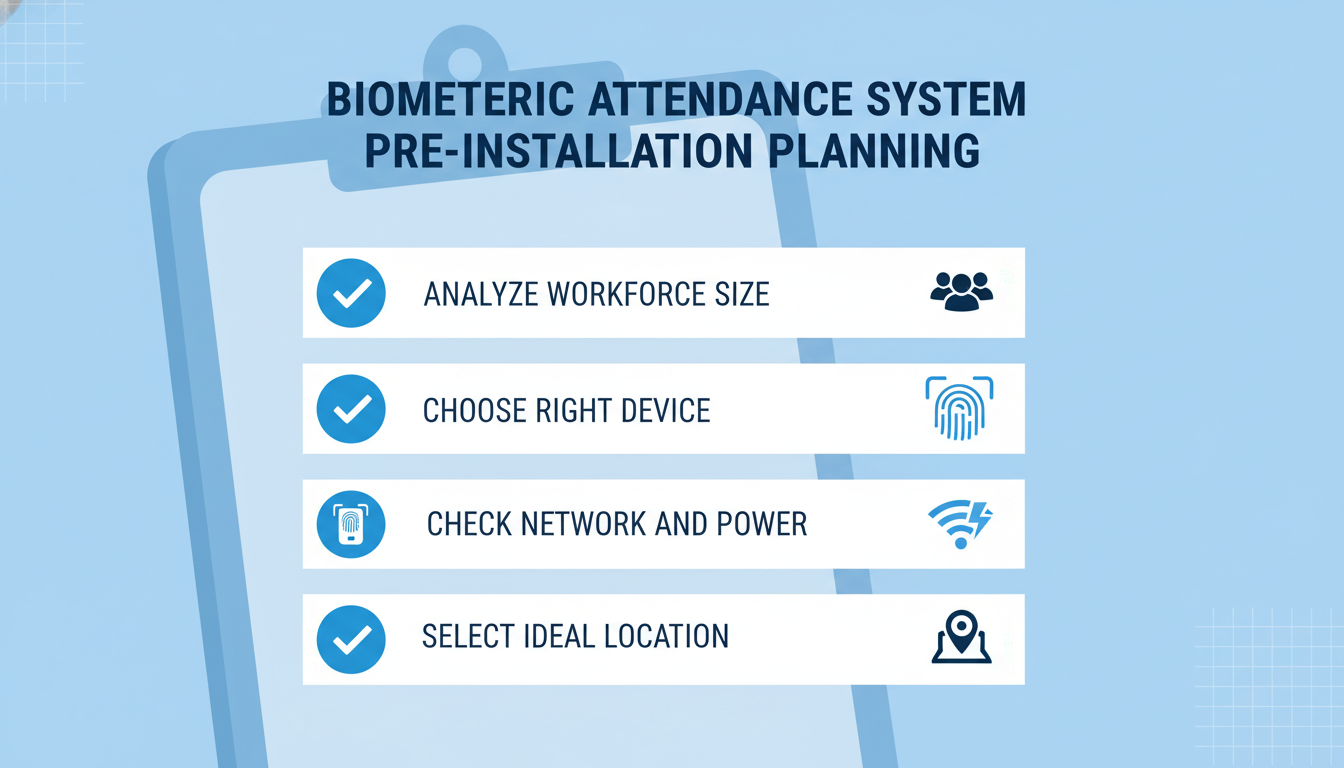
Analysing Your Business Requirements and Workforce Size
Before buying any device, ask yourself a few questions. How many employees do you have? Do you have one office or many? Do you need the system to connect to payroll software?
A small office with 20 staff needs a different setup than a factory with 500 workers. Your workforce size decides how many devices you need and what type of software works best.
Choosing the Right Biometric Device for Your Organisation
Not all biometric devices are the same. Some read only fingerprints. Others use face recognition. Some do both. There are also devices that work with RFID cards.
Choose a device based on your environment. Dusty or oily workplaces are not good for fingerprint scanners. Factories often do better with face recognition devices. Offices can use either.
Also, check the device capacity. How many fingerprints can it store? How many attendance records can it hold? Make sure the device can handle your total number of employees.
Network and Infrastructure Readiness Checklist
Before installation day, check these things:
• Is there a working internet connection at the device location?
• Is there a LAN port nearby?
• Is there a power socket close to where the device will go?
• Is the wall strong enough to hold the device?
If your office uses Wi-Fi only, make sure the signal is strong at the device spot. A weak signal causes sync failures.
Selecting the Ideal Location for Device Placement
The device should be placed at the main entry or exit point of your office. It should be at a height where all employees can reach it easily. The standard height is around 4 to 5 feet from the floor.
For face recognition devices, avoid placing them where sunlight hits the camera directly. Bright backlighting makes face detection fail.
Types of Biometric Attendance Systems Available in Dhaka
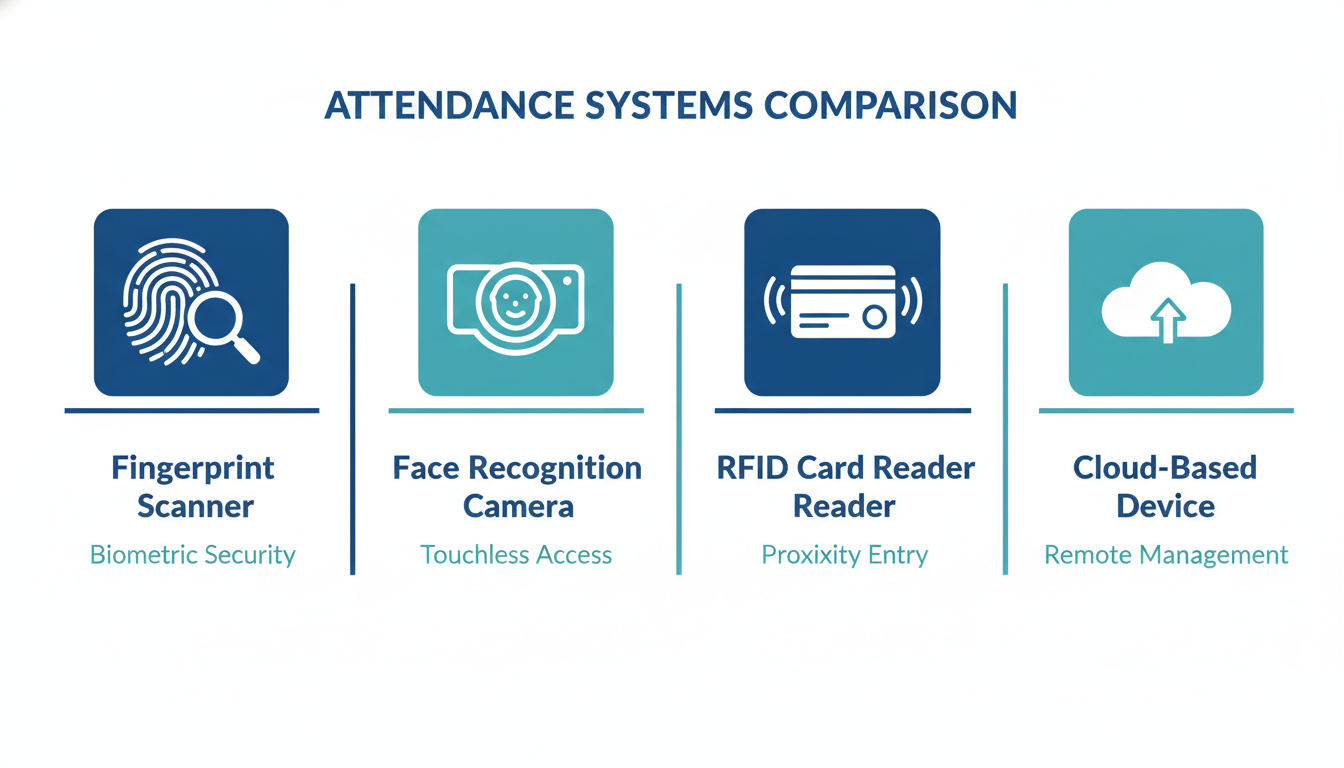
Fingerprint Attendance Systems
Fingerprint systems are the most common type in Dhaka. They are affordable and easy to use. Each employee registers their fingerprint once. After that, they just touch the scanner to mark attendance.
These systems work well in air-conditioned offices. They are less reliable in dusty or wet environments where fingers may not scan properly.
Face Recognition Attendance Systems
Face recognition systems use a camera to scan the employee’s face. No touching needed. This is hygienic and fast.
These systems are popular in garment factories and hospitals where hand hygiene matters. They also work better in dusty environments where fingerprint scanners struggle.
Modern face recognition devices can work even with masks on, though accuracy can vary.
RFID and Hybrid Attendance Systems
RFID systems use cards or key fobs. The employee taps the card near the reader to mark attendance. These are simple and fast.
Hybrid systems combine RFID with fingerprints or face recognition. This adds an extra layer of security. Even if someone loses their card, they cannot mark attendance without their fingerprint.
Hybrid systems are a good choice for organisations that need high security.
Cloud-Based vs Local Server-Based Biometric Devices
Local server-based systems store all data on a computer inside your office. Cloud-based systems send data to an online server. Both have pros and cons.
Cloud-based systems let you check attendance from anywhere. You do not need a separate server computer. But you need a stable internet connection at all times.
Local systems work even without the internet. But you can only check data from inside the office. For most businesses in Dhaka, a cloud-based system is easier to manage and scale.
Step-by-Step Biometric Attendance System Installation Process
This is the core of the guide. Follow each step carefully for a smooth biometric attendance system installation process.
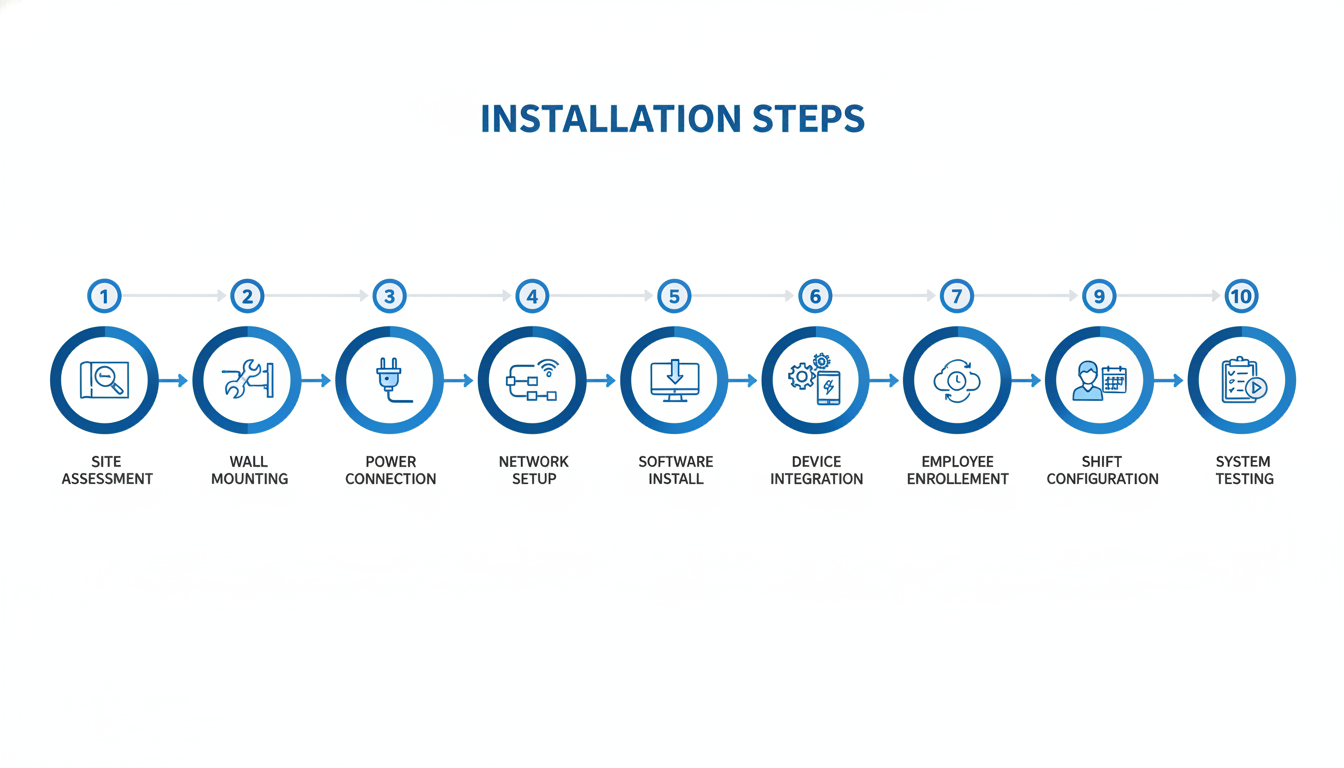
Step 1: Site Assessment and Final Device Placement Decision
Visit the location before installation day. Check the wall, power points, and network access. Mark the exact spot where the device will go. Make sure there are no obstacles like pillars or doors that block the scanner.
Take photos of the site. Share them with the installation technician so they know what to expect.
Step 2: Hardware Installation and Secure Wall Mounting
On installation day, the technician will drill the wall and fix the mounting bracket. The device clips onto the bracket. Make sure the device is level and firmly fixed. A loose device falls easily and can get damaged.
Use the screws and anchors that come with the device. Do not use random screws that may not hold the weight.
Step 3: Power Connection and Initial Device Setup
Plug the power adapter into a nearby socket. Turn the device on. The screen will show a setup wizard. Follow the on-screen steps to set the date, time, and language.
Connect a UPS to the device. This keeps it running during power cuts, which are common in Dhaka.
Step 4: Network Configuration via LAN or Wi-Fi
For a LAN connection, plug one end of the cable into the device and the other into your router or switch. The device will get an IP address automatically in most cases.
For Wi-Fi, go to the network settings on the device. Select your Wi-Fi name and enter the password. Wait for the connection to confirm.
Write down the device’s IP address. You will need it during software setup.
Step 5: Attendance Management Software Installation on PC or Server
Install the attendance management software on your main computer or server. Most biometric devices come with their own software. Follow the installation wizard step by step.
Make sure your computer meets the minimum system requirements listed in the software manual.
Step 6: Device Integration and IP Address Configuration
Open the software. Go to the device management section. Enter the device’s IP address that you noted earlier. Click connect. The software will detect the device and link to it.
If the connection fails, check that both the device and the computer are on the same network. Firewall settings can also block the connection.
Step 7: Real-Time Data Sync and Cloud or Remote Access Setup
If you are using a cloud-based system, log in to your cloud dashboard and add the device there. Enter the device credentials. The device will start sending data to the cloud in real time.
For remote access, set up a VPN or use the cloud portal to view attendance data from outside the office.
Step 8: Employee Biometric Data Enrollment
This step is very important. Each employee must register their fingerprint or face in the system. Do this one by one.
For fingerprints, ask the employee to place the same finger on the scanner three times. The device will save the fingerprint template.
For face recognition, ask the employee to stand in front of the camera and look straight. The device will capture the face in a few seconds.
Enrol at least two fingers per employee in case one finger gets injured.
Step 9: Shift Scheduling and Attendance Policy Configuration
Go to the software settings. Create work shifts for your employees. Set start time, end time, and grace period. Define what counts as a late arrival or an early departure.
Set overtime rules if your organisation pays for extra hours. Link each employee to their correct shift.
Step 10: System Testing and Final Commissioning
Ask a few employees to test the system. Check if their attendance is recorded correctly in the software. Check if the data shows the right time and date.
Run a sync to make sure data moves from the device to the software without errors. Once everything works, the system is ready to use.
Cost of Biometric Attendance System Installation in Dhaka
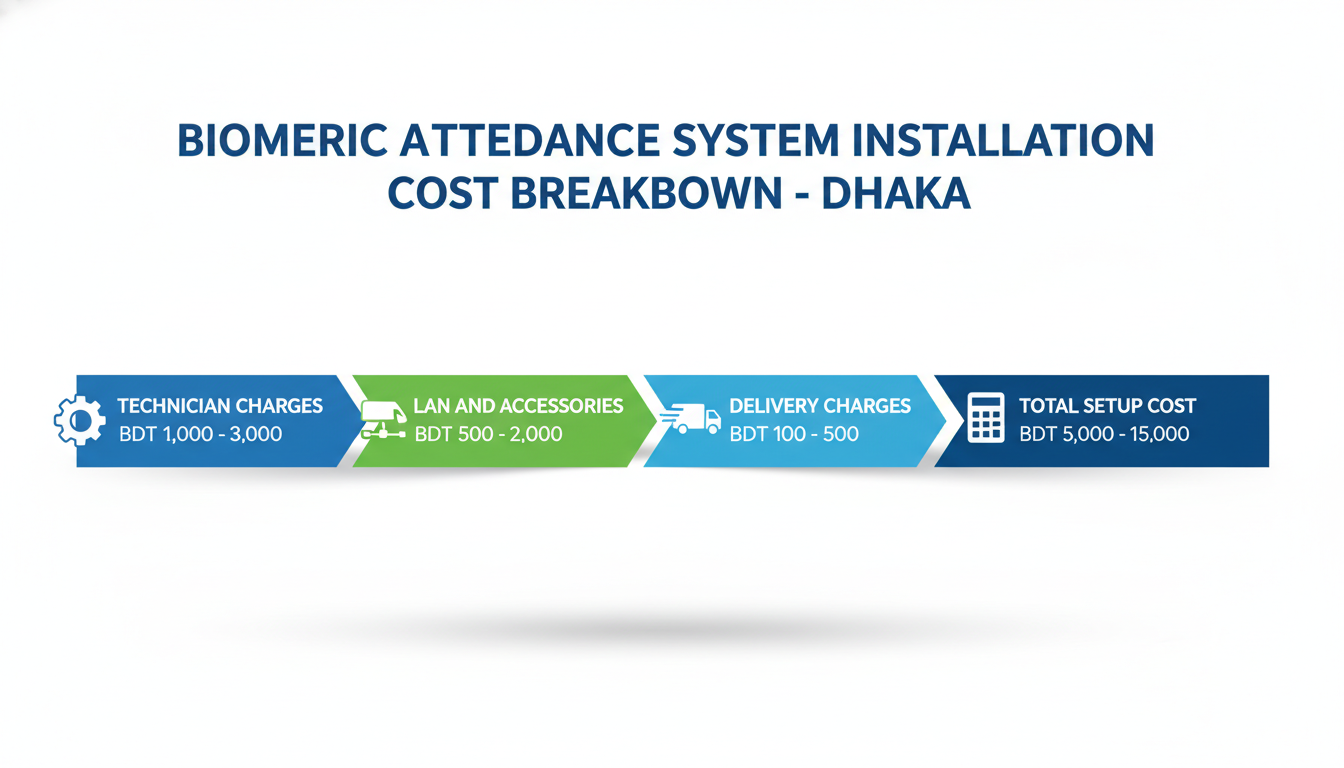
Technician and Professional Installation Service Charges
In Dhaka, professional installation service charges usually range from BDT 1,000 to BDT 3,000 per device, depending on the complexity. If wiring or drilling work is needed, the cost goes up.
Some providers, like Tipsoi, include installation in the device package price. This is a good deal because it saves you from hiring a separate technician.
LAN Cable, Accessories, and Additional Setup Costs
LAN cables, wall brackets, conduit pipes for cable management, and UPS units are extra costs. For a typical single-device setup, accessories can cost between BDT 500 to BDT 2,000, depending on cable length and quality.
Delivery and Logistics Charges Within Dhaka
Most biometric device suppliers in Dhaka offer free delivery within the city for orders above a certain amount. For smaller orders or same-day delivery, a charge of BDT 100 to BDT 500 may apply.
Key Factors That Influence Total Installation Cost
The total cost depends on how many devices you need, how far the installation site is, whether network cabling is needed, and if server setup is included. A basic single-device setup in Dhaka can cost from BDT 5,000 to BDT 15,000, including device, accessories, and installation.
Key Factors to Consider and Common Mistakes to Avoid
Indoor vs Outdoor Installation and Environmental Durability
Indoor devices are not built for rain or extreme heat. If you need a device near a gate or outside entry point, use an IP65-rated weatherproof device. These are sealed against dust and water.
Check the device’s temperature range. Dhaka summers get very hot. Make sure the device can handle the heat.
Scalability and Future Expansion Planning
Buy a system that can grow with your business. If you have 50 employees today but plan to hire 200 more, choose software that handles a large number of users. Make sure the device can store enough fingerprints.
Also, check if the software supports multiple devices at different office locations. This saves you from changing the whole system later.
Incorrect Device Placement and Lighting Issues
Placing a device too high or too low causes problems. Tall and short employees both need to reach it comfortably. Placing face recognition devices facing a window causes light interference.
Always test the device placement before permanently fixing it to the wall.
Poor Network Setup and Connectivity Problems
A device that cannot connect to the software is useless. Common network issues include wrong IP address settings, weak Wi-Fi signal, and blocked firewall ports.
Always use a wired LAN connection if possible. It is more reliable than Wi-Fi for attendance systems.
Incomplete Employee Enrollment and Data Accuracy Issues
If an employee is not enrolled, the device will not recognise them. Their attendance will not be recorded. Make sure every employee is enrolled before the system goes live.
Also, re-enrol employees whose fingerprints are not reading well. This often happens with older workers whose fingerprints have worn down.
Ignoring Data Backup and Security Measures
Always set up automatic data backup. If the server crashes or the device resets, you can lose months of attendance data. Back up to a cloud service or an external drive weekly.
Set a strong admin password on the device. Restrict access so only authorised staff can change settings.
Maintenance and Support After Installation
Routine Device Cleaning and Physical Maintenance Tips
Clean the fingerprint scanner with a dry soft cloth once a week. Dust and oil from fingers can reduce scan accuracy. For face recognition cameras, wipe the lens gently.
Do not use water or strong chemicals on the device. They can damage the sensor.
Software Updates and Regular System Backup Practices
Keep the attendance software updated. Updates fix bugs and add new features. Most providers release updates every few months.
Schedule automatic backups of the attendance database. Keep at least one month of backup history at all times.
Troubleshooting Common Biometric Device Issues
If the device does not scan fingerprints, clean the sensor and try again. If it still fails, re-enrol the fingerprint. If the device is offline, check the LAN cable or Wi-Fi settings. If data is not syncing, restart the device and the software. Most issues are simple and can be fixed without calling a technician.
When to Call a Professional for Technical Support
Call a professional if the device shows error codes you do not understand. Call them if the device has physical damage. Also, call them if the software database is corrupted or if you are adding new devices to an existing network.
Tipsoi offers post-sale technical support for all its biometric devices. This means you get help whenever something goes wrong.
Benefits of Professional Installation and Top Providers in Dhaka
Why Hiring a Professional Installer Saves Time and Cost
A professional installer knows the device well. They set it up correctly the first time. You avoid costly mistakes like wrong network settings or poor device placement. You also save time because a trained technician works much faster than someone doing it for the first time.
Proper Configuration, Integration, and Ongoing Support
Professional installation includes proper software configuration, device integration, and basic training for your admin staff. A good installer also tests the whole system before leaving and gives you a support contact for future problems.
Top Biometric Attendance System Providers in Dhaka
Tipsoi
Tipsoi is the leading biometric attendance system provider in Bangladesh. They offer a wide range of fingerprint and face recognition devices with cloud-based attendance software. Their system is trusted by thousands of businesses across Dhaka and the rest of Bangladesh.
What makes Tipsoi stand out is its end-to-end service. They handle device supply, delivery, installation, software setup, employee enrollment, and after-sales support. You do not need to manage multiple vendors.
Their attendance software is easy to use and works on both computers and mobile phones. You can check attendance from anywhere. If you are looking for a reliable biometric attendance system in Bangladesh, visit:
Tipsoi Biometric Attendance System in Bangladesh
Zaman IT
Zaman IT is another provider in Dhaka that offers biometric devices along with CCTV and networking services. They carry a range of entry-level to mid-range devices.
Trimatrik
Trimatrik is a technology company in Dhaka that provides biometric attendance systems along with HR software integration. They work with medium to large enterprises.
Legal and Compliance Considerations in Bangladesh
Employee Biometric Data Privacy and Protection Guidelines
Biometric data is sensitive personal data. When you collect fingerprints or face scans from employees, you must handle that data responsibly.
Inform employees about what data you are collecting and why. Do not share their biometric data with third parties without consent. Store the data securely with password protection.
Bangladesh does not yet have a dedicated biometric data law, but the Digital Security Act and general privacy principles apply. Always follow ethical practices when handling employee data.
Organisational Attendance Policy and Labour Law Compliance
Your attendance policy must follow the Bangladesh Labour Law. This includes rules on working hours, overtime, leave, and holidays. Configure your attendance software to reflect these rules accurately.
Keep attendance records for at least one year. These records may be needed during audits or labour disputes.
Final Checklist Before Biometric System Deployment
Stable Power Supply and Network Connectivity Verified
Check that the device is connected to a UPS. Test the network connection by pinging the device from the software. Make sure data is syncing correctly.
Employee Data Enrollment and Device Accuracy Confirmed
Run a test with 5 to 10 employees. Check that each person’s attendance is recorded correctly. Make sure no employee is unrecognised by the device.
Overall System Performance and Reliability Tested
Run the system for one full day in test mode before going live. Check the reports in the software. Make sure shift timings, overtime rules, and late arrival alerts are all working as expected. Once everything checks out, the system is ready for daily use.
Frequently Asked Questions
How long does a biometric system installation take in Dhaka?
A single-device installation takes about 2 to 4 hours. If you are setting up multiple devices across different floors or locations, it can take a full working day or more.
Can I install a biometric attendance system myself?
It is possible to do a basic installation yourself if you are technically experienced. But for network configuration, software setup, and employee enrollment, professional installation is strongly recommended. Mistakes in setup can cause data errors that are hard to fix later.
What is the best location to install a biometric device?
The best location is at the main entry or exit of your office or factory. Place it at a height of 4 to 5 feet from the floor. Make sure the area has good lighting and is away from direct sunlight.
Does a biometric system work without the internet?
Yes. Most biometric devices store data locally, even without the internet. But to sync data with the software and access reports remotely, an internet connection is needed. Cloud-based systems require the internet to function fully.
What is the average installation cost in Dhaka?
A complete setup, including device, accessories, and professional installation costs between BDT 5,000 and BDT 15,000 for a single-device setup. The cost varies based on device model, installation complexity, and the provider you choose.