


An overtime cost report shows what extra hours cost your business. It lists the hours worked, the hours approved, and the taka paid for both. This guide is for Bangladeshi managers in HR, payroll and finance. You will first learn five numbers to track. You will also see how to work out the cost. Then you will see how to review a monthly report. You can also download our Excel overtime calculation template now.
Key takeaways
- An overtime cost report tracks five numbers. They are hours, approvals, cost, budget gap and cost by site.
- Rule 102 of the Labour Rules 2015 gives the overtime rate formula.
- At the lowest garment grade, one overtime hour costs about BDT 64.
- If logged hours run 10 percent over, a 400-worker site pays BDT 134,000 more.
What is an overtime cost report, and which five numbers matter?
An overtime cost report is a monthly summary of overtime hours and their cost. It compares plan with result. Gaps are easy to see because the plan sits beside the result. Five numbers then make it useful.
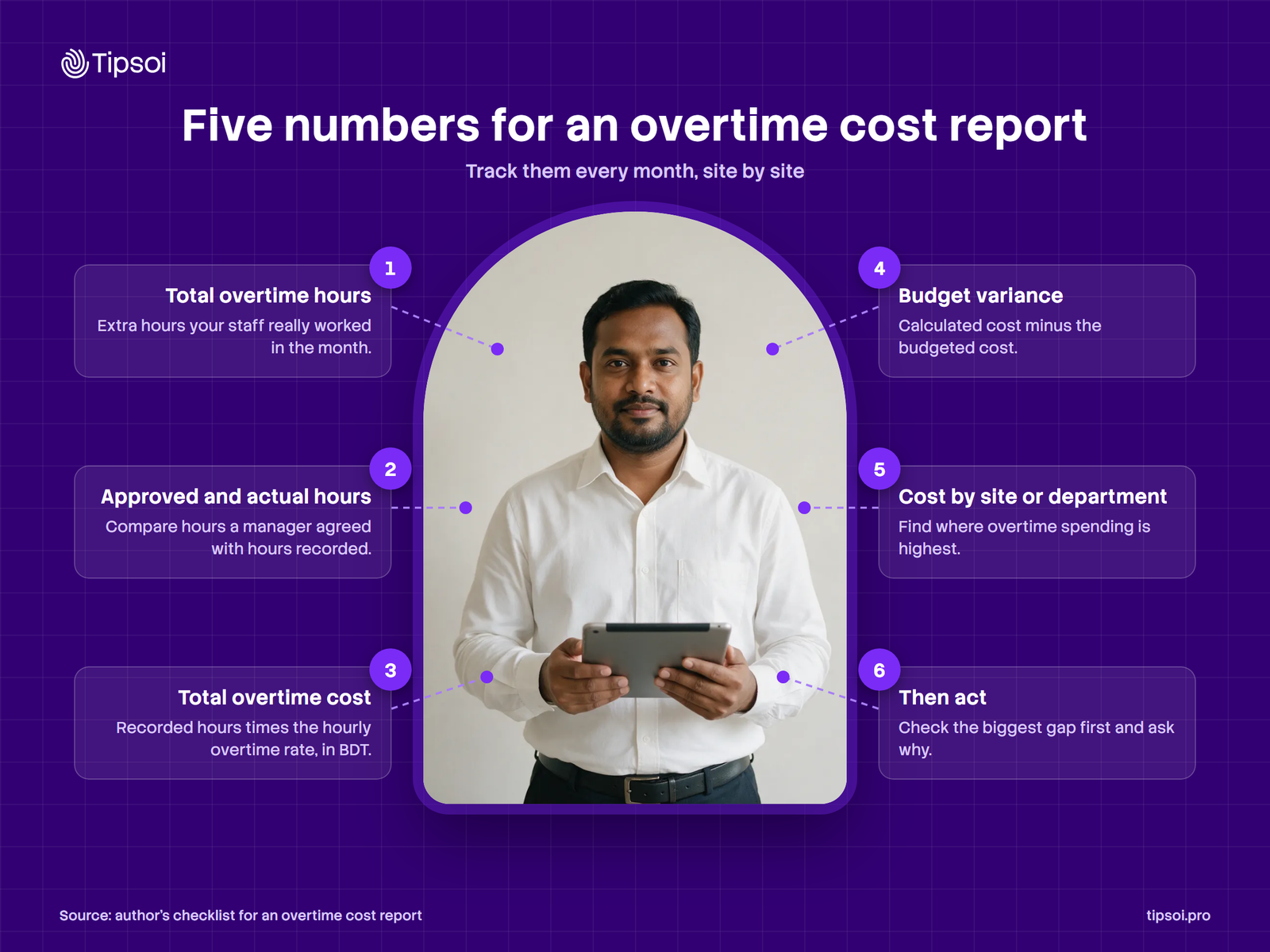
1. Total overtime hours
This is the number of extra hours your staff worked in the month. It matters because every hour adds cost. Take it from your attendance records, by site or department. If it rises, ask why before you approve more. For example, Site A logged 22,880 overtime hours in October.
2. Approved and actual overtime hours
Approved hours are the hours a manager agreed to in advance. Actual hours are the hours the punches recorded, because every punch is logged. The gap matters because it shows overtime that nobody approved. Subtract approved from actual for each site. Then ask managers to explain every large gap. For example, Site A had 20,800 approved hours and 22,880 recorded hours. The gap is 2,080 hours.
3. Total overtime cost
This is what the recorded overtime costs, in BDT. Multiply the overtime hours by the hourly overtime rate. It also shows the real size of the bill. Compare it with payroll before month end. For example, 22,880 hours at BDT 64.42 cost about BDT 1,473,930.
4. Overtime budget variance
Budget variance is the calculated cost minus the budgeted cost. A positive number means you spent more than planned. It also tells finance if overtime is under control. Set the budget from approved hours. Then review the gap every month. Example: the budget was about BDT 1,339,936, so the variance is about BDT 133,994 over.
5. Overtime cost by site or department
This also splits the total cost by site or department. It shows where overtime is highest, so you know where to look first. Some sites may simply need more staff. Rank your sites from highest to lowest. Then visit the top two first. Example: Site A is over budget, but Site B is under budget.
How do you do the overtime calculation and rate in Bangladesh?
The Labour Act pays most workers twice the ordinary rate for overtime (section 108). The rate rests on basic wage, dearness allowance and ad hoc or interim pay. Rule 102 of the Labour Rules 2015 gives the formula. Add those three. Divide by 208 hours, then multiply by 2. House rent, medical and conveyance also stay out of the rate.
The numbers below are an example. They are my own sum, so treat them as made-up examples.
| Step | What to do | Example |
|---|---|---|
| 1 | Add basic wage, dearness allowance and ad hoc pay. Leave out house rent, medical and conveyance. | BDT 6,700 (the grade lists no dearness allowance or ad hoc pay). |
| 2 | Divide by 208 to get the ordinary hourly rate. | BDT 6,700 ÷ 208 = BDT 32.21. |
| 3 | Multiply by 2 to get the overtime rate. | BDT 32.21 × 2 = BDT 64.42. |
| 4 | Multiply the rate by the overtime hours. | 20,800 hours × BDT 64.42 = about BDT 1,340,000. |
The Daily Star reported the 2023 garment wage gazette. It sets the lowest grade at BDT 12,500 a month. Basic wage in that grade is BDT 6,700. The grade also lists house rent, medical, transport and food. Those stay out of the rate. It lists no dearness allowance or ad hoc pay. The rate uses BDT 6,700 alone.
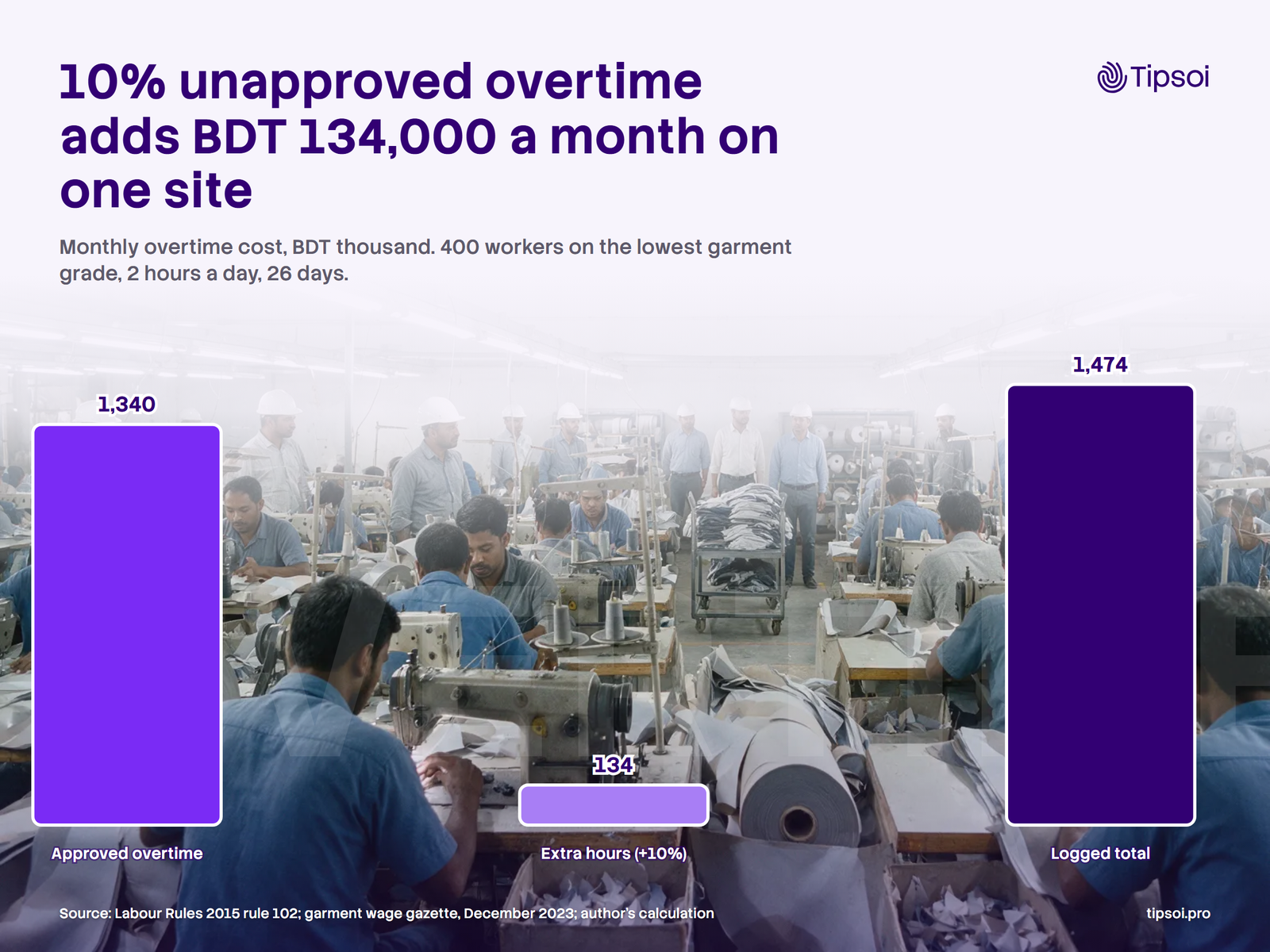
Take a site with 400 workers. Each works 2 approved overtime hours a day for 26 days. That is 20,800 hours, or about BDT 1,340,000 a month.
Say the logs show 10 percent more hours. That is 22,880 hours. The extra 2,080 hours would then cost about BDT 134,000. Swap in your own wage base before you rely on this result.
A second example with allowances
Take an office worker. Basic wage is BDT 20,000. Dearness allowance is BDT 2,000. Ad hoc pay is BDT 1,000. The wage base is BDT 23,000. House rent and medical are also paid. They stay out of the rate.
Divide by 208 to get BDT 110.58 an hour. Then multiply by 2 to get BDT 221.15 an hour. Ten overtime hours cost about BDT 2,212. Basic wage alone would give only BDT 192.31 an hour. The report would then understate the cost. These numbers are an example, because they are made up.
Approved, recorded and payable hours differ
Approved hours are what a manager agreed to. Recorded hours are what the punches show. Payable hours are what the law and your contract require you to pay. The law sets the rate for overtime worked. Whether unapproved hours must be paid is a legal question. Ask your legal adviser. Don’t guess.
Want to see where your overtime costs come from? Explore our attendance reporting features.
What does a monthly overtime cost report look like?
A monthly overtime cost report fits on one page. It shows hours, rate, cost and budget for each site. It also shows the gap between plan and result. The table below is a simple sample. Read it from the last column back to the first. The gap matters most because it shows the cost of extra hours.
All numbers are assumed examples. Site A pays basic wage BDT 6,700 plus BDT 5,800 in other allowances. Site B pays basic wage BDT 9,000 plus BDT 6,000 in other allowances. Only basic wage, dearness allowance and ad hoc pay go into the rate. Cost is logged hours times the rate. Budget is approved hours times the rate.
| Month | Site | Total OT hours | Approved OT hours | Rate (BDT/hour) | Calculated cost (BDT) | Budgeted cost (BDT) | Variance (BDT) |
|---|---|---|---|---|---|---|---|
| October (example) | Site A, garment | 22,880 | 20,800 | 64.42 | 1,473,930 | 1,339,936 | +133,994 |
| October (example) | Site B, packing | 5,600 | 5,850 | 86.54 | 484,624 | 506,259 | -21,635 |
| Total | 28,480 | 26,650 | 1,958,554 | 1,846,195 | +112,359 |
How to read the sample
Start with the last column, because it shows the gap. Site A is over budget by BDT 133,994. Then check the hours. Site A logged 2,080 more hours than approved. Site B is under budget. Still, check that no work was left undone.
HR checks the hours and the approvals. Then finance checks the cost and the budget. Together they decide what to check next.
Download the Monthly Overtime Cost Report Template. It’s an Excel file with this sample built in. Its six sheets cover the rate, staff data, site totals and department totals. The last sheet is a monthly overview.
Overtime cost by department
Split the biggest site by department. The table below splits Site A. It is an assumed example, built from the same numbers.
| Department | Total OT hours | Approved OT hours | Gap (hours) | Gap (percent) | Extra cost (BDT, rounded to 100) |
|---|---|---|---|---|---|
| Cutting | 4,160 | 3,900 | 260 | 6.7 | 16,700 |
| Sewing | 14,560 | 13,000 | 1,560 | 12.0 | 100,500 |
| Finishing | 4,160 | 3,900 | 260 | 6.7 | 16,700 |
| Site A total | 22,880 | 20,800 | 2,080 | 10.0 | 133,900 |
Sewing carries three quarters of the gap, so check that line first. Ask if the roster fits the orders. Then ask if every extra hour was approved.
Why overtime costs rise
High overtime has many causes, so check these first.
- Absent staff. Colleagues then cover the gap and are paid double. Check the Absent Summary Report.
- Late arrivals. Shifts start late, so work runs on. Check the Late Report.
- Too few staff at one site. Compare headcount with the work plan.
- A wrong shift or roster setup. Normal hours may then count as overtime.
- Punches added by hand after the day. Each one needs a manager’s approval.
- Extra hours that no manager approved. This is the gap between approved and actual hours.
How to prepare the report each month
Follow five steps. Keep the same layout every month, because it makes trends easy to see.
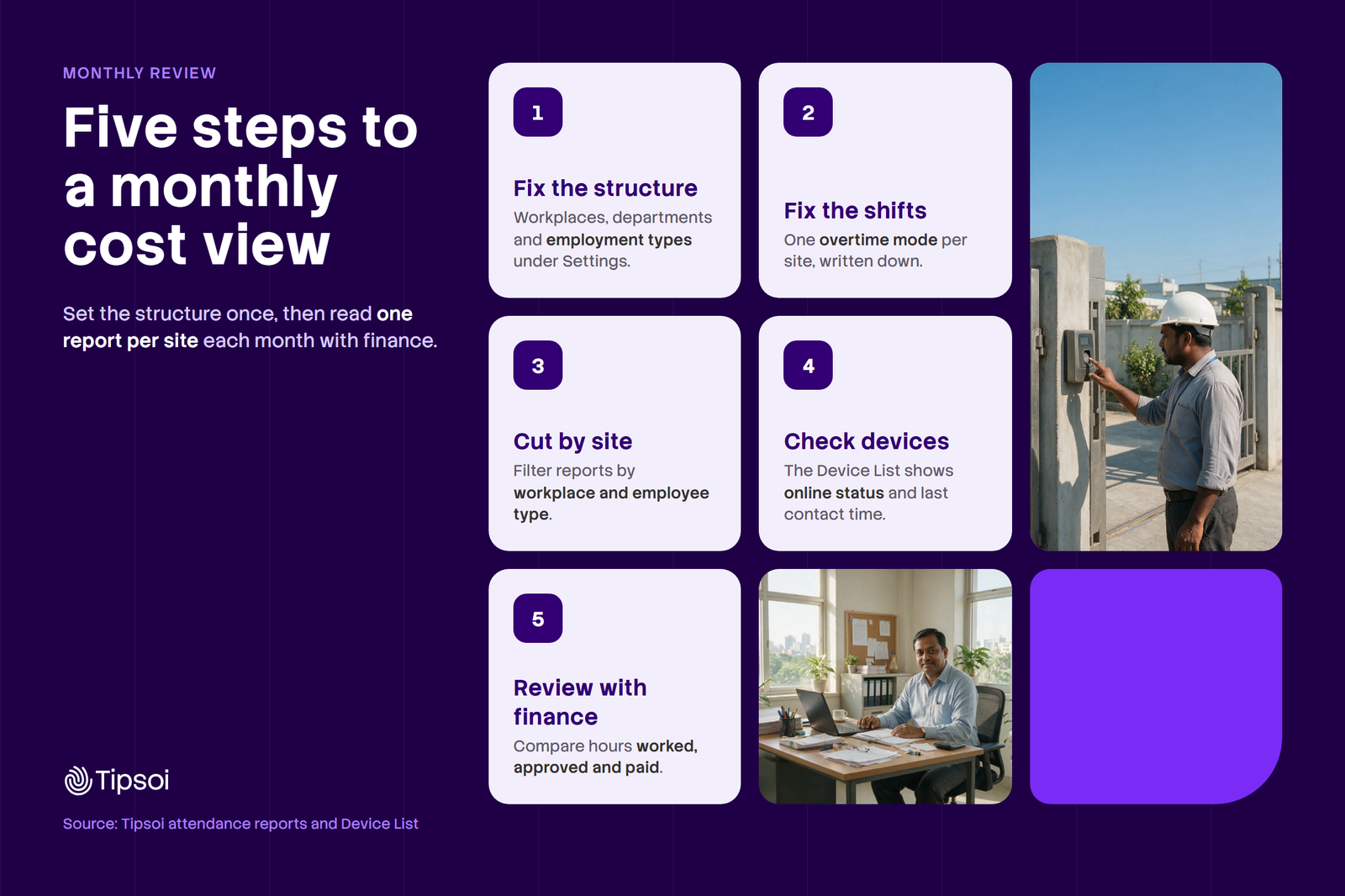
- Fix the structure. List your sites, departments and worker types. Every report can then be cut the way finance cuts cost.
- Fix the shifts. Pick one overtime mode for each shift. Overtime can count from before the shift starts, or only after it ends.
- Cut the hours by site. Then apply the overtime rate. Use a separate rate for each wage base.
- Check the devices. A dead device leaves a gap in the hours, so check its status first. It doesn’t record anyone.
- Review with finance. Compare hours, approvals and budget. Then agree what to change.
What to do when the gap is large
First, find the site and the department with the largest gap. Then check whether the hours were approved. Next, check the roster and the headcount. Check the absent and late reports for that team. Then agree one change and write it down. Finally, review the same site next month. If the gap stays, raise it with the site manager and finance together.
How to review the report in a monthly meeting
Keep the meeting short. Cover the same five points every month, so results stay comparable.
- Find the site with the biggest gap in taka.
- Find the department that caused most of it.
- Check if the extra overtime was approved.
- Check if the same workers carry most of the hours. Compare them with the 60-hour weekly limit.
- Agree what to change next month.
Write each answer next to the number. Next month’s meeting starts from the decision.
Common mistakes to avoid
- Using basic wage alone. The rate also counts dearness allowance and ad hoc pay.
- Mixing approved and recorded hours in one column.
- Comparing sites with different wage bases as if they were equal.
- Skipping the monthly sign-off, so gaps are never explained.
- Guessing how to treat unapproved hours. Ask your legal adviser first.
Build the report in Google Sheets
You can build the report in Google Sheets. Use three tabs. They are Settings, Employees and Summary.
Make the Settings tab. Type 208 in cell B1. Type 2 in cell B2. These are the divisor and the multiplier from Rule 102.
Next, make the Employees tab. Put the headers in row 1. Add one row for each employee or group. Row 2 below shows the formulas, so copy them down.
| Column | Header | What to type, or the formula in row 2 |
|---|---|---|
| A | Employee ID | Type the ID. |
| B | Name or group | Type the name or the group, for example Sewing line 1. |
| C | Site | Type the site name. Use the same spelling every time. |
| D | Department | Type the department. |
| E | Basic wage | Type the monthly basic wage in BDT. |
| F | Dearness allowance | Type the amount, or 0. |
| G | Ad hoc or interim pay | Type the amount, or 0. |
| H | Other allowances | Type house rent, medical and the rest. They stay out of the rate. |
| I | Approved OT hours | Type the hours a manager approved. |
| J | Recorded OT hours | Type the hours from your attendance records. |
| K | Wage base | =E2+F2+G2 |
| L | Hourly OT rate | =ROUND(K2/Settings!$B$1*Settings!$B$2,2) |
| M | Calculated cost | =J2*L2 |
| N | Budgeted cost | =I2*L2 |
| O | Hours gap | =J2-I2 |
| P | Cost variance | =M2-N2 |
Then make the Summary tab. Add one row for each site. Copy the formulas down. Add a Total row at the bottom.
| Column | Header | Formula in row 2 |
|---|---|---|
| A | Site | Type the site name. Add one row for each site. |
| B | Recorded OT hours | =SUMIFS(Employees!$J:$J,Employees!$C:$C,$A2) |
| C | Approved OT hours | =SUMIFS(Employees!$I:$I,Employees!$C:$C,$A2) |
| D | Gap hours | =B2-C2 |
| E | Gap percent | =IFERROR(D2/C2,0) |
| F | Calculated cost | =SUMIFS(Employees!$M:$M,Employees!$C:$C,$A2) |
| G | Budgeted cost | =SUMIFS(Employees!$N:$N,Employees!$C:$C,$A2) |
| H | Variance | =F2-G2 |
| I | Status | =IF(F2>G2,"Over budget","Within budget") |
In the Total row, use =SUM(B2:B3) for each number column. Change the range to match your rows. For gap percent, use =IFERROR(D4/C4,0). For a department view, copy the Summary tab. Then replace Employees!$C:$C with Employees!$D:$D.
Format column E as a percent. Format the cost columns as numbers with commas. Check one site by hand. Multiply its recorded hours by its rate. The result should match the sheet.
These formulas also work in Excel. This is an estimate. Check with your payroll or legal adviser before paying. The formula does not cover piece-rate workers.
Download the Excel template
You can also start from our Excel template. Its column letters differ a little, so follow the headers. It has six sheets. Read me explains the steps. Assumptions holds the rate formula. Employees is where you type your data. Site summary and Department summary add up the hours and cost. Monthly overview shows the five numbers and a chart.
To use it, follow four steps.
- Open the Employees sheet. Replace the example rows with your own staff or groups.
- Type basic wage, allowances, approved hours and recorded hours.
- Check the rate on the Assumptions sheet. Change it only if your sector rule differs.
- Type your own site names on the summary sheets. Then read the Monthly overview.
This template gives an estimate. Check with your payroll or legal adviser before paying. The example numbers are made-up examples. Download the Excel template here.
What are the overtime rules in Bangladesh under the Labour Act?
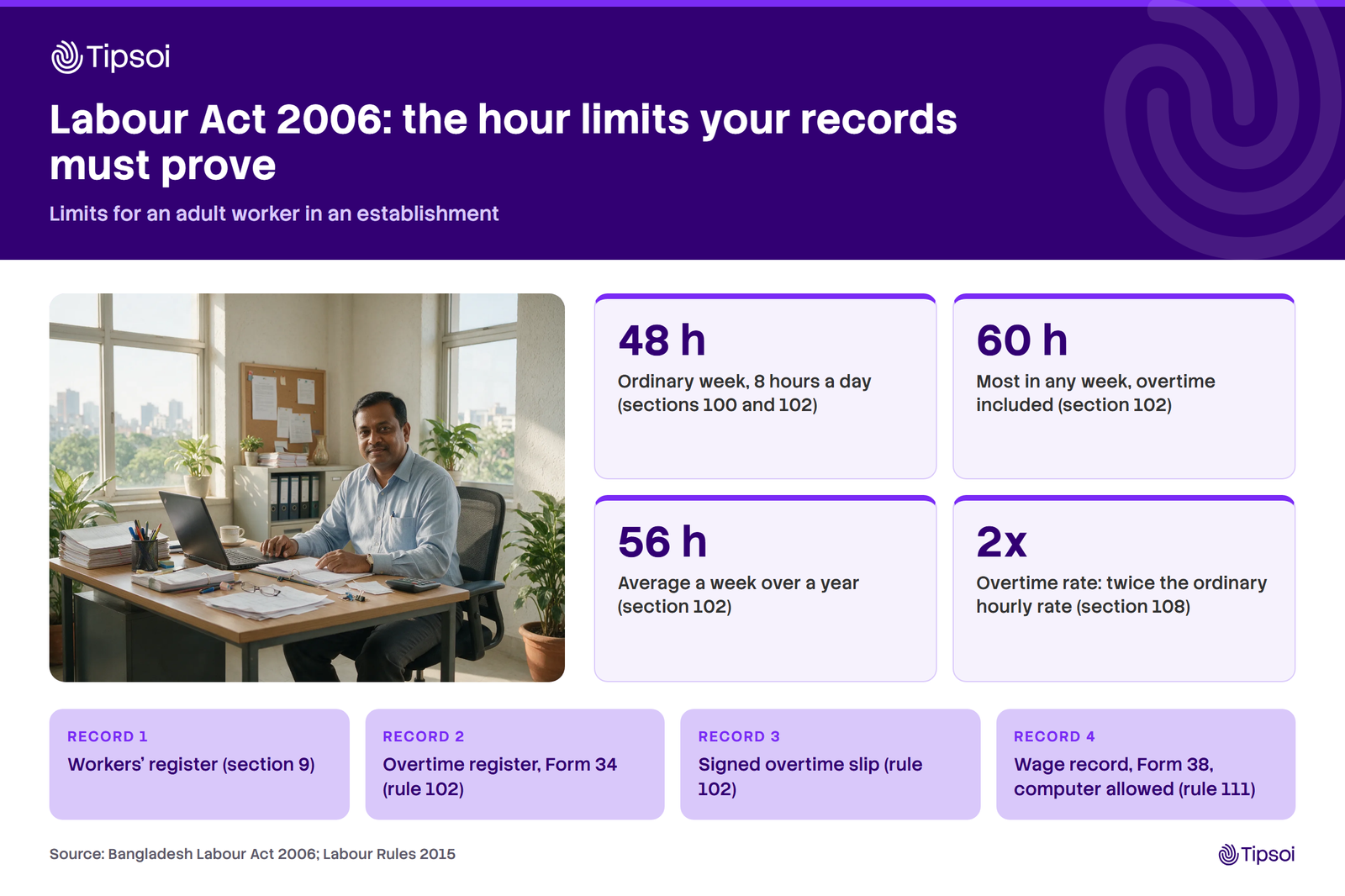
The Bangladesh Labour Act 2006 sets an ordinary eight-hour day and a 48-hour week. Overtime can stretch this. The limit is ten hours a day and 60 hours a week. The yearly weekly average must also stay at or below 56 hours. Overtime pays twice the ordinary hourly rate for most workers. Your report must therefore prove these limits.
Records the rules ask for
Rule 102 asks for an overtime register, Form 34. The unofficial English translation calls it a Register of Daily Attendance and Overtime. The rule also asks for a signed overtime slip for each worker. Rule 111 also asks for wage records in Form 38. A computer is allowed. Section 9 of the Act adds a workers’ register. Ask your legal adviser which records your sector needs.
Check for relaxed limits
Section 102 of the Labour Act 2006 lets the Government relax these limits. It can do so for some industries. It does so by written order, for up to 6 months at a time. Check the current notice for your sector before you set a cap.
Festival holiday work
A worker called in on a festival holiday gets one substitute holiday. The worker also gets two days of extra wages. This rule is in the Bangladesh Labour Act 2006, section 118, as amended. Add two days of wages to your cost for each worker called in. A 2026 Act raised festival holidays from 11 to 13 days a year.
How often the limits are missed
Better Work reported in September 2025 on garment firms. It found that well over half broke national overtime limits. Better Work is an ILO and IFC programme. The study also covered four countries. It included 99 factories in Bangladesh.
Use this as a rough guide to your own gap. Recorded hours at or below approved hours is good. A gap in one month is common. Well over half of the firms studied broke the limits. The same gap three months in a row is a warning. Then find the cause and fix it.
A University of Nottingham Rights Lab and GoodWeave survey from February 2025 covered Bangladesh. It found this: 28 percent of factory-based respondents worked over ten hours a day. They also worked six days a week.
Frequently asked questions
What is an overtime cost report?
An overtime cost report lists the overtime hours worked, approved and paid. It also prices them by site or department. A good one shows the budget and the gap between plan and result. Finance uses it to see where overtime money goes. HR uses it to check that every extra hour was approved.
How do you do the overtime calculation and find the overtime rate in Bangladesh?
Add basic wage, dearness allowance and ad hoc pay. Divide the total by 208 for the hourly rate. Then multiply by two. Multiply the result by the overtime hours. At the lowest garment grade, one overtime hour is about BDT 64. Check the wage components first. House rent and medical also stay out of the rate.
What are the overtime rules in Bangladesh?
The Labour Act 2006 sets an eight-hour day and a 48-hour week. Overtime can stretch this to ten hours a day and 60 hours a week. Overtime pays twice the ordinary hourly rate for most workers. Your report should therefore prove these limits. Keep hours worked, hours approved and pay for each worker together.
How do you compare approved and actual overtime hours?
Subtract approved hours from actual hours for each site. A positive gap means unapproved overtime. Ask managers to explain every large gap. Write the answer next to the number. Do this every month, so the gaps become visible. Our Overtime Report shows worked and approved hours side by side.
How can a company track overtime costs across multiple sites?
Use one report layout for every site. Rank the sites by cost and by gap, and check the largest gap first. Our reports filter by workplace and department, so each site gets its own view. You can also track overtime hours across all employees and departments.
Can I download an overtime cost report Excel template?
Yes. You can download the Excel template from this page. It follows the sample report and the Rule 102 formula. Replace the example numbers with your own. The template gives an estimate. Check the wage components with your payroll or legal adviser before you pay anyone.
What to do next
How our software helps with attendance and overtime reports
Our attendance software has an Overtime Report. It shows the hours worked and the hours the line manager approved. The Overtime Allocator sets a maximum overtime allowance. Hours beyond it are not counted. Our overtime tools also give department-wise overtime cost visibility.
The Late Report and the Absent Summary Report show lateness and absence. Check both when overtime rises. Our Site Management module has a Site Summary Report for remote work sites. Learn more about our attendance platform. You can also read the overtime tracking guide.
We give you the hours. You still apply the legal rate and your budget. For manual overtime disputes, read how to automate the overtime math.
Pick one site and one month. Then run the Overtime Report, the Late Report and the Absent Summary Report. Then fill in the sample table with your own numbers. Check the biggest gap first.
Managing overtime across multiple sites? Talk to us about a demo to see how our attendance reports can help. We serve 1,400+ client organisations and 500K+ daily active users in 15+ countries.